web
You’re offline. This is a read only version of the page.
close
Skip to main content

Notifications

Announcements

No record found.

Community site session details

Community site session details

Session Id :
Microsoft Dynamics CRM (Archived)

Microsoft Visual Studio Uknown Version 9.0. Dynamics CRM Reports

(1) ShareShare
ReportReport
Posted on by 3,634

I created a report in Dynamics CRM online and downloaded it RDL to make some modifictations into it.

I added the report in a project in Visual Studio 2015 (Update 2, Version 4.6.01055, SSDT 140.061704.300) and when I save the report or try to check its Preview I came accross with following error. I set the Target Server Version of the project to SQL Server 2016 or later, but nothing get me out of the mess. Any idea to further drill down the problem?
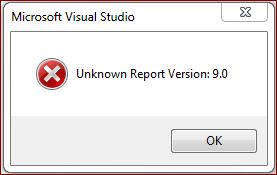
6445.Capture.JPG

*This post is locked for comments

I have the same question (0)
  • Suggested answer
    Eccountable Profile Picture
    10 on at

    I was never able to get VS 2015 to update CRM SSRS reports with the Authoring Extension loaded properly. I was able to solve this problem by using my old VS 2012 with BIDS environment. I created a new reporting project, added the RDL file, opened and saved it, then moved it over to VS 2017 where I can save and publish the work. I wrote a blog about it here: https://eccosystem.blogspot.com/2017/09/dynamics-365-crm-unknown-report-version.html

  • Suggested answer
    RaviKashyap Profile Picture
    55,410 Moderator on at

    Hi Mohsin,

    Change the Target Server Version to "SQL Server 2008 R2, 2012 or 2014" for the report project and then see if it works.

    Hope this helps.

  • Mohsin Ali Profile Picture
    3,634 on at

    That make sense, I've another question, should I also install authoring extesnion for VS2012? if so which version should be installed then?

  • Suggested answer
    RaviKashyap Profile Picture
    55,410 Moderator on at

    I don't think it is required but can't say for sure as I have it installed in my system I would suggest to try to change the target version and then it doesn't work then worth trying.

    Let me know how it goes.

  • Eccountable Profile Picture
    10 on at

    Did my suggestion of using VS 2012 work for you?

  • Suggested answer
    Simon Niederkircher Profile Picture
    217 on at

    Hi Nelson Johnson,

    your solution worked for me, although I did not do it with VS 2017 but VS 2015 because there are no CRM Report authoring extensions for VS 2017

    anyhow, here are my steps based on your blog post:

    1.) Install VS 2012 with BIDS

    2.) Create new empty Report Server Solution in VS 2012

    3.) Add existing report .rdl file from CRM

    4.) Build the solution in VS 2012

    5.) Open the solution in VS 2015

    Error message "Unknown Version 9.0" is gone.

    In addition I had to replace the reference for the Microsoft.Crm.Reporting.RdlHelper.dll within my report in VS 2015

    1.) Righ click outside the report in the Design tab

    2.) Report Properties

    3.) References

    4.) Replace existing reference by browsing for the Microsoft.Crm.Reporting.RdlHelper (came with CRM Report Authoring extensions)

  • Community Member Profile Picture
    on at

    Did you have Option "Microsoft Dynamics 365 Fetch" in Data Resource Properties of the Report.

    As shown in figure

    Document.png

  • MrMarkS Profile Picture
    15 on at

    I have this same issue.  I have uninstalled and re-installed VS2015.  I have tried version 8 and 9 of the Report Authoring Extension and changing the target server version. CRM reports downloaded from on-line CRM cannot be changed, they generate the "Unknown report Version: 9.0" error shown above.  This seemed to go south after the latest Win10 update (Build 17134). I would really like to understand what's going on here.

Under review

Thank you for your reply! To ensure a great experience for everyone, your content is awaiting approval by our Community Managers. Please check back later.

Helpful resources

Quick Links

Responsible AI policies

As AI tools become more common, we’re introducing a Responsible AI Use…

Neeraj Kumar – Community Spotlight

We are honored to recognize Neeraj Kumar as our Community Spotlight honoree for…

Leaderboard > 🔒一 Microsoft Dynamics CRM (Archived)

#1
SA-08121319-0 Profile Picture

SA-08121319-0 4

#1
Calum MacFarlane Profile Picture

Calum MacFarlane 4

#3
Alex Fun Wei Jie Profile Picture

Alex Fun Wei Jie 2

Last 30 days Overall leaderboard

Featured topics

Product updates

Dynamics 365 release plans
