web
You’re offline. This is a read only version of the page.
close
Skip to main content

Notifications

Announcements

No record found.

Community site session details

Community site session details

Session Id :
Microsoft Dynamics CRM (Archived)

Showing a SSRS report in Dashboard iFrame

(0) ShareShare
ReportReport
Posted on by

Hi all,

I have a SSRS report that gets data from a data warehouse via SSAS. This report runs fine on the CRM server as a standalone report and also on a dashboard using an iframe but when I run CRM from a remote pc / laptop and go to the same dashboard I get an error message as below:
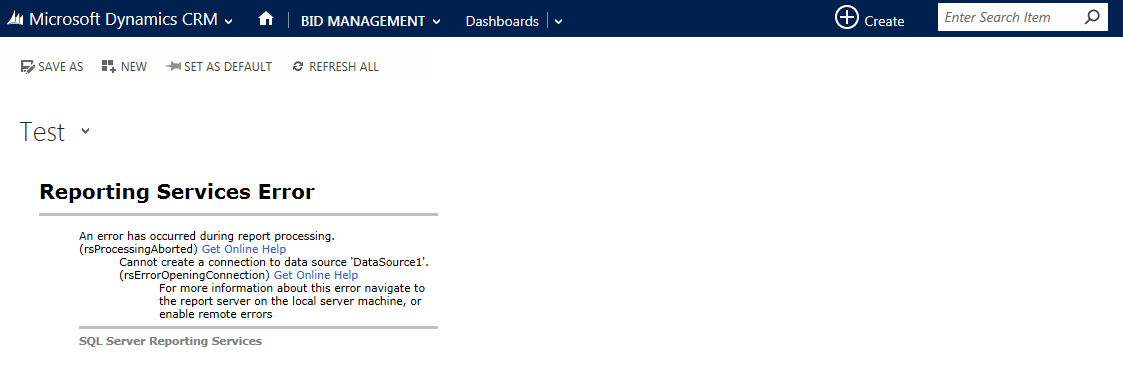
0167.crmerror1.png

Now, the iframe URL I am using here is straight from reporting services e.g.

http://crm-srv/ReportServer/Pages/ReportViewer.aspx?%2fDW+Outcomes%2fFS_Success12M_Gauge&rs:Command=Render

and I can then add  &rc:Toolbar=False to remove navigation bars etc.

I have tried as others have mentioned to use the URL from CRM instead such as:

http://crm-srv:5555/CRM/crmreports/viewer/viewer.aspx?action=run&helpID=HS_Success3M_Gauge.rdl&id=%7b7E79A117-99D1-E511-80CF-0050568D9C8A%7d

and this works on remote pcs but I don't know how to get rid of the navigation bars.

Can anyone please advise on how to get either of these solutions to work, either fixing the first error when running away from the CRM server or how to get rid of navigation bars using the second method?

Thanks in advance

*This post is locked for comments

I have the same question (0)
  • Pranesh M Juwale Profile Picture
    1,196 on at

    Hi Terry,

    Check this link...may be helpful for you

    srmscrm.wordpress.com/.../370

  • Verified answer
    Community Member Profile Picture
    on at

    Thanks all,

    I have found the problem is solved if I manage the report in reporting services manager and change the data source connection to connect using credentials stored securely in the report server. Also tick the option to use as windows credentials when connecting to the data source.

    After doing this the dashboard charts run fine.

Under review

Thank you for your reply! To ensure a great experience for everyone, your content is awaiting approval by our Community Managers. Please check back later.

Helpful resources

Quick Links

Responsible AI policies

As AI tools become more common, we’re introducing a Responsible AI Use…

Neeraj Kumar – Community Spotlight

We are honored to recognize Neeraj Kumar as our Community Spotlight honoree for…

Leaderboard > 🔒一 Microsoft Dynamics CRM (Archived)

#1
SA-08121319-0 Profile Picture

SA-08121319-0 4

#1
Calum MacFarlane Profile Picture

Calum MacFarlane 4

#3
Alex Fun Wei Jie Profile Picture

Alex Fun Wei Jie 2

Last 30 days Overall leaderboard

Featured topics

Product updates

Dynamics 365 release plans



