web
You’re offline. This is a read only version of the page.
close
Skip to main content

Announcements

No record found.

News and Announcements icon
Community site session details

Community site session details

Session Id :
Small and medium business | Business Central, N...
Suggested Answer

How to setup document to be approved by the creator himself

(0) ShareShare
ReportReport
Posted on by 219

Hi:

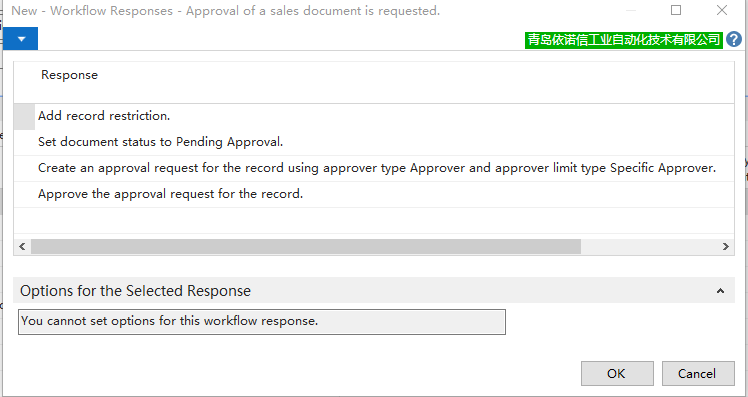
If some kind of criteria is met, the creator of the doc can approve by himself, I use the 'Approve the approval request for the record.' as the following image:
wf_2D00_1.png

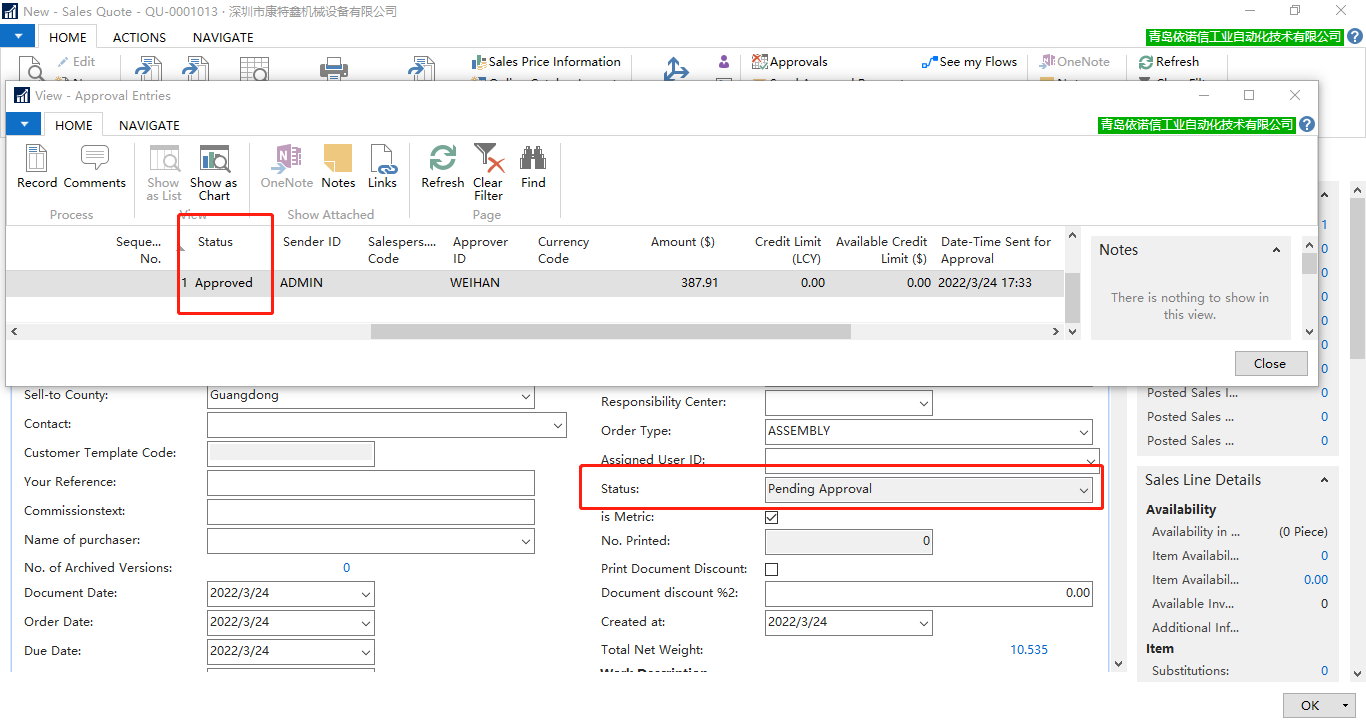
I click 'Send Approval Request', the order status is still 'Pending Approval', but I click 'Approvals', found that the work flow status is 'Approved', since the doc status is still pending approval, nothing can be done for this doc:
wf_2D00_2.png

Could you please help to advise which step I'm wrong, thanks.

Regards,

Lanqing.

I have the same question (0)
  • Suggested answer
    Nitin Verma Profile Picture
    21,812 Moderator on at

    Hi,

    can you please check in your workflow if there are multiple approver being setup in that case it’s partially approved.

    hope it will help you 

    thanks

  • Suggested answer
    YUN ZHU Profile Picture
    100,919 Super User 2026 Season 1 on at

    Hi, Is this user set as Approval Administrator? When you click 'Send Approval Request', it should automatically change to Release, no need to click 'Approvals' again. I think you can test it after enabling this. 

    pastedimage1648168179974v1.png

    Hope this will help.

    Thanks.

    ZHU

  • qjwlq Profile Picture
    219 on at

    Hi, ZHU,

    Thanks for your reply, these are users from the sales dept, the logic is, if the line discount is blank, the creator of the doc can approve by himself, otherwise it will

    be sent to the managers for approval.

    Regards,

    Lanqing.

  • Suggested answer
    Community Member Profile Picture
    on at

    Lanqing,

    I see the initial Step for the Approval Workflow. I am curious your other steps to see how the User who clicked Send Approval and the Approval User Setup. If you can send your screen shots to see all the Workflow Steps.

    Thanks,

    Steve

Under review

Thank you for your reply! To ensure a great experience for everyone, your content is awaiting approval by our Community Managers. Please check back later.

Helpful resources

Quick Links

Introducing the 2026 Season 1 community Super Users

Congratulations to our 2026 Super Stars!

Meet the Microsoft Dynamics 365 Contact Center Champions

We are thrilled to have these Champions in our Community!

Congratulations to the April Top 10 Community Leaders

These are the community rock stars!

Leaderboard > Small and medium business | Business Central, NAV, RMS

#1
OussamaSabbouh Profile Picture

OussamaSabbouh 1,961 Super User 2026 Season 1

#2
YUN ZHU Profile Picture

YUN ZHU 1,211 Super User 2026 Season 1

#3
AndrewThomas81 Profile Picture

AndrewThomas81 1,141

Last 30 days Overall leaderboard

Featured topics

Product updates

Dynamics 365 release plans
