web
You’re offline. This is a read only version of the page.
close
Skip to main content

Announcements

No record found.

News and Announcements icon
Community site session details

Community site session details

Session Id :
Customer experience | Sales, Customer Insights,...
Answered

Flow to send email to contact email address 2

(0) ShareShare
ReportReport
Posted on by 75

I want to be able to send an email to a contact via their "email address 2" in Dynamics 365

I have a flow working where I can create an new email message and then use "perform a bound action" to send it. This works fine but only to send to the contacts main email address. 

Is there a way I can create and send an email to "email Address 2" of the contact? 

I have thought of even editing the contacts main email address, sending the email, then changing it back but would like to avoid this. 

Thanks
pastedimage1642449407331v1.png

I have the same question (0)
  • Verified answer
    Bipin D365 Profile Picture
    28,985 Moderator on at

    Hello,

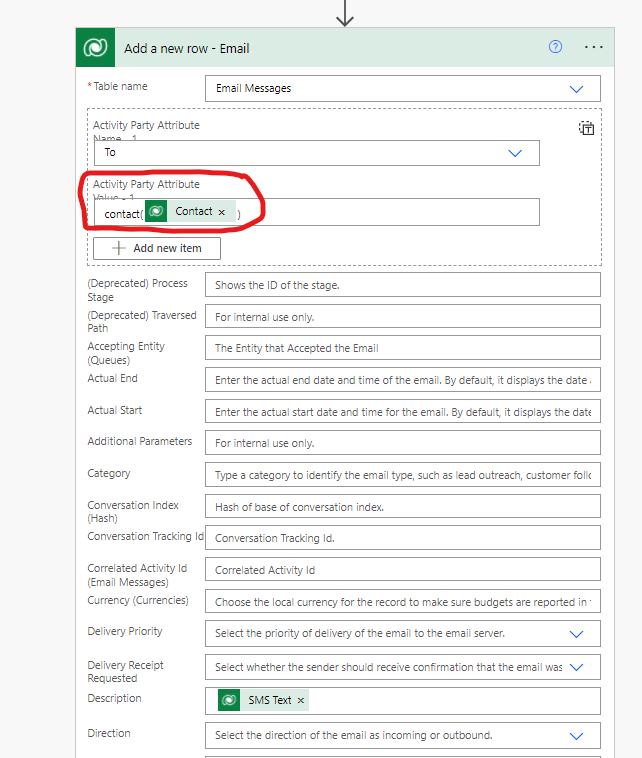
    Yes it is possible. You need to use 'addressused' property of activity part. please see below blog -

    linnzawwin.blogspot.com/.../send-email-to-unresolved-recipients-in.html

    Please mark my answer verified if this is helpful!

    Regards,

    Bipin Kumar

    Follow my Blog: xrmdynamicscrm.wordpress.com/

  • Verified answer
    Trying Profile Picture
    75 on at

    Thanks Bipin

    Worked well. I did the following. Please note SMS is the email address 2 field with another display name.

    pastedimage1642541570663v1.png

  • Suggested answer
    Bipin D365 Profile Picture
    28,985 Moderator on at

    Hello,

    I'm glad that it worked for you.

    Could you please mark my answer verified by clicking on Yes under 'Did this answer your question?'

    Please mark my answer verified if this is helpful!

    Regards,

    Bipin Kumar

    Follow my Blog: xrmdynamicscrm.wordpress.com/

  • Rdobryanskyy1 Profile Picture
    5 on at

    Hi,

    Thank for the solution, that worked for me as well. But now I have faced with the problem with Attachments. I did some research but still have no clue of how to add attachments to such emails.

    Thanks

Under review

Thank you for your reply! To ensure a great experience for everyone, your content is awaiting approval by our Community Managers. Please check back later.

Helpful resources

Quick Links

Introducing the 2026 Season 1 community Super Users

Congratulations to our 2026 Super Stars!

Meet the Microsoft Dynamics 365 Contact Center Champions

We are thrilled to have these Champions in our Community!

Congratulations to the March Top 10 Community Leaders

These are the community rock stars!

Leaderboard > Customer experience | Sales, Customer Insights, CRM

#1
ManoVerse Profile Picture

ManoVerse 184 Super User 2026 Season 1

#2
11manish Profile Picture

11manish 138

#3
CU11031447-0 Profile Picture

CU11031447-0 100

Last 30 days Overall leaderboard

Product updates

Dynamics 365 release plans
