web
You’re offline. This is a read only version of the page.
close
Skip to main content

Announcements

No record found.

News and Announcements icon
Community site session details

Community site session details

Session Id :
Microsoft Dynamics AX (Archived)

Autofill financial dimension (Project) on new Projects

(0) ShareShare
ReportReport
Posted on by

Hey,

Iam trying to figure out how to autofill the financial dimension "project" in the Form ProjTable:
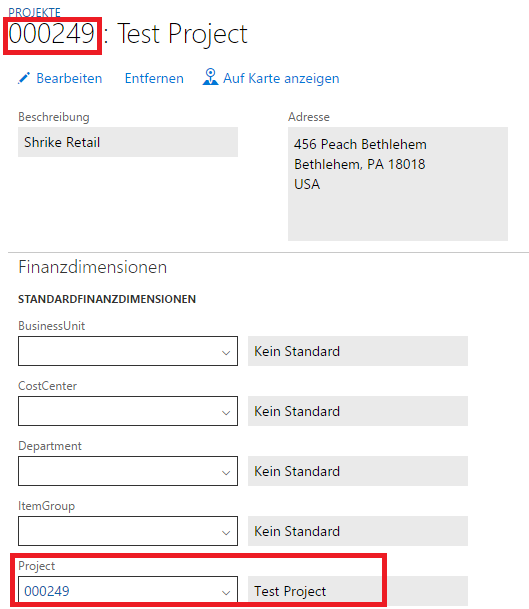
2275.Project.png

It should always autofill Project with the identical Project number.

The thing is, that the entry in the Table DimensionAttributeValueSetItem is only created if you selected a Project by the Combobox (marked red).

I think I have to execute the identical code that is executed by the combobox so I can "simulate" the user interactions.

Here I found the Class DimensionEntryControl with it's Method dimensionValue_modified.

In this case it passes the number of the Field (5) and the Value (000249) to the method. Unfortunately most of the Methods in this class are private so I cant access them from anywhere else (I already tried a Event Handler on a delegator).

My Steps where:

  1. Create a Delegator
  2. Call the Delegator from Form ProjTable in Method createprojId
  3. added event to delegator

in The event i can't access the protected method.

Is there any other approach to solve this "problem"?

I hope someone can help me out... wasted hours already :(

*This post is locked for comments

I have the same question (0)
  • André Arnaud de Calavon Profile Picture
    303,679 Super User 2026 Season 1 on at

    Hi,

    You can have a look at the DMFDimensionHelper class to get an idea how to use coding to insert a single value an a certain dimension value. Trying to simulate user actions is not working.

  • Community Member Profile Picture
    on at

    This class seems to be gone since AX7... But thank you for your hint.

  • Community Member Profile Picture
    on at

    I am able to set existing dimension as a default and the project is filled in. I could create the dimensions by some inserts and then set them as the default. I would prefer simple code if there is some existing code in some classes. Iam not sure what tables need to be touched if I create a new DimensionAttributeValueSetItem by code.

Under review

Thank you for your reply! To ensure a great experience for everyone, your content is awaiting approval by our Community Managers. Please check back later.

Helpful resources

Quick Links

Introducing the 2026 Season 1 community Super Users

Congratulations to our 2026 Super Stars!

Congratulations to our 2025 Community Spotlights

Thanks to all of our 2025 Community Spotlight stars!

Leaderboard > 🔒一 Microsoft Dynamics AX (Archived)

#1
Joris dG Profile Picture

Joris dG 5

#2
Alexey Lekanov Profile Picture

Alexey Lekanov 2

#2
Henrik Nordlöf Profile Picture

Henrik Nordlöf 2 User Group Leader

Last 30 days Overall leaderboard

Featured topics

Product updates

Dynamics 365 release plans
