web
You’re offline. This is a read only version of the page.
close
Skip to main content

Notifications

Announcements

No record found.

Community site session details

Community site session details

Session Id :
Microsoft Dynamics CRM (Archived)

Where is the Folder Structure settings stored in Dynamics CRM?

(0) ShareShare
ReportReport
Posted on by 65

Hi Experts, 

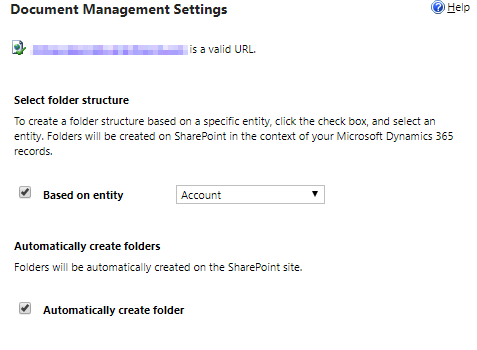
Wanted to know where exactly is the Folder Structure settings stored in Dynamics CRM, because while enabling the SharePoint, we have the option of defining Based on Entity structure, and, if we were to programmatically create the Document Locations, we cannot ascertain whether the Folder Structure is Based on Entity or not. 
2018_2D00_10_2D00_25-20_5F00_11_5F00_29_2D00_Document-Management-Settings.png

Any help or guidance in the right direction would be real help!

Thanks!!!

*This post is locked for comments

I have the same question (0)
  • Suggested answer
    Wayne Walton Profile Picture
    13,730 on at

    If you're doing it programmatically, you will want to just manually create SharePoint Document Locations and set the parent structures up yourself.  That entity and its relationships should do what you're looking for.

  • Parth Bhaidani Profile Picture
    65 on at

    Hi Wayne,

    Thanks a lot for your prompt reply.

    The main question here is, how would I know whether the document location that I am about to create would have the Folder Structure Based off of entity or not Based off of entity.

    Thanks!

  • Wayne Walton Profile Picture
    13,730 on at

    You would define that yourself, if you're building them.  The checkbox in your screenshot is only if you're asking Dynamics to build the folders.  And you're not.

  • Parth Bhaidani Profile Picture
    65 on at

    Still, wouldn't it be stored somewhere in CRM, so that next time when the folder is being created even by the OOB steps the CRM knows what should be the folder hierarchy?

  • RaviKashyap Profile Picture
    55,410 Moderator on at

    Hi Parth,

    Are you referring to the setting which appears under the Document Management Settings i.e. "Based on entity"? If yes that this setting is not specific to entity but its a global setting for all entities. The setting must be stored in CRM but I don't think it is exposed via SDK.

    As mentioned above by Wayne, if you are creating your folder structure manually then you can decide if you want folder hierarchy or not.

    I have built the same functionality and I am storing this on my own custom entity i.e. I have my own setting in my config entity which says if the code should use hirarchy or not.

    Hope this helps.

  • Verified answer
    Dimcho Tsanov Profile Picture
    5 on at

    "Based on entity" value is stored insde the "folderstructureentity" property of the "sharepointsites" entity. So this values is not global but per site! If you select "Account" as in your screenshot, the value of "folderstructureentity" will be "account" for the selected site url. If the checkbox is not selected, the "folderstructureentity" is "none".

Under review

Thank you for your reply! To ensure a great experience for everyone, your content is awaiting approval by our Community Managers. Please check back later.

Helpful resources

Quick Links

Responsible AI policies

As AI tools become more common, we’re introducing a Responsible AI Use…

Neeraj Kumar – Community Spotlight

We are honored to recognize Neeraj Kumar as our Community Spotlight honoree for…

Leaderboard > 🔒一 Microsoft Dynamics CRM (Archived)

#1
SA-08121319-0 Profile Picture

SA-08121319-0 4

#1
Calum MacFarlane Profile Picture

Calum MacFarlane 4

#3
Alex Fun Wei Jie Profile Picture

Alex Fun Wei Jie 2

Last 30 days Overall leaderboard

Featured topics

Product updates

Dynamics 365 release plans



