web
You’re offline. This is a read only version of the page.
close
Skip to main content

Notifications

Announcements

No record found.

Community site session details

Community site session details

Session Id :
Microsoft Dynamics CRM (Archived)

Cannot access parent variable from Iframe in CRM 2016 using turbo form mode

(1) ShareShare
ReportReport
Posted on by 390

Hi,

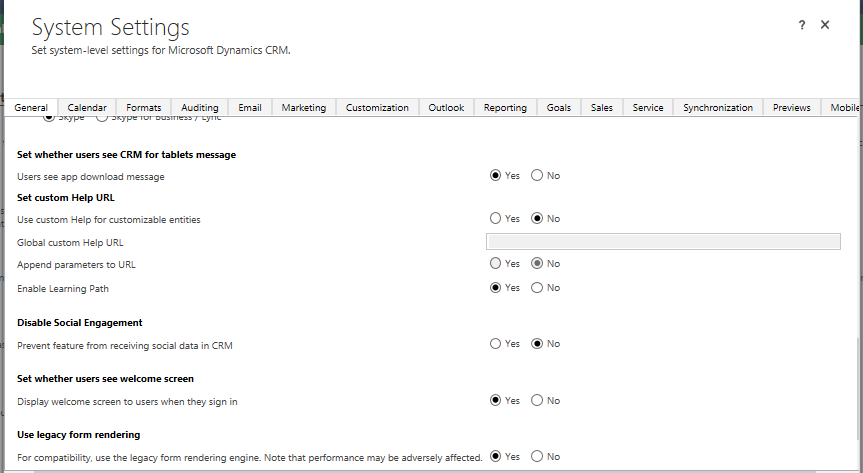
How to access parent variable from iframe web resource in crm 2016 using turbo form. When I switched back to Legacy mode I can access the parent variable using code below.
6811.legacy.png

window.parent.myVariable

If I disable legacy form mode and switch back default turbo form mode I cannot access the parent variable. I am getting undefined error.

So the problem is due to turbo form. So is there no way to access the parent variable from iframe using turbo form?

*This post is locked for comments

I have the same question (0)
  • Verified answer
    Daniel Wikell Profile Picture
    2,360 on at

    With turbo forms, your custom scripts all run inside their own iframe as opposed to legacy rendering when they were loaded into the main container. Since your iframe is in the main container it means that your iframe and your scripts are both children to the main container which in turn means they are now siblings.

    You can try access the sibling iframe containing your script variables by searching for it using something like this:

    $(parent.document).find("iframe#customScriptsFrame")[0].contentWindow.myVariable

    For this locator to work you would of course need a jQuery library loaded in your iframe. Also notable is that the snippet above is likely considered unsupported, but afaik the only way to do it.

  • Jayakumar Profile Picture
    390 on at

    Thanks Daniel. It worked using your code below.

    $(parent.document).find("iframe#customScriptsFrame")[0].contentWindow.myVariable

    Can we do the same way to assign the parent variable from iframe like,

    $(parent.document).find("iframe#customScriptsFrame")[0].contentWindow.myVariable = "val";

    Also how to call a parent function using similar method?

  • Daniel Wikell Profile Picture
    2,360 on at

    Yes, assigning the variable should also work.

    The same goes for methods, you can access them the same and just slap a parenthesis pair after it to call it:

    $(parent.document).find("iframe#customScriptsFrame")[0].contentWindow.myFunction()

  • Jayakumar Profile Picture
    390 on at

    Great. Thanks,

  • Suggested answer
    Community Member Profile Picture
    on at

    We can add common function on Xrm.Page

    ex.

    function myCommonMethod(){   console.log(' My Common Method ');    }

    Xrm.Page['myCommonMethod'] = myCommonMethod;

    No we can access this function in webresource using

    ex.

    var fn = parent.Xrm.Page['myCommonMethod'];

    fn();


  • Jayakumar Profile Picture
    390 on at

    Thanks Hardik. I dont know this technique. I will try.

Under review

Thank you for your reply! To ensure a great experience for everyone, your content is awaiting approval by our Community Managers. Please check back later.

Helpful resources

Quick Links

Responsible AI policies

As AI tools become more common, we’re introducing a Responsible AI Use…

Neeraj Kumar – Community Spotlight

We are honored to recognize Neeraj Kumar as our Community Spotlight honoree for…

Leaderboard > 🔒一 Microsoft Dynamics CRM (Archived)

#1
SA-08121319-0 Profile Picture

SA-08121319-0 4

#1
Calum MacFarlane Profile Picture

Calum MacFarlane 4

#3
Alex Fun Wei Jie Profile Picture

Alex Fun Wei Jie 2

Last 30 days Overall leaderboard

Featured topics

Product updates

Dynamics 365 release plans
