web
You’re offline. This is a read only version of the page.
close
Skip to main content

Announcements

No record found.

News and Announcements icon
Community site session details

Community site session details

Session Id :
Small and medium business | Business Central, N...
Answered

Incoming Documents not available in Sales Invoice card

(0) ShareShare
ReportReport
Posted on by 30

Hi,

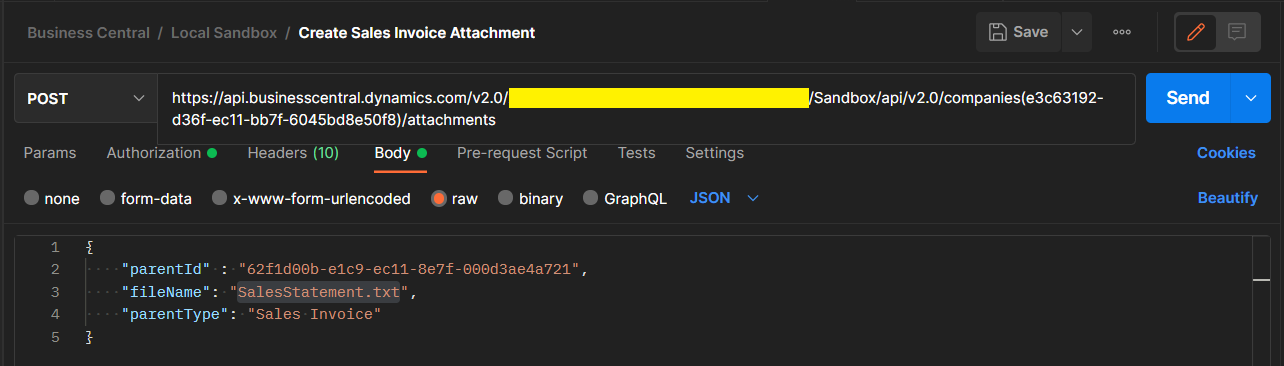
I am creating Sales Invoice attachment with /attachments API and managed to update attachment content to the attachment in BC. However, when access the specific Sales Invoice, there is no "Incoming Documents" section available and could not see the attachment files. Those attached files does not appear in Attachments section also.
pastedimage1651597294475v1.png

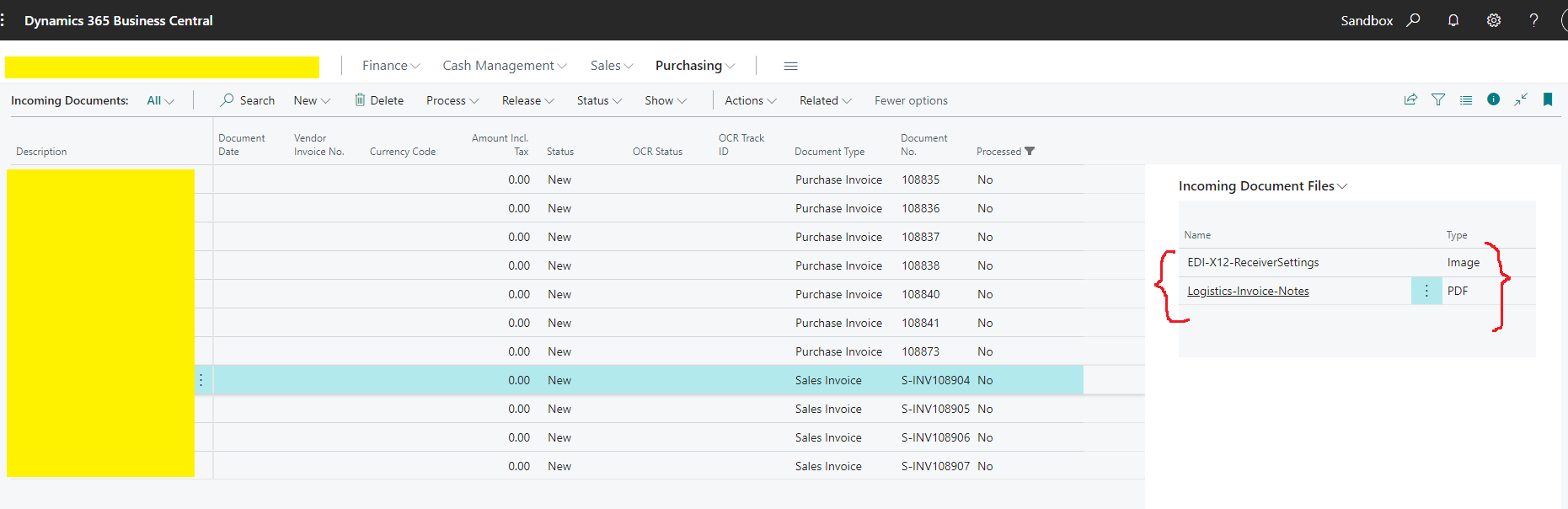
The only place where we could see those documents is in "Incoming Documents" screen in BC. Is there any way that we could get "Incoming Documents" section in Sales Invoice screen?
pastedimage1651597636406v2.png

I have the same question (0)
  • Suggested answer
    JAngle Profile Picture
    152 on at

    You can add it if you personalise the pages (list and document):

    pastedimage1651610056637v1.png

    pastedimage1651610109680v3.png

  • Verified answer
    YUN ZHU Profile Picture
    99,313 Super User 2026 Season 1 on at

    Hi, just adding Josh's reply, you can also choose Actions -> Functions -> Incoming Document -> View Incoming Document to view the record.

    pastedimage1651632000288v1.png 

    pastedimage1651632055536v2.png

    Hope this also helps.
    Thanks.

    ZHU

  • dynamicsdevman Profile Picture
    30 on at

    Thanks Josh.. It worked.

  • dynamicsdevman Profile Picture
    30 on at

    Thanks Zhu.. This option is also working. Much appreciate your help.

Under review

Thank you for your reply! To ensure a great experience for everyone, your content is awaiting approval by our Community Managers. Please check back later.

Helpful resources

Quick Links

Introducing the 2026 Season 1 community Super Users

Congratulations to our 2026 Super Stars!

Meet the Microsoft Dynamics 365 Contact Center Champions

We are thrilled to have these Champions in our Community!

Congratulations to the March Top 10 Community Leaders

These are the community rock stars!

Leaderboard > Small and medium business | Business Central, NAV, RMS

#1
OussamaSabbouh Profile Picture

OussamaSabbouh 1,947 Super User 2026 Season 1

#2
YUN ZHU Profile Picture

YUN ZHU 1,120 Super User 2026 Season 1

#3
Khushbu Rajvi. Profile Picture

Khushbu Rajvi. 628 Super User 2026 Season 1

Last 30 days Overall leaderboard

Featured topics

Product updates

Dynamics 365 release plans
