web
You’re offline. This is a read only version of the page.
close
Skip to main content

Notifications

Announcements

No record found.

Community site session details

Community site session details

Session Id :
Small and medium business | Business Central, N...
Answered

Connecting VsCode to Business Central sandbox

(0) ShareShare
ReportReport
Posted on by 60

Hello everyone,

I am new to BC development, I am trying to connect BC sandbox environment hosted in the cloud to Visual studio code, but when I try to download the symbols I receive the following errors

[2021-09-17 11:52:56.12] The request for path /v1.0/sandbox/dev/packages?publisher=Microsoft&appName=System Application&versionText=18.0.0.0 failed with code NotFound. Reason: Not Found
[2021-09-17 11:52:56.15] The request for path /v1.0/sandbox/dev/packages?publisher=Microsoft&appName=Application&versionText=18.0.0.0 failed with code NotFound. Reason: Not Found
[2021-09-17 11:52:56.17] The request for path /v1.0/sandbox/dev/packages?publisher=Microsoft&appName=Base Application&versionText=18.0.0.0 failed with code NotFound. Reason: Not Found
[2021-09-17 11:52:56.17] The request for path /v1.0/sandbox/dev/packages?publisher=Microsoft&appName=System&versionText=18.0.0.0 failed with code NotFound. Reason: Not Found
Could not download reference symbols. Please ensure that:
1. The correct server name and instance are specified in the launch.json file.
2. The correct application version is specified in the app.json file.

bellow are my app.json and launch.json config

app.json

{
  "id": "2304e79c-e38f-4a58-b804-7783f1eab810",
  "name": "AddFieldTest",
  "publisher": "Cha Ltd",
  "brief": "",
  "description": "",
  "version": "1.0.0.0",
  "privacyStatement": "",
  "EULA": "",
  "help": "",
  "url": "",
  "logo": "",
  "capabilities": [],
  "dependencies": [
    {
      "appId": "63ca2fa4-4f03-4f2b-a480-172fef340d3f",
      "name": "System Application",
      "version": "18.0.0.0",
      "publisher": "Microsoft"
    },
    {
      "appId": "437dbf0e-84ff-417a-965d-ed2bb9650972",
      "name": "Base Application",
      "version": "18.0.0.0",
      "publisher": "Microsoft"
    }
  ],
  "screenshots": [],
  "application": "18.0.0.0",
  "platform": "18.0.0.0",
  "runtime": "2.0",
  "idRange": {
    "from": 60000,
    "to": 60005
  }  
}

launch.json

{
    "version": "0.2.0",
    "configurations": [
        {
            "name": "Microsoft cloud sandbox",
            "type": "al",
            "request": "launch",
            "startupObjectId": 22,
            "breakOnError": true,
            "breakOnRecordWrite": false,
            "server": "https://businesscentral.dynamics.com/",
            "tenant": "**My tennant ID**"


        }
    ]
}

This are the details of the sandbox environment
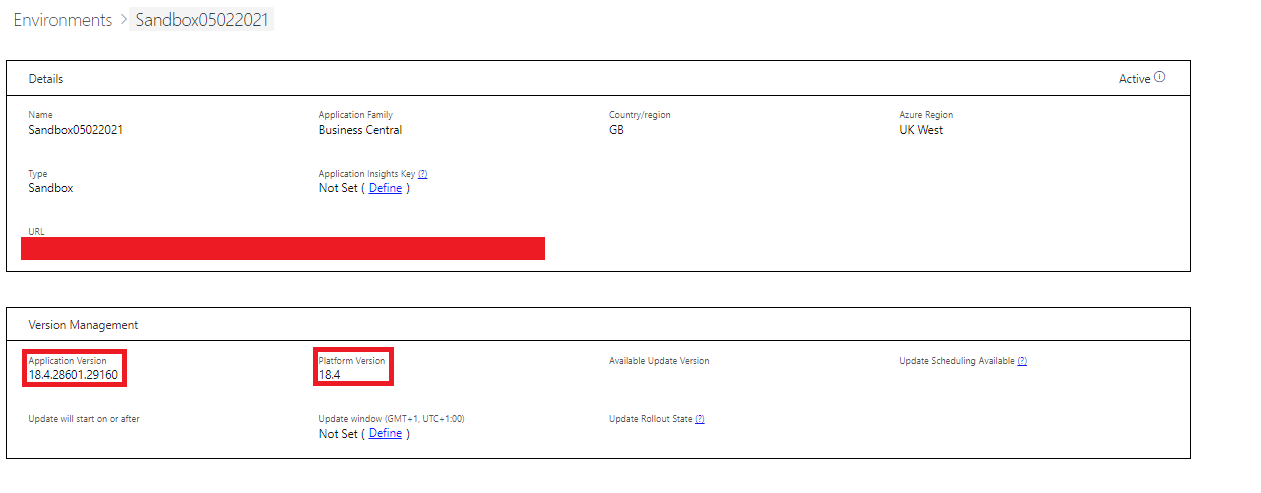
pastedimage1631877291796v2.png

and this are dependencies which I targeted in the app.json

pastedimage1631877136019v1.png 

I have tried to use the sandbox name property in the launch.json but this did not work, and it produced the same error message. Also for some reason which is not clear to me, when I add the property VS code shows the property is not allowed

VSCodeAL.png  

In order to download the symbols I have also tried to clear my credential cache but this did not help

I have the same question (0)
  • Suggested answer
    Mohana Yadav Profile Picture
    60,993 Super User 2025 Season 2 on at

    Please remove dependencies in app.json

    just application and platform properties are enough.

  • M.Barimah Profile Picture
    60 on at

    Hello Mohana, thanks for your response, I removed the dependencies, and I still get the same errors

  • Suggested answer
    Andrey Baludin Profile Picture
    3,941 on at

    Hi!

    Remove "server" from launch.json and add

               "environmentType": "Sandbox",

               "environmentName": "Your sandbox name"

    Default sandbox name is "Sandbox" also

  • M.Barimah Profile Picture
    60 on at

    Hello Andrey,

    thanks for your response and help. I have added the changes you suggested but is still not working, also when I added the environmentType and environmentName proprieties I can see this warning

    pastedimage1631895084018v1.png

  • Community Member Profile Picture
    on at

    The tenant ID is shown in the Help and Support page in your Business Central. Make sure you have

    "tenant": "<id_from_BC>" in your launch.json

  • M.Barimah Profile Picture
    60 on at

    Hello Neil, the tenant id is already in the launch.json, if you are looking at the screenshot is not visible because it's actually behind the intellisense error message text.

  • Suggested answer
    M.Barimah Profile Picture
    60 on at

    Hello everyone,

    Thanks for all the answer, definitely helped stare me in the right direction. At the end I found a solution, basically it was a combination of things. Just writing my solution here in case someone runs into my same issue.

    - Make sure your VSCode version is updated, if you don't see new updates download the latest version of vscode and re-install it.

    I think that I was receiving intelissense warnings because although I had installed the AL Extension in VsCode, I assume that the extension version which was installed was not the latest, because my VsCode was not the latest. I realized that because although no new update will show (every time that I tried to update via  Help -> Check for update), when going to the Help -> About I will see that my version number was not the same version number documented on Visual Studio Code Update Page and also I could see an i32 bellow the OS info which looked suspicious

    - as Andrey Baludin mentioned, make sure you have environmentType": "Sandbox" and "environmentName": "Your sandbox name" are set correctly.

        these should match the environment information's you can find in your BC admin portal, for the environment you want to target. 

    - Make sure that the user you are using to authenticate/set up the connection between VsCode and BC Sanbox, has the D365 EXTENSION MANAGEMENT and D365 Read permissions

  • Verified answer
    Marco Mels Profile Picture
    on at

    Thank you for sharing final solution which is a combination of things and suggestions this great community provided to help others.

Under review

Thank you for your reply! To ensure a great experience for everyone, your content is awaiting approval by our Community Managers. Please check back later.

Helpful resources

Quick Links

Responsible AI policies

As AI tools become more common, we’re introducing a Responsible AI Use…

Neeraj Kumar – Community Spotlight

We are honored to recognize Neeraj Kumar as our Community Spotlight honoree for…

Leaderboard > Small and medium business | Business Central, NAV, RMS

#1
OussamaSabbouh Profile Picture

OussamaSabbouh 3,229

#2
Jainam M. Kothari Profile Picture

Jainam M. Kothari 1,867 Super User 2025 Season 2

#3
YUN ZHU Profile Picture

YUN ZHU 1,153 Super User 2025 Season 2

Last 30 days Overall leaderboard

Featured topics

Product updates

Dynamics 365 release plans
