web
You’re offline. This is a read only version of the page.
close
Skip to main content

Notifications

Announcements

No record found.

Community site session details

Community site session details

Session Id :
Microsoft Dynamics CRM (Archived)

Error when registering plugin using VS2012 using CRM Toolkit (Error registering plugins and/or workldows)

(0) ShareShare
ReportReport
Posted on by 727

Dear all

My colleague created a new plugin for a CRM entity (Marketing List). She added  a new project in VS with the plugin code. I now tried to debug this code on my local VM.


What I did so far is -

1. Did a get on TFS on VM

2. Updated my local CRM database (with a DB clone of our master dev organization)

3. When I now try to deploy the CRM solution using the deploy functionality in VS I get following error message:

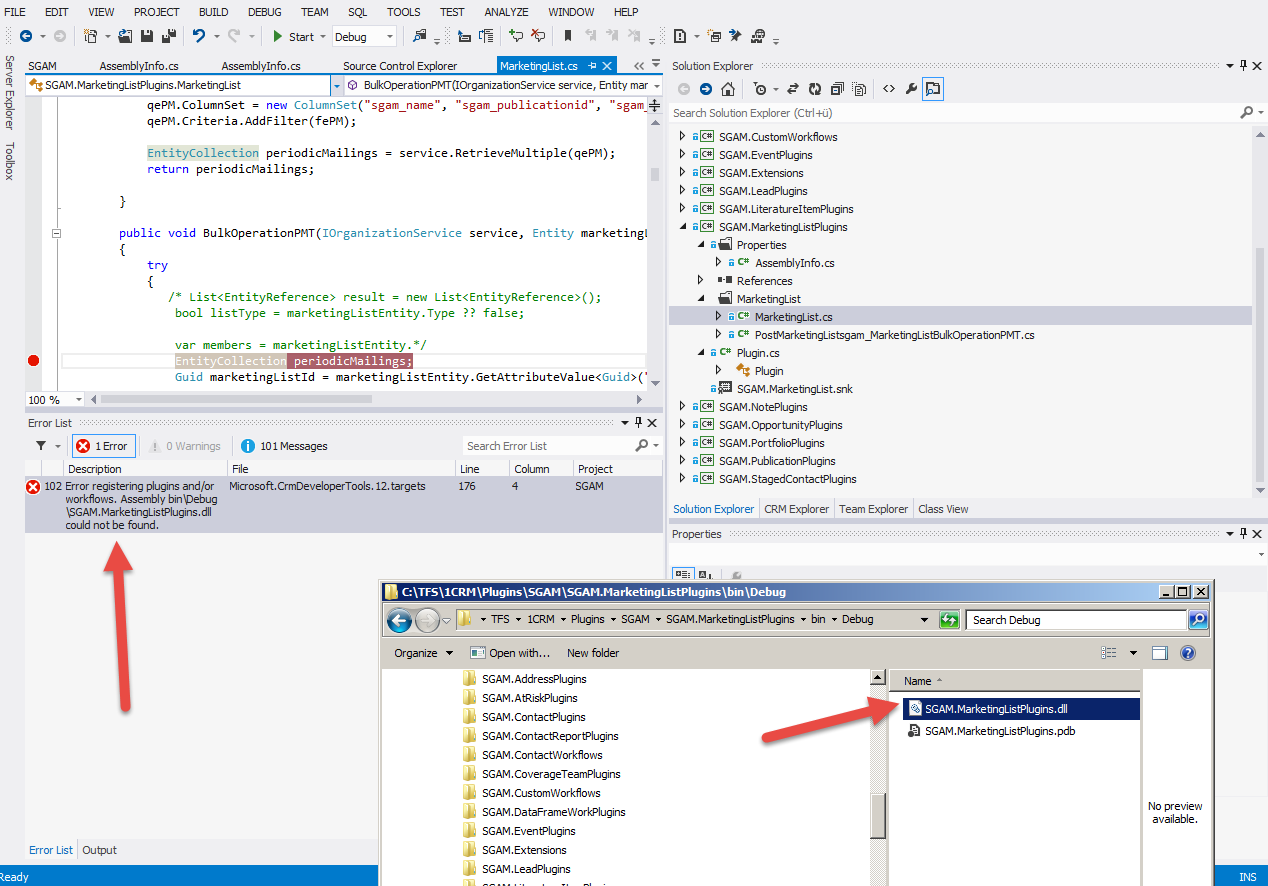
Error 102 Error registering plugins and/or workflows. Assembly bin\Debug\SGAM.MarketingListPlugins.dll could not be found. C:\Program Files (x86)\MSBuild\Microsoft\CRM\Microsoft.CrmDeveloperTools.12.targets 176 4 SGAM


But I'm pretty sure that SGAM.MarketingListPlugins.dll does exists in debug folder. See attached screenshot for more information.


What am I missing?

Thanks
Alen
4087.error_5F00_plugin_5F00_deployment.png

*This post is locked for comments

I have the same question (0)
  • Royal King Profile Picture
    27,686 on at

    It looks crm toolkit is not copying plugin assembly to SGM ( crmPackage project) bin folder. Try to manually copy your plugin assembly to SGM(crmpackage project) bin folder and try to deploy it . If it works you can add post build script to copy plugin dll to this folder whenever you build solution.

  • alen1979 Profile Picture
    727 on at

    Hi Chitra

    Many thanks for your quick reply. It looks like there is no crmPackage project bin folder att all in our Visual Studio solution?!

    Thanks

    Alen

  • Royal King Profile Picture
    27,686 on at

    Whichever  project has file "RegisterFile.crmregister"  that project is a crmPackage project.

    It seems to be SGAM in your case based on the screen shot and error message.Copy your plugin assembly to bin folder of this project and try to deploy the solution.

  • alen1979 Profile Picture
    727 on at

    Hi Chitrarasan

    Many thanks, this helped. I can now deploy the new plugin as well!

    Where/how post build script to copy plugin dll to this folder whenever you build solution.

    Thanks

    Alen

  • Royal King Profile Picture
    27,686 on at

    You find more about post build event to copy dll in below post

    msdn.microsoft.com/.../c02as0cs.aspx

    copy /Y "$(TargetDir)$(ProjectName).dll" "$(SolutionDir)lib\$(ProjectName).dll"

  • alen1979 Profile Picture
    727 on at

    Hi Chitrarasan

    Many thanks for your help - may I ask you a follow up question:

    I'm still struggling to understand how these things hang toghether.

    What happened now is:

    1. I changed the code of plugin which is part of the project SGAM.MarketingListPlugins

    2. I built and deployed the entire SGAM solution

    3. I wanted to test/debug my code change. But it looks like my change did not make it into CRM

    4. When I check the bin/debug folder of the SGAM package all .dll and .pdb. files have been updated. They have an updated timestamp from today. But only the one plugin I changed SGAM.MarketingListPlugins.dll has not been refreshed (has still an old timestamp)

    This is probably as you said because of the missing post build event which would copy the .dll and .pdb  to this folder.

    But now what I don't understand: None of the other projects in our solution has any post built events set.  So why are they properly refreshed and only SGAM.MarketingListPlugins.dll isn't ? I attached the property screen of one of project which deployed properly.

    Many thanks for your help.

    Alen

    VS_5F00_issue2.png

    VS_5F00_issue2.png

  • Royal King Profile Picture
    27,686 on at

    CrmPackage project has reference to all plugin/workflow/web resources within the project file. For some reason some times this reference gets removed that's why some of the plugin/workflow dll not copied over to crmpackage project bin folder. You can check this by unloading your SGAM project after project unloaded right click and select edit SGAM.csproj that will show xml fiel which project meta data. in this xml file search for projectreference  and check all the plugin project reference exists. If you don't see any of the project reference it that will automatically copy dll of the plugin project automatically whenever you build project.

    <ItemGroup>

       <ProjectReference Include="..\Plugins\.csproj">

         <Name>Plugins</Name>

         <Project>{e26c3651-e3f2-47bf-a08d-a687a1c539de}</Project>

         <Private>True</Private>

         <SilverlightApplication>False</SilverlightApplication>

       </ProjectReference>

Under review

Thank you for your reply! To ensure a great experience for everyone, your content is awaiting approval by our Community Managers. Please check back later.

Helpful resources

Quick Links

Responsible AI policies

As AI tools become more common, we’re introducing a Responsible AI Use…

Neeraj Kumar – Community Spotlight

We are honored to recognize Neeraj Kumar as our Community Spotlight honoree for…

Leaderboard > 🔒一 Microsoft Dynamics CRM (Archived)

#1
SA-08121319-0 Profile Picture

SA-08121319-0 4

#1
Calum MacFarlane Profile Picture

Calum MacFarlane 4

#3
Alex Fun Wei Jie Profile Picture

Alex Fun Wei Jie 2

Last 30 days Overall leaderboard

Featured topics

Product updates

Dynamics 365 release plans



