web
You’re offline. This is a read only version of the page.
close
Skip to main content

Announcements

No record found.

News and Announcements icon
Community site session details

Community site session details

Session Id :
Finance | Project Operations, Human Resources, ...
Suggested Answer

Dynamics 2009 Upgrade analysis (Lifecycle Services, LCS) not generating report

(0) ShareShare
ReportReport
Posted on by Microsoft Employee

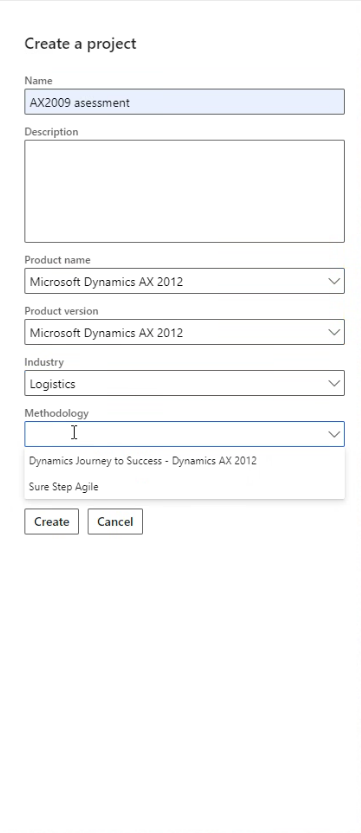
We have a customer, who tries to follow the tutorial on upgrading AX 2009. The complication gets on the very first stage, where during project creation he doesn't see an option in Product version line for 2009, but only 2012 and NAV.

If he choses 2012 and proceeds with Methodology "Dynamics journey to success - Dynamics Ax 2012" he can reach the step of Upgrade analysis and collecting data using RDC as well as uploading the zip file together with all AODs. However, after clicking Analyze Code it looks like nothing happens, because the report was not generated after 20+ hours.

The tutorial seems to be quite misleading and not comprehensive enough.

How can an Upgrade Analysis be done for AX 2009? What steps are missing/crucial here?

Thank you in advance!367471.Capture.PNG
I have the same question (0)
  • Suggested answer
    nmaenpaa Profile Picture
    101,166 Moderator on at

    Hi Aleeee,

    could you please go back to your customer and ask what is this tutorial that they're using? Would be nice to know, otherwise it's hard to comment on that. Thanks!

    Also, I don't think that there's a code migration tool for AX2009->D365. Only for AX2012. At least based on the official documentation. The official documentation only describes how you can upgrade your data.

    The AX2012 code migration tool definetely expects an AX2012 modelstore, not AX2009 AODs so I'm not surprised if it doesn't work in this case.

    Here's the official documentation (browse the left hand navigation): docs.microsoft.com/.../upgrade-home-page

  • Aleeee Profile Picture
    Microsoft Employee on at

    Hi Nikolaos and thank you for your quick response !

    The customer is using this guide: docs.microsoft.com/.../upgrade-analysis-lifecycle-services-lcs

    Currently they are interested in upgrade analysis, not the migration itself.

  • nmaenpaa Profile Picture
    101,166 Moderator on at

    Hi,

    the article that you linked is meant for upgrading AX2009 to AX2012. Is your customer trying to upgrade to AX2012 or D365?

    I noticed only now that you didn't share this detail in your initial question, and I thought they're upgrading to D365.

  • Aleeee Profile Picture
    Microsoft Employee on at

    Ideally it would be to move to D365, but as it's not possible, so far they are trying to upgrade to AX2012 only.

  • Suggested answer
    nmaenpaa Profile Picture
    101,166 Moderator on at

    Thanks for the clarification.

    In this case I suggest your customer to create a support request if the upgrade analysis doesn't seem to work. I would imagine that almost nobody is upgrading to AX2012 anymore, hence the tools might not be actively monitored and maintained.

    Note that support for AX2009 ended a long time ago. Also mainstream support for AX2012 has already ended, and MS is only providing security hotfixes for one more year, until even that is stopped in January 2023.

    docs.microsoft.com/.../mainstream-support-ax-2009-2012

    So it might be that they don't offer support for upgrading from AX2009 to AX2012 anymore.

  • Aleeee Profile Picture
    Microsoft Employee on at

    Should the support request be done via LCS portal itself?

  • Suggested answer
    nmaenpaa Profile Picture
    101,166 Moderator on at

    Yes, the support request should be done via LCS portal.

    Please reach out to your Microsoft contact if you have any issues (such as no support contract).

  • Acer Profile Picture
    75 on at

    Why do they even want to upgrade in the first place.

    Keep the AX2009. Perhaps tidy it up a bit removing data that is not necessary. Make sure there are no external systems accessing the database with heavy load queries as well as have the enough RAM on the database. If your database i 1TB get a server with 1TB of RAM. It's cheaper than you thing.

    If you really do want to move to a new ERP System.

    Install it fresh with no changes and do a fit/gap analyze. Don't just try to move all your code from one ERP system to the next.

    Keeping an ERP system that is "out of support" is no problem. Lots of companies are still running on systems 20+ years old. The american government has systems from the 70ties still running. I've been working on AS/400 system built in the 80ties - still performing well. You see companies still running XAL (pre-Axapta version), Navision, Concorde etc.

    The "out of support" is something Microsoft invented.

Under review

Thank you for your reply! To ensure a great experience for everyone, your content is awaiting approval by our Community Managers. Please check back later.

Helpful resources

Quick Links

Introducing the 2026 Season 1 community Super Users

Congratulations to our 2026 Super Stars!

Meet the Microsoft Dynamics 365 Contact Center Champions

We are thrilled to have these Champions in our Community!

Congratulations to the March Top 10 Community Leaders

These are the community rock stars!

Leaderboard > Finance | Project Operations, Human Resources, AX, GP, SL

#1
Giorgio Bonacorsi Profile Picture

Giorgio Bonacorsi 689

#2
André Arnaud de Calavon Profile Picture

André Arnaud de Cal... 455 Super User 2026 Season 1

#3
Syed Haris Shah Profile Picture

Syed Haris Shah 308 Super User 2026 Season 1

Last 30 days Overall leaderboard

Product updates

Dynamics 365 release plans
