web
You’re offline. This is a read only version of the page.
close
Skip to main content

Announcements

No record found.

News and Announcements icon
Community site session details

Community site session details

Session Id :
Microsoft Dynamics CRM (Archived)

SystemUserRoles doesn't show up in Portal Entity Permission

(0) ShareShare
ReportReport
Posted on by 37

I need to display dropdown of users within certain security role in my Dynamics Portal. In order to get list in my portal i am using fetchxml and it needs to link systemuser, systemuserroles and role entities. I was able to add read permission for systemuser and role entity in Portal > Entity Permission but i can't find 'systemuserroles' as one of the option under 'Entity Name' dropdown in Entity Permission page. 

Does anyone know how i can achieve this?

Here is the fetch xml that i ran in XrmToolbox:

<fetch mapping="logical" count="50" version="1.0">
  <entity name="systemuser">
    <attribute name="fullname" />
    <link-entity name="systemuserroles" from="systemuserid" to="systemuserid">
      <link-entity name="role" from="roleid" to="roleid">
        <filter>
          <condition attribute="name" operator="eq" value="salesperson" />
        </filter>
      </link-entity>
    </link-entity>
  </entity>
</fetch>

Here is the fetch xml that i have in portal:

{% fetchxml feed %}
	<fetch mapping="logical" count="50" version="1.0">
	  <entity name="systemuser">
		<attribute name="fullname" />
		<link-entity name="systemuserroles" from="systemuserid" to="systemuserid">
		  <link-entity name="role" from="roleid" to="roleid">
			<filter>
			  <condition attribute="name" operator="eq" value="salesperson" />
			</filter>
		  </link-entity>
		</link-entity>
	  </entity>
	</fetch>
{% endfetchxml %}
<tr>
	<td>
		User:
		<select>
			<option value="" disabled="disabled" selected="selected">- Please select a name -</option>
			{% for item in feed.results.entities %}				
				<option value='{{item.systemuserid}}'>{{item.fullname}}</option>
			{% endfor %}
		</select>
	</td>
</tr>

Portal > Entity Permission
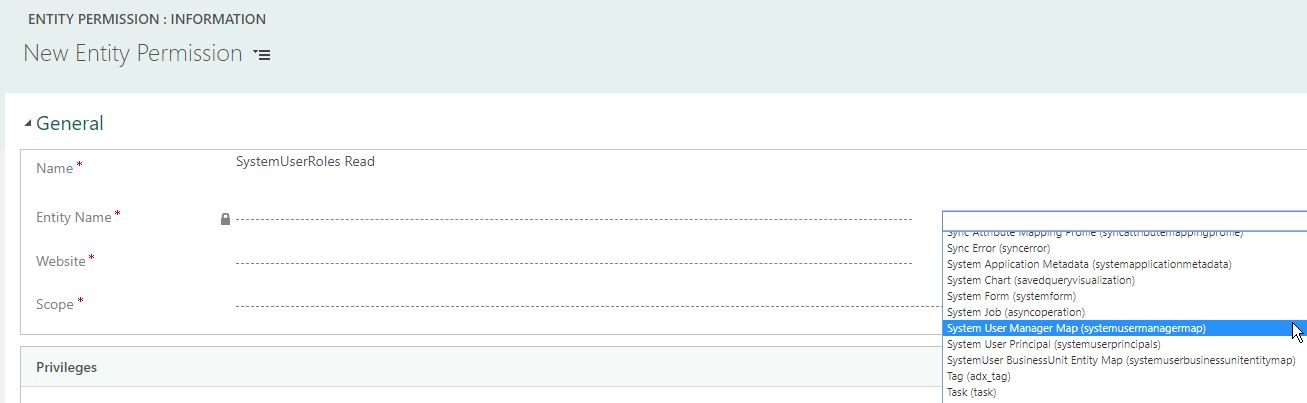
systemuserroles.jpg

Thank 

Sanjeev

*This post is locked for comments

I have the same question (0)
  • Suggested answer
    RaviKashyap Profile Picture
    55,410 Moderator on at

    Hi Sanjeev,

    This is because entity "SystemUserRoles' is not enabled for advance find which is why it is not available in the list to select. Only entities which are enabled displays in the list.

    Did you just try System User entity permissions? You can still add permissions for System User role  by making the Entity field as editable and then type in the text "systemuserrole". This worked for me but later it looks like that it doesn't need permissions for the linked entity, only main entity will work

    Hope this helps

  • sanjeev40084 Profile Picture
    37 on at

    @RaviKashyap

    I added read permission on 'systemuser' and 'role' entity under 'entity permission' and while running above fetch xml, nothing got returned. i know the fetch xml code is right since i am able to get record while running in XrmToolbox.

  • RaviKashyap Profile Picture
    55,410 Moderator on at

    Hi,

    Did you add the entity permission to the web role?

Under review

Thank you for your reply! To ensure a great experience for everyone, your content is awaiting approval by our Community Managers. Please check back later.

Helpful resources

Quick Links

Introducing the 2026 Season 1 community Super Users

Congratulations to our 2026 Super Stars!

Meet the Microsoft Dynamics 365 Contact Center Champions

We are thrilled to have these Champions in our Community!

Congratulations to the April Top 10 Community Leaders

These are the community rock stars!

Leaderboard > 🔒一 Microsoft Dynamics CRM (Archived)

Last 30 days Overall leaderboard

Featured topics

Product updates

Dynamics 365 release plans
