web
You’re offline. This is a read only version of the page.
close
Skip to main content

Notifications

Announcements

No record found.

Community site session details

Community site session details

Session Id :
Small and medium business | Business Central, N...
Answered

Is there a way to change multiple items location simultaneously?

(0) ShareShare
ReportReport
Posted on by

We have a developer working on a bridge between BC and Woo Commerce. They said that for their solution to work correctly all items need a Location assignment. Currently none of our 3000+ items have a location assignment because we only have 1 location. If I want to add "Main Location" as the location for all our items is there a way to do so with a bulk action?

I tried going to the Item Reclassification Journal but I don't see "Page/ Edit in Excel" like in other tables. Yes, I do have permissions to do this (super user) and I can see the "Page" button in other lists.

I have the same question (0)
  • Suggested answer
    Renni Profile Picture
    960 on at

    Hello there,

    I know I find it quite annoying that everywhere I don't really need it edit in excel so there and when I want it it is not there !

    You could rapid start them in with a configuration package.

    Select the item table then export via excel you should use the field selection and only export a few like no, name, unit of measure, location and maybe price so then you can easily identify the items if you are adding more than 1 location.

    Remember this location must be created in business central or the date will not re-import.

    Update the data and save

    Upload package back into Business Central

  • Alexei Pavlov Profile Picture
    20 on at

    Use MODIFYALL

  • Dan Kinsella Profile Picture
    468 on at

    This seems like a integration design problem to me, the developer should be able to insert a default location value into the bridge if it's required by woo commerce. We usually introduce some sort of value mapping in integrations anyway, but if the location is always the same this should be simple enough to implement without doing anything in BC.

    A blank location is perfectly valid in BC, so the bridge should be adapted to handle it in my view.

  • Community Member Profile Picture
    on at

    I am not a developer. I am looking for a way to do this myself with no experience with Code.

  • AndrewThomas Profile Picture
    on at

    Edit in excel is not available on the item reclassification journal, have you already loaded the inventory with no location?

  • Community Member Profile Picture
    on at

    Unfortunately yes. This was done back in April. Our Microsoft approved developer charges a large amount for support after we went live so we can't contact them without a large fee involved.

  • Suggested answer
    Renni Profile Picture
    960 on at

    Have you tried adding the location column on the item list and using edit in excel there ? 

  • Community Member Profile Picture
    on at

    In the Production environment you cannot view "location" column in the item list. When you Edit in Excel it does not appear there either.

  • Verified answer
    MartinNL Profile Picture
    480 on at

    Hi,

    I don't think there is a exact or perfectly simple way to achieve this, I'm not a developer nor a logistics expert but here is what I would try to do in your situation.

    Goal: Get the +-3000 items that have quantities in location 'Blank' to a new location "Main" by using the Item Reclassification Journal.

    • Create new location called e.g. "Main".
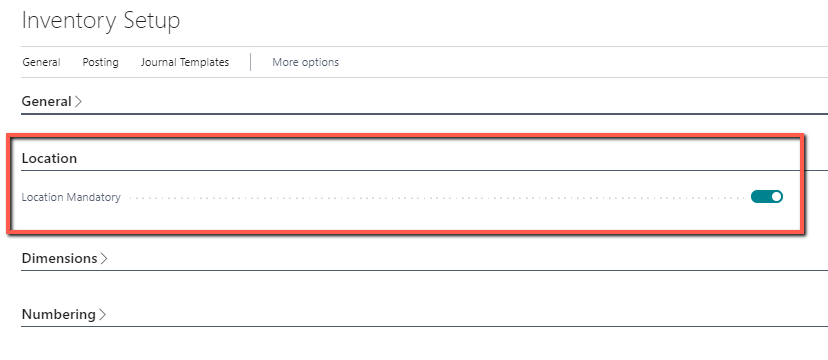
    • Define the setting "Location Mandatory" in Inventory Setup to true. Preventing any further transactions to the 'blank' location.
    Loc-man.png

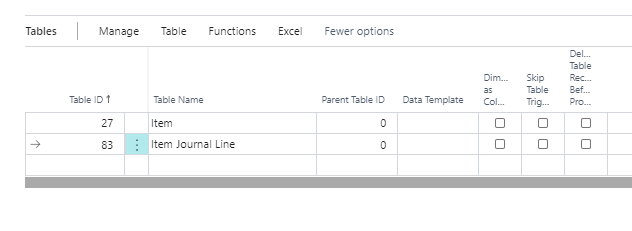
    • Create a Configuration Package containing:
      1. Item table 27 (delimit included fields to required fields, also reduces size of excel sheet, else every field from item table is included). 
      2. Item Journal Line Table 83 (delimit included fields to required fields, also reduces size of excel sheet, else every field from journal table is included. Try include only what you need as displayed in BC. Note the template and batch name for where to import to e.g. Template = Transfer, Batch = Default).
    Config.png

    • Export Configuration package containing the 2 tables to Excel.
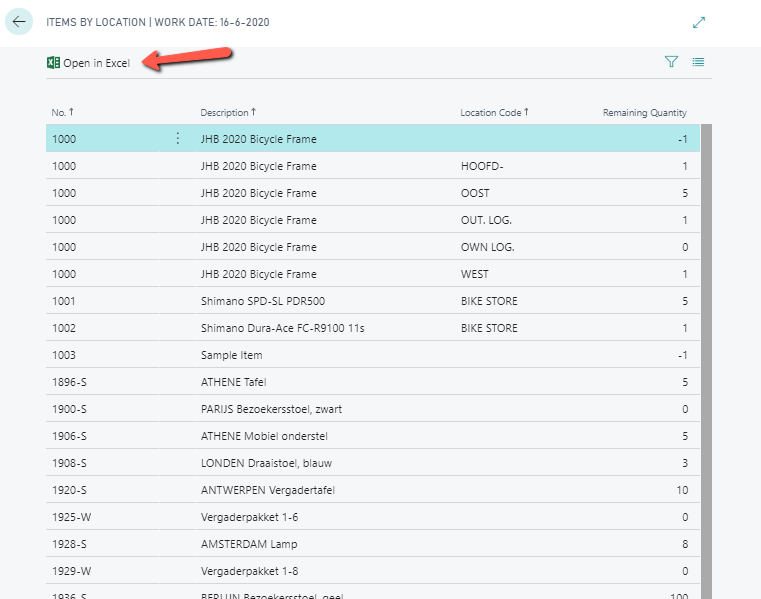
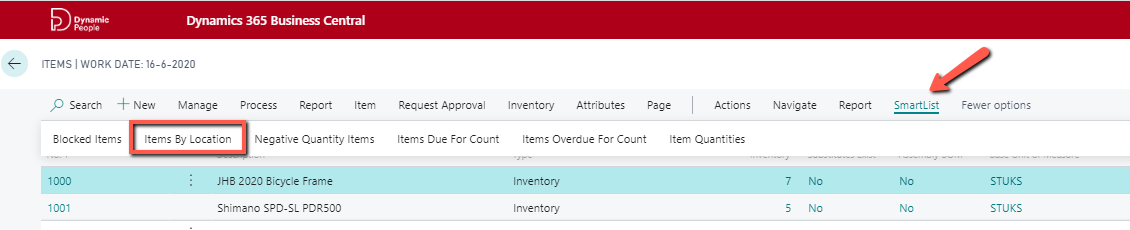
    • Run the SmartList found in the Items List Page called "Items By Location"
    2020_2D00_07_2D00_22_5F00_10_2D00_12_2D00_02.png

    • Open SmartList in Excel.

    Smartlist-IBL.png

    • Populate the Configuration package for item journal line using the items to be transferred and the remaining quantities to be transferred from the SmartList.
    • Import configuration package and apply only table 83.

    Desired result: Item Reclassification Journal batch 'Default' is populated with the +-3000 items with Location Code = 'blank', New Location Code = 'Main' and Quantity = the remaining quantity that is in location 'blank'.

    Note: This process will only result in the quantity of items in location 'blank' to be 0, any item ledger entries that were posted where location was 'blank' will remain and only future transactions will be done in new 'Main' location. 

    Of course this is just an idea and hope it gives you some ideas and perhaps help you along 

    Let us know how you get along.

    Regards,

    Martin

  • Community Member Profile Picture
    on at

    I got all the way to the import and nothing was working. Like I said before, I am not a developer so this is kind of over my head. Why is this so difficult?

Under review

Thank you for your reply! To ensure a great experience for everyone, your content is awaiting approval by our Community Managers. Please check back later.

Helpful resources

Quick Links

Responsible AI policies

As AI tools become more common, we’re introducing a Responsible AI Use…

Neeraj Kumar – Community Spotlight

We are honored to recognize Neeraj Kumar as our Community Spotlight honoree for…

Leaderboard > Small and medium business | Business Central, NAV, RMS

#1
OussamaSabbouh Profile Picture

OussamaSabbouh 3,229

#2
Jainam M. Kothari Profile Picture

Jainam M. Kothari 1,867 Super User 2025 Season 2

#3
YUN ZHU Profile Picture

YUN ZHU 1,153 Super User 2025 Season 2

Last 30 days Overall leaderboard

Featured topics

Product updates

Dynamics 365 release plans