web
You’re offline. This is a read only version of the page.
close
Skip to main content

Notifications

Announcements

No record found.

Community site session details

Community site session details

Session Id :
Microsoft Dynamics GP (Archived)

Management Report Issue - "S-1 is not a valid default base period for this company. The default base period has been changed to CUR".

(0) ShareShare
ReportReport
Posted on by

Hi Everyone, 

I've currently been adding in historical transactions amounts. Here's a little back story. We originally believed we would post two years worth of historical data, making our first year 2013. We later changed this idea to one, and I closed the fiscal period 2013. We still have 2014 open, and i'm currently adding transactions into GP. Today, i went to Management Reporter to run my typical reports and this message appeared "S-1 is not a valid default base period for this company. The default base period has been changed to CUR". I've also noticed that the transactions I placed in yesterday for 2014 (just one month summaries for each account) aren't showing up in the reports when i use this new default base period. 

I don't know if these two issues are related, but if anyone has any guidance on this problem it would be most appreciated. 

Thanks!
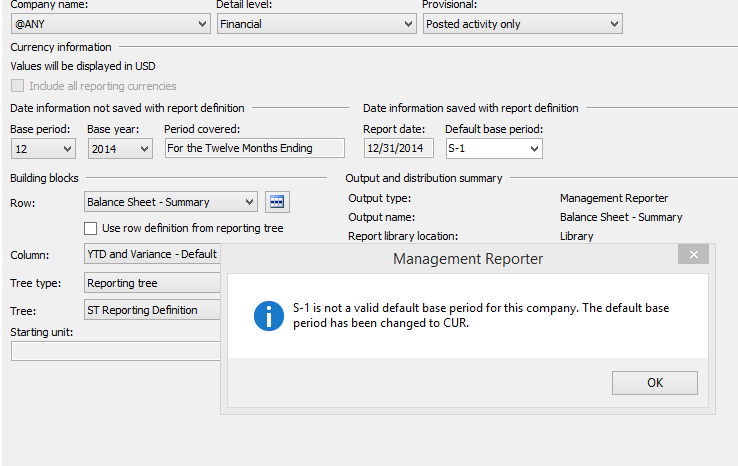
Screenshot-_2800_181_2900_.png

*This post is locked for comments

I have the same question (0)
  • Suggested answer
    Community Member Profile Picture
    on at

    Hi,

    This is a bug in MR and you should only change the Base Period and Base Year on the left and leave the Default base period as CUR


    Hope this helps!


    Thomas S.

  • Suggested answer
    Redbeard Profile Picture
    12,931 on at

    My first instinct is you are working with a new company with a Fiscal Period setup, which includes the current year (2015) and future years, but not 2014, as your S-1 selection sets the period to December 2014.  Creating the Fiscal Period setup for 2014 should resolve your problem. Make sure you close the periods so no one inadvertently posts transactions to 2014. This can be done in Tools > Setup > Company > Fiscal Periods.

  • Suggested answer
    Bill Campbell Profile Picture
    12 on at

    Not to be picky, but Harry, might you have ment 2013 rather that 2014 as Kim has noted that she has data entered and posted (summary) for 2014.

    I was thinking the same thing that the S-1 was forcing the system to look back to 2013 and it was not there.

    I have to also agree that the 'bug' not on the change of the base period is of great interest as well.

  • Community Member Profile Picture
    on at

    Hi guys, first, thanks for all of your comments - i really appreciate them. To Harry's point, i went to make sure that all there years - 13, 14, & 15 were setup correctly. Please see screenshots. Here, you can see 2015 is my present year with everything opened. 2014 looks exactly the same, except i have it set to a historical year. Lastly, as you can see in the second photo everything in 2013 is closed. Should i try opening the year back up? As for this bug you guys are mentioning, how can i get it set back to the original settings? 

    Thanks!

    Screenshot-_2800_185_2900_.pngScreenshot-_2800_185_2900_.png

  • Verified answer
    Beat Bucher  GP Geek  GPUG All Star Profile Picture
    28,058 Moderator on at

    Hi Kimberly,

    There might be more players in this game... What version of MR are you running on  (CU) ? what connector are you using (legacy or DataMart) ? You may have to rebuild your Datamart if you're using this connector...

    Also, when entering historical transactions in the system, you should always run a GL Reconcile process for all your closed years, as otherwise the summary table may not get updated.

  • Community Member Profile Picture
    on at

    Hi Beat,

    Following your advice, i went ahead and ran the GL Reconcile process - since we had no transactions in the 2013 year, the amount was the balances was $0 - however i only ran it to one account under the payables management module. Is there a way you can click all accounts at once instead of going through and adding each one? Please see the screenshot for my version of MR. We are using a DataMart connector - how can i go about rebuilding my DataMart I feel like this might be the issue.

    Thanks!


    Screenshot-_2800_187_2900_.png

  • Community Member Profile Picture
    on at

    Sorry, had a slow moment, I know i can rebuild the DataMart from inside MR 2012 Config console - how can i make a backup though? Just in case!

  • Verified answer
    Beat Bucher  GP Geek  GPUG All Star Profile Picture
    28,058 Moderator on at

    Kim,

    Your MR is pretty up-to-date (CU11HF2, Jan-2015), as the last CU12 update was just released a week ago :-).. I don't think MR's DataMart is the issue in your case, but you may want to apply the latest CU just to exclude any issues on that side, as HF3 & HF4 have fixed quite a few bugs.

    [View:http://blogs.msdn.com/b/dynamics_financial_reporting/archive/2015/04/22/management-reporter-2012-cu-12-now-available.aspx:0:0]

    In order to run the reconcile of all your GL accounts on historical and current years, you need to go to :

    Financial >> Utilities >> Financial >> Reconcile

    this would re-calculate the summary for all your accounts, past and present.

  • Beat Bucher  GP Geek  GPUG All Star Profile Picture
    28,058 Moderator on at

    you don't really need a backup of the "ManagementReporterDM" database as this one can be rebuilt any time and only holds aggregated data from your original GP companies.. but in case you really want to, you have to go into SQL Studio Management and run a backup of that single DB

  • Community Member Profile Picture
    on at

    Hi Beat,

    I went to reconcile all of my years. Every time I clicked reconcile i was prompted with "if detailed transactions don't exist for the historical year you've selected, the summary balance will be zero after the reconcile. Do you want to continue? At which i then continue. Nothing else shows up on the screen, i'm wondering did it complete?

    On another note everyone: I took a step back and entered in another month's worth of summary historical transactions ( these are for Feb 2014). I went to MR and voila! They worked perfect. Now I'm starting to wonder if the real issue is with the first set of transactions? Thoughts? They sets did clear, as you can see in the screenshot. I'm so lost as to why one would show up perfect and the other wouldn't. 

    Screenshot-_2800_192_2900_.pngScreenshot-_2800_192_2900_.png<---Also, off topic but why do i always see 2 dollar signs instead of one? 

Under review

Thank you for your reply! To ensure a great experience for everyone, your content is awaiting approval by our Community Managers. Please check back later.

Helpful resources

Quick Links

Responsible AI policies

As AI tools become more common, we’re introducing a Responsible AI Use…

Neeraj Kumar – Community Spotlight

We are honored to recognize Neeraj Kumar as our Community Spotlight honoree for…

Leaderboard > 🔒一 Microsoft Dynamics GP (Archived)

#1
Community Member Profile Picture

Community Member 2

#2
Victoria Yudin Profile Picture

Victoria Yudin 1

#2
mtabor Profile Picture

mtabor 1

Last 30 days Overall leaderboard

Featured topics

Product updates

Dynamics 365 release plans



