web
You’re offline. This is a read only version of the page.
close
Skip to main content

Notifications

Announcements

Community site session details

Community site session details

Session Id :
Microsoft Dynamics CRM (Archived)

Set Regarding in Dynamics 365 App For Outlook

(0) ShareShare
ReportReport
Posted on by

Hi All,

I have the functionality to send an email when the case is created in Dynamics 365 and the regarding is set as the Case which is created.

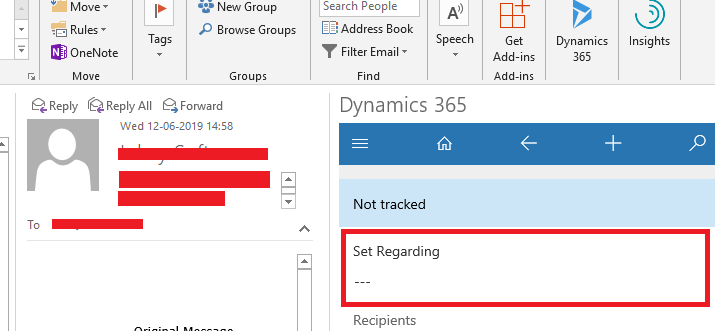
But in Dynamics 365 App for Outlook, I don't see the regarding field tracked as in the below image:
7752.SetRegarding.png

Please share your suggestions on this issue.

Thank you.

*This post is locked for comments

I have the same question (0)
  • Suggested answer
    Priyesh Profile Picture
    7,396 User Group Leader on at

    Hi,

    Actually, we have "Sent Emails" out of D365 which are set to Case. And in my Inbox, they appear as Tracked Regarding already when I open D365 App For Outlook pane in my Outlook.

    Hence, can you try my suggestion and see it if works?

    Thanks.

  • Suggested answer
    Dynamics365 Rocker Profile Picture
    7,755 on at

    Check your workflow or plugin what ever you are using to send email. It may be possible that you are not setting regarding in Workflow/Plugin.

  • Verified answer
    LuHao Profile Picture
    40,892 on at

    Hi Swetha,

    This is by design. We cannot see the Rawarding record of the original email in the App for Outlook.

    If we want to see the record of the email Regarding in the App for Outlook, then we first need to click Track without Regarding.

    8358.2.PNG

    Then, click ··· and click View email.

    8358.2.PNG

    This way we can see the record Regarding with the email.

    17504.3.PNG

    Please note that if we track this email in App for Outlook, it will automatically create the email we tracked in CRM, the same email as the original email. (The creator of the email is the Outlook account.)

    Please refer to this article on tracking of App for Outlook:

    [View:~/crm/b/crminthefield/archive/2018/12/11/dynamics-365-app-for-outlook-part-7-helpful-tips-for-using-the-app:320:50]

  • Suggested answer
    Priyesh Profile Picture
    7,396 User Group Leader on at

    Hi,

    Can you check your email step in your workflow that the Regarding fields should be tied to the Case record in the workflow context.

    regardingField.png

    Hope this helps.

Under review

Thank you for your reply! To ensure a great experience for everyone, your content is awaiting approval by our Community Managers. Please check back later.

Helpful resources

News and Announcements

Season of Giving Solutions is Here!

Quick Links

Responsible AI policies

As AI tools become more common, we’re introducing a Responsible AI Use…

Neeraj Kumar – Community Spotlight

We are honored to recognize Neeraj Kumar as our Community Spotlight honoree for…

Leaderboard > 🔒一 Microsoft Dynamics CRM (Archived)

Last 30 days Overall leaderboard

Featured topics

Product updates

Dynamics 365 release plans



