web
You’re offline. This is a read only version of the page.
close
Skip to main content

Notifications

Announcements

No record found.

Community site session details

Community site session details

Session Id :
Small and medium business | Business Central, N...
Suggested Answer

Sales Line: Show additional fields based on item No.

(0) ShareShare
ReportReport
Posted on by 40

Hi

Whenever i open a Sales Invoice, i want to display additional fields on the sales lines in the Sales Invoice Subform, based on the Item No. in the sales line.

How can i achieve this?
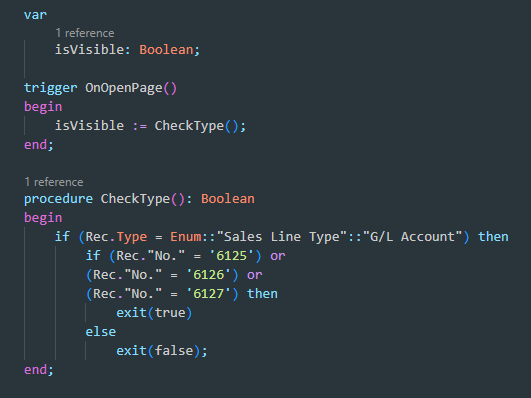
I have extended the Sales Invoice SubForm and tried something like this where the relevant fields have a "Visible = isVisible;" property:
unknown.png

Here, the Rec (the sales line) is always empty because the sales lines are not yet fetched, so i cant read the data and make changes based on those.
I want to read the sales lines whenever i open a sales invoice, and based on the No. i want a few more fields to be displayed.

Thanks in advance.

I have the same question (0)
  • Suggested answer
    Nitin Verma Profile Picture
    21,698 Moderator on at

    Hi andreas@protektit.no ,

    You can move your code on Onaftergetrecord or OnafterInsert  trigger of sub page, and instead of True of False in Exit function take a global variable something like : globalvariable:boolean

    [InDataSet]

    globalvar : boolean;

    and use that globalvar to your field property like below.

    modify("No.")

           {

               Visible = globalvar;

           }

    Hope it will help you.

  • Suggested answer
    Dallefeld Profile Picture
    211 User Group Leader on at

    1. I don't feel that you should EVER hardcode like you've done here

    2. Why don't you just have the fields visible and they will only be populated for the desired No.values

Under review

Thank you for your reply! To ensure a great experience for everyone, your content is awaiting approval by our Community Managers. Please check back later.

Helpful resources

Quick Links

Responsible AI policies

As AI tools become more common, we’re introducing a Responsible AI Use…

Neeraj Kumar – Community Spotlight

We are honored to recognize Neeraj Kumar as our Community Spotlight honoree for…

Leaderboard > Small and medium business | Business Central, NAV, RMS

#1
OussamaSabbouh Profile Picture

OussamaSabbouh 3,229

#2
Jainam M. Kothari Profile Picture

Jainam M. Kothari 1,867 Super User 2025 Season 2

#3
YUN ZHU Profile Picture

YUN ZHU 1,153 Super User 2025 Season 2

Last 30 days Overall leaderboard

Featured topics

Product updates

Dynamics 365 release plans
