web
You’re offline. This is a read only version of the page.
close
Skip to main content

Announcements

No record found.

News and Announcements icon
Community site session details

Community site session details

Session Id :
Microsoft Dynamics AX (Archived)

Account dimension column not displaying data

(0) ShareShare
ReportReport
Posted on by 127

Hi All,

The account dimension column is blank when in entering dimension.
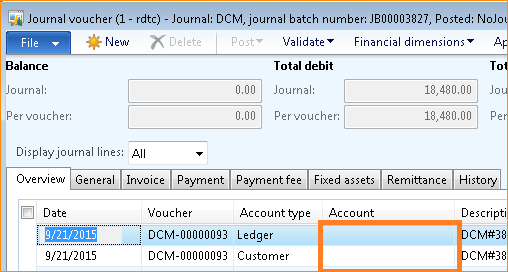
2821.unnamed.png

but when you when check the General Tab, the account dimension does exist.
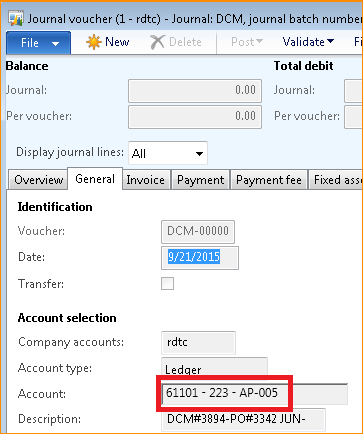
5545.unnamed-_2800_1_2900_.png

When click the grid account dimension cell, the data will appear and disappear again if we select other cell.
Steps we did to try resolve this:
  • compare the journal voucher form from dev form and found no difference.
  • Restart AOS service.
  • Delete XppIL folder in AOS bin folder.
  • Generate full CIL compile
  • Sync Database
  • Delete user data.
  • Clear user cache in user app settings folder.

Hope you could help me on this.

thanks,

Jassfer

*This post is locked for comments

I have the same question (0)
  • Ludwig Reinhard Profile Picture
    Microsoft Employee on at

    Hi Jassfer,

    Can you try attaching your screenprints again.

    We can't see them and do not know where you have the problem.

    Best regards,

    Ludwig

  • JazZ0003 Profile Picture
    127 on at

    Thank you Ludwig for pointing it out.

    I corrected now the image and you should see it now.

    Thanks,

    Jassfer

  • Brandon Wiese Profile Picture
    17,790 on at

    When you deleted the AUC files in the user's AppData folder, was the AX client open or closed?  In order to have an effect, the AX client must be closed.  

    Have you made any modifications to the form?

  • Suggested answer
    Brandon Wiese Profile Picture
    17,790 on at

    One thing you can try is to turn off Form pre-loading under System administration, Setup, System, Client performance options.

  • JazZ0003 Profile Picture
    127 on at

    Hi Brandon,

    This problem affect all users. Even in the AOS server client. I tried also comparing the from our dev instance but no changes.

    Would it be oke it i just export the form from Dev and import it into our live overwriting this form.

    Thanks,

    Jassfer

Under review

Thank you for your reply! To ensure a great experience for everyone, your content is awaiting approval by our Community Managers. Please check back later.

Helpful resources

Quick Links

Introducing the 2026 Season 1 community Super Users

Congratulations to our 2026 Super Stars!

Meet the Microsoft Dynamics 365 Contact Center Champions

We are thrilled to have these Champions in our Community!

Congratulations to the March Top 10 Community Leaders

These are the community rock stars!

Leaderboard > 🔒一 Microsoft Dynamics AX (Archived)

#1
CP04-islander Profile Picture

CP04-islander 16

#2
GiacomoRovai Profile Picture

GiacomoRovai 4

#3
Douglas Noel Profile Picture

Douglas Noel 2

Last 30 days Overall leaderboard

Featured topics

Product updates

Dynamics 365 release plans
