web
You’re offline. This is a read only version of the page.
close
Skip to main content

Announcements

No record found.

News and Announcements icon
Community site session details

Community site session details

Session Id :
Microsoft Dynamics AX (Archived)

Available Physical Qty as per Sales unit or Unit Conversion

(0) ShareShare
ReportReport
Posted on by 1,909

Dear all,

I have Sales unit carton24(24PC = 1 carton) and  below code it returns available qty into PCS. I need available qty in cartons. For example if I receive 5 cartons it should be return value 5.  I don't need a value like 5(cartons)*24(PC) = 120.  

public display Qty availPhyQty()
{

   InventOnhand inventOnhand;


   InventDim inventDim;

   InventDimParm inventDimParm;

   ItemId itemId;

   InventQty availQty;

   ;

   itemId = this.ItemId;

   inventDim.InventSiteId = ''; //site

   inventDim.InventLocationId = ''; //WHS

   inventDimParm.initFromInventDim(inventDim);

   inventOnhand = InventOnhand::newParameters(itemId, inventDim, inventDimParm);

   availQty = inventOnhand.availPhysical();

   return availQty;

    
}
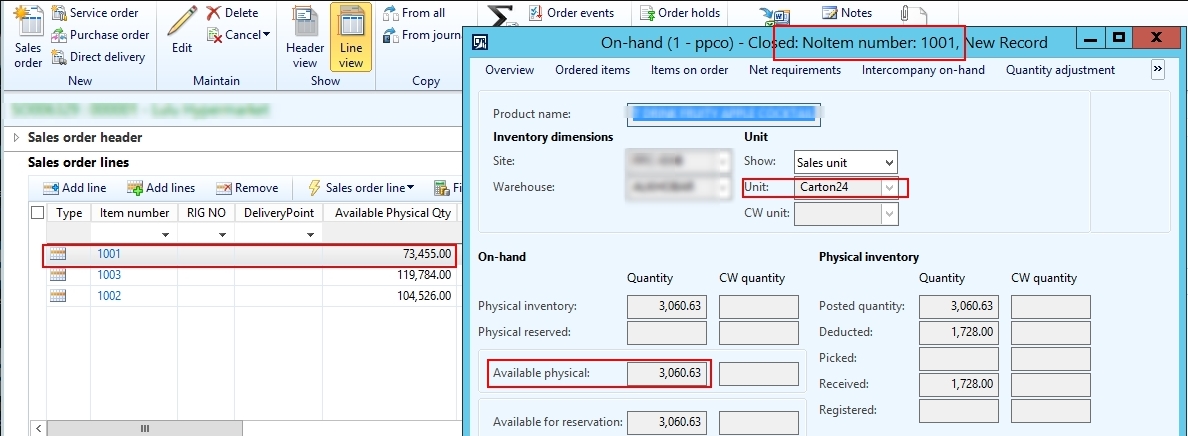
1832.sales.jpg

Thank you.

*This post is locked for comments

I have the same question (0)
  • Verified answer
    Chaitanya Golla Profile Picture
    17,225 on at

    Hi,

    As suggested by Crispin, you have to use method convert of class UnitOfMeasureConverter class, provided you should have valid conversion factor being defined between two units, if not error is displayed with message "Conversion between FromUnit and ToUnit does not exist." Below would be your code:

    public display Qty availPhyQty()
    {
       InventOnhand inventOnhand;
       InventDim inventDim;
       InventDimParm inventDimParm;
       ItemId itemId;
       InventQty availQty;
       real value;
       ;
    
        itemId = this.ItemId;
        inventDim.InventSiteId = ''; //site
        inventDim.InventLocationId = ''; //WHS
        inventDimParm.initFromInventDim(inventDim);
        inventOnhand = InventOnhand::newParameters(itemId, inventDim, inventDimParm);
        availQty = inventOnhand.availPhysical();
       
        // In place of symbols provide the values, like PCS i feel it might be salesLine.SalesUnit
        // Fifth parameter refers to any product with specific conversion, it accepts either RecId or default is zero
        // Sixth parameter refers to rounding, I made it to No
        availQty = UnitOfMeasureConverter::convert(availQty, UnitOfMeasure::findBySymbol("PC").RecId, UnitOfMeasure::findBySymbol("Cartons").RecId, NoYes::No, 0, NoYes::No);        
        
        return availQty;
    }


  • Faqruddin Profile Picture
    1,909 on at

    Hello,

    Thank you for your suggestions. The above code is works. But what if conversion factors doesn't exists. The code that you suggested is ok, if unit conversion factor exists for particular unit only.  

    availQty = UnitOfMeasureConverter::convert(availQty, UnitOfMeasure::findBySymbol("PCS").RecId, UnitOfMeasure::findBySymbol(salesLine.SalesUnit).RecId, NoYes::No, 0, NoYes::No);        

    For other Factors I face below error.

    6557.pc.jpg

  • Verified answer
    Chaitanya Golla Profile Picture
    17,225 on at

    Hi,

    Please use below code, I added an condition to check if valid conversion exists then go and fetch the value else same value.

    static void AXC_UnitOfConversion(Args _args)
    {
        InventOnhand inventOnhand;
        InventDim inventDim;
        InventDimParm inventDimParm;
        ItemId itemId;
        InventQty availQty;
        real value;
        UnitOfMeasureFromRecId  fromUnitOfMeasure;
        UnitOfMeasureToRecId    toUnitOfMeasure;  
        ;
        
        itemId = this.ItemId;
        inventDim.InventSiteId = ''; //site
        inventDim.InventLocationId = ''; //WHS
        inventDimParm.initFromInventDim(inventDim);
        inventOnhand = InventOnhand::newParameters(itemId, inventDim, inventDimParm);
        availQty = inventOnhand.availPhysical();
        
        fromUnitOfMeasure = UnitOfMeasure::findBySymbol("PC").RecId;
        toUnitOfMeasure = UnitOfMeasure::findBySymbol("Cartons").RecId;
        
        if (UnitOfMeasureConversion::findByConversion(fromUnitOfMeasure, toUnitOfMeasure) || // Add this condition
            UnitOfMeasureConversion::findByConversion(toUnitOfMeasure, fromUnitOfMeasure))
        {
            // In place of symbols provide the values, like PCS i feel it might be salesLine.SalesUnit
            // Fifth parameter refers to any product with specific conversion, it accepts either RecId or default is zero
            // Sixth parameter refers to rounding, I made it to No
            availQty = UnitOfMeasureConverter::convert(availQty, fromUnitOfMeasure, toUnitOfMeasure, NoYes::No, 0, NoYes::No);        
        }
    }

    return availQty;

Under review

Thank you for your reply! To ensure a great experience for everyone, your content is awaiting approval by our Community Managers. Please check back later.

Helpful resources

Quick Links

Introducing the 2026 Season 1 community Super Users

Congratulations to our 2026 Super Stars!

Meet the Microsoft Dynamics 365 Contact Center Champions

We are thrilled to have these Champions in our Community!

Congratulations to the March Top 10 Community Leaders

These are the community rock stars!

Leaderboard > 🔒一 Microsoft Dynamics AX (Archived)

#1
CP04-islander Profile Picture

CP04-islander 39

#2
Michel ROY Profile Picture

Michel ROY 14

#3
imran ul haq Profile Picture

imran ul haq 8

Last 30 days Overall leaderboard

Featured topics

Product updates

Dynamics 365 release plans
