web
You’re offline. This is a read only version of the page.
close
Skip to main content

Notifications

Announcements

No record found.

Community site session details

Community site session details

Session Id :
Microsoft Dynamics CRM (Archived)

Data Type of Status Reason - how to have this show up on another record?

(0) ShareShare
ReportReport
Posted on by 26

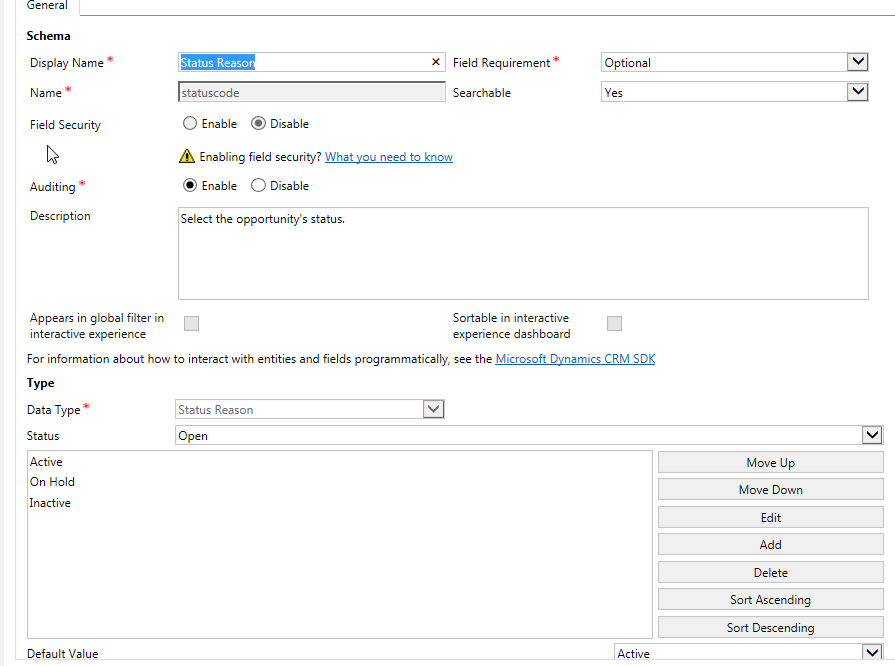
StatusReason.png

Above is from the Opportunity Record, from the Status Reason field.  From here, I go to the Sales Incentive/Commission entity and I want to create the same data type field here so that I can copy the field value from the opportunity over to this other entity.  However, when I am on this other entity, and go to Data Type, I don't have the option of Status Reason.  Am I doing something wrong?

*This post is locked for comments

I have the same question (0)
  • Suggested answer
    Adrian Begovich Profile Picture
    1,027 Moderator on at

    Hi USA80.

    Status Reason ('statuscode') is an out of the box field.

  • Suggested answer
    RaviKashyap Profile Picture
    55,410 Moderator on at

    Hi,

    All entities have the StateCode & StatusCode field by default. Check this article technet.microsoft.com/.../dn531157.aspx

    Now, for custom entities, you cannot change the state i.e. you cannot have state like Open, Won, Lost etc but you can have the same status reason like In Progress/ Hold etc.

    Hope this helps.

  • Suggested answer
    Preeti Sharma Profile Picture
    2,678 on at

    Hi,

    You can try with custom option set. Create a global option set and use it in both entities.

    Hope this helps:)

  • Suggested answer
    Shidin Haridas Profile Picture
    3,499 on at

    Status Reason and Status are special fields that come out-of-the-box.

    We can add more options to Status Reasons, but that is where our control ends.

    If you need to customize more, advise you to set up a custom option-set field and have validation rules in place via JavaScript or server side code.

    And you will not be able to copy the opportunity values unfortunately, you will have to re-create them (unless you have some utility built out that can retrieve meta-data and rebuild them)

    If my answer helps you, please mark it as verified.

  • Verified answer
    USA80 Profile Picture
    26 on at

    I used a workflow to complete this and in the workflow I just used Change Status

Under review

Thank you for your reply! To ensure a great experience for everyone, your content is awaiting approval by our Community Managers. Please check back later.

Helpful resources

Quick Links

Responsible AI policies

As AI tools become more common, we’re introducing a Responsible AI Use…

Neeraj Kumar – Community Spotlight

We are honored to recognize Neeraj Kumar as our Community Spotlight honoree for…

Leaderboard > 🔒一 Microsoft Dynamics CRM (Archived)

#1
SA-08121319-0 Profile Picture

SA-08121319-0 4

#1
Calum MacFarlane Profile Picture

Calum MacFarlane 4

#3
Alex Fun Wei Jie Profile Picture

Alex Fun Wei Jie 2

Last 30 days Overall leaderboard

Featured topics

Product updates

Dynamics 365 release plans



