web
You’re offline. This is a read only version of the page.
close
Skip to main content

Announcements

No record found.

News and Announcements icon
Community site session details

Community site session details

Session Id :
Microsoft Dynamics AX (Archived)

in lookup drop down is not coming

(0) ShareShare
ReportReport
Posted on by 327

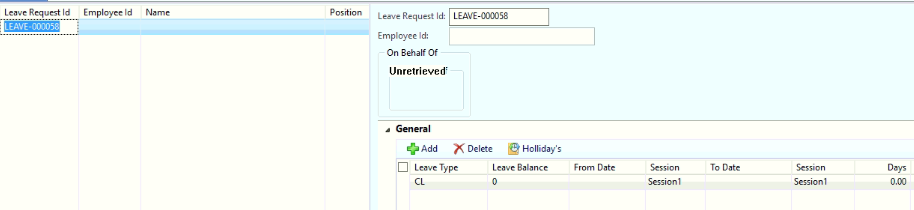
hai all i have requirement
6076.Untitled.png 

i have form like show above there i can create a leave request in line details "leave type" feild is there that is master data through foreign key relation i am getting drop down and ill select leave type is "CL"

and ill save the record.

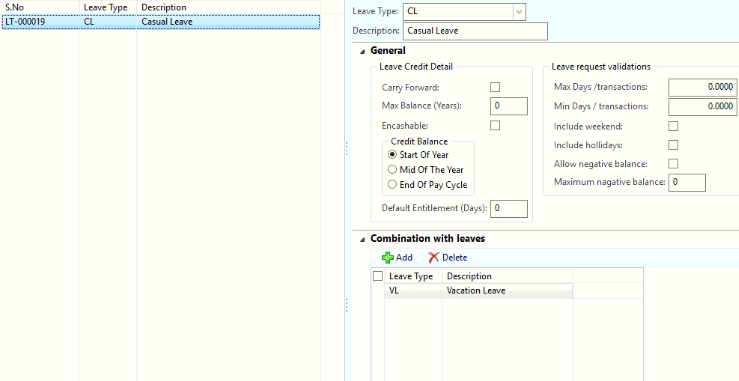
now i have one setup for leave type form is like this
6013.Untitled1.png

this is leave setup form for "CL" we can take another leave "VL"   this is basic setup.

now iam going to first form 

6076.Untitled.png

i already applied a leave type is "CL" so as per my setup i can apply "VL" also

if apply second time in that drop down only "VL" should come because of in setup i have given "VL" for "CL"

for that drop down i have overwrite the lookup method in leave type code is shown bellow.

public void lookup()
{
LeaveReqHeader   _LeaveReqHeader;
LeaveReqLine _       _LeaveReqLine;
Query query= new Query();
QueryBuildDataSource qbds,qbds1;
QueryBuildRange qbr;
VacationTypeLineTBL      _VacationTypeLineTBL;
VacationType                   _VacationType;
_LeaveTypeMasters        _LeaveTypeMasters;

SysTableLookup sysTableLookup = SysTableLookup::newParameters(tableNum(VacationTypeLineTBL), this);


select _LeaveReqHeader;
select count(RecId) from _LeaveReqLine where _LeaveReqLine.LeaveReqId==_LeaveReqHeader.LeaveReqId;

if(_LeaveReqLine.RecId >= 1)
{

qbr = qbds1.addRange(fieldNum(VacationTypeLineTBL, LeaveTypeMasters));

while select _VacationType
{
select _VacationTypeLineTBL join _LeaveTypeMasters where _VacationTypeLineTBL._LeaveTypeMasters==_LeaveTypeMasters.RecId
&& _VacationTypeLineTBL.SerialNumber==_VacationType.SerialNumber;

qbr.value(int642str(_VacationTypeLineTBL.ITTI_LeaveTypeMasters));

sysTableLookup.addLookupField(fieldNum(_VacationTypeLineTBL, _LeaveTypeMasters),true);
sysTableLookup.addLookupField(fieldNum(_VacationTypeLineTBL, LeaveCodeDescription),true);


sysTableLookup.parmQuery(query);
sysTableLookup.performFormLookup();
}
}


}

if use this code in debugger i am getting correct value but drop is not coming its in disabled stage......

note:

1.VacationType    ,VacationTypeLineTBL     these two tables belongs to my leave setup form one is header and line 

2.LeaveReqHeader ,  LeaveReqLine these tow tables belongs two leave apply form tables 

this my code please review and help me out what is the mistake in that any other way to filter data 

thanks in advance.....


*This post is locked for comments

I have the same question (0)
  • Suggested answer
    Chaitanya Golla Profile Picture
    17,225 on at

    Hi,

    I just changed your code and you need to perform lookup using joins instead of while-select loop. Please test the below code(if in case any syntax errors) as I don't have your objects and let me know if anything is missing.

    Refer following links:

    (Adding custom lookup query code in AX X++)

    http://www.robertmusau.com/index.php/2-ax/8-adding-custom-lookup-query-code-in-ax

    (lookup with joining two tables in ax2012)

    axaptaexplorer.blogspot.com/.../lookup-with-joinning-2-tables-in-ax-2012.html

    public void lookup()
    {
        LeaveReqHeader   _LeaveReqHeader;
        LeaveReqLine _       _LeaveReqLine;
        Query query= new Query();
        QueryBuildDataSource qbds,qbds1;
        QueryBuildRange qbr;
        VacationTypeLineTBL      _VacationTypeLineTBL;
        VacationType                   _VacationType;
        _LeaveTypeMasters        _LeaveTypeMasters;
        SysTableLookup sysTableLookup = SysTableLookup::newParameters(tableNum(VacationTypeLineTBL), this);
    
        sysTableLookup.addLookupField(fieldNum(_VacationTypeLineTBL, _LeaveTypeMasters),true);
        sysTableLookup.addLookupField(fieldNum(_VacationTypeLineTBL, LeaveCodeDescription),true);    
            
        select count(RecId) from _LeaveReqLine 
        join Recid from _LeaveReqHeader
            where _LeaveReqLine.LeaveReqId==_LeaveReqHeader.LeaveReqId;
       
       if(_LeaveReqLine.RecId >= 1)
       {
            qbds = query.addDatasoure(tablenum(VacationTypeLineTBL));
        
            // Join _LeaveTypeMasters
            qbds1 = qbds.adddatasource(tablenum(_LeaveTypeMasters));
            qbds1.addlink(fieldnum(_VacationTypeLineTBL,_LeaveTypeMasters), fieldnum(LeaveTypeMasters,RecId)); 
            qbds1.addlink(fieldnum(_VacationTypeLineTBL,SerialNumber), fieldnum(LeaveTypeMasters,SerialNumber)); 
    qbds1.joinMode(joinMode::InnerJoin));
            // Add range 
    qbr = qbds.addRange(fieldNum(VacationTypeLineTBL, LeaveTypeMasters));
    qbr.value(int642str(_VacationTypeLineTBL.ITTI_LeaveTypeMasters));
    sysTableLookup.parmQuery(query);
    sysTableLookup.performFormLookup();
    }
    }

  • karthik143 Profile Picture
    327 on at

    i have tried your code still drop down is not coming

Under review

Thank you for your reply! To ensure a great experience for everyone, your content is awaiting approval by our Community Managers. Please check back later.

Helpful resources

Quick Links

Introducing the 2026 Season 1 community Super Users

Congratulations to our 2026 Super Stars!

Meet the Microsoft Dynamics 365 Contact Center Champions

We are thrilled to have these Champions in our Community!

Congratulations to the March Top 10 Community Leaders

These are the community rock stars!

Leaderboard > 🔒一 Microsoft Dynamics AX (Archived)

#1
CP04-islander Profile Picture

CP04-islander 39

#2
Michel ROY Profile Picture

Michel ROY 14

#3
imran ul haq Profile Picture

imran ul haq 8

Last 30 days Overall leaderboard

Featured topics

Product updates

Dynamics 365 release plans
