web
You’re offline. This is a read only version of the page.
close
Skip to main content

Announcements

No record found.

News and Announcements icon
Community site session details

Community site session details

Session Id :
Microsoft Dynamics AX (Archived)

Response to a SalesOrderService.Create AIF Inbound port

(0) ShareShare
ReportReport
Posted on by

Using AX 2012 R3 CU9

I'm setting up my AIF inbound / Oubound ports for EDI and would like to have a more detailed response when a service is complete.  Let me explain more....

I have a Inbound AIF port created, using the SalesSalesOrderService.Create Service operation.  I selected the check box for "Response address" which uses a File system adapter to write an XML file when the processes complete (success or failure).  I have it send to a URL, which works great for every inbound Sales Order document that it processes.

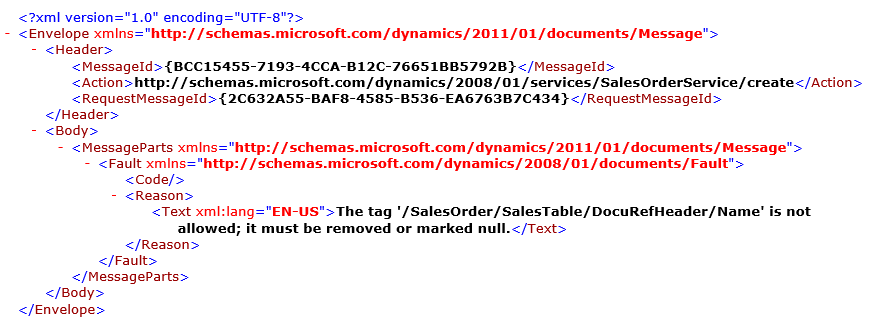
However, when there is an error, it writes back an XML file which has the "TEXT" on the error that occurred, giving the reason why the Sales Order could not be created.  See the example below (I'm not looking to troubleshoot THIS specific error, it's just an example):
2016_2D00_05_2D00_19-12_5F00_41_5F00_49_2D00_Remote-Desktop-Manager-Free-_5B00_S001_2D00_EDIT1_5D00_.png

Looks like it takes the error text message from the "SYSEXCEPTIONS" table, or from looking at the Exceptions under system Admin -> Periodic -> Services and Application Integration Framework ->Exceptions form.  However, if I happen to have 100's or 1000's of incoming PO's on a daily basis, it would be beneficial to see the PO number and / or customer number displayed on this Response XML file.  This would aid me in troubleshooting situations, like addresses or part numbers not available for THAT specific Order.

From research I've conducted already, seems like I would have to create a customized XSL file, and upload it into the "Transform all responses: Outbound Transforms" button on the Processing options fast tab (if I'm incorrect, someone tell me please).  But from there, I'm not well educated on what particular headers and elements I should use to create this form.  I'm looking to place the...

  • PO number
  • Account Number
  • (Maybe more information for troubleshooting)

... as well as keeping the message of the error as seen above.

Can someone point me in the right direction, on how to properly create the file, and what elements I would have to place inside of the XSL file to get the PO and Account number of the document in question?

*This post is locked for comments

I have the same question (0)
  • SU-22040800-0 Profile Picture
    2,487 on at

    hi Rich

    Did you come right with this? I've also run into the same type of request..

    Thanks

  • Martin Dráb Profile Picture
    239,451 Most Valuable Professional on at

    I'm not sure if it's wise asking AX to extract information such as PO number from a file that doesn't conform to the schema? AX clear can't extract data from XML elements before it actually successfully parses the file. What fails and the process for logging exceptions will throw an exception?

    Maybe it would be sufficient to (try to) extract the data when you're analyzing failed messages (outside of AX).

  • SU-22040800-0 Profile Picture
    2,487 on at

    hi Martin

    I have tried to create a an outbound transform for an inbound port, based on an imported Sales Order (xml file via inbound port).. However I am struggling to get the transform to output what I want. Maybe you can help? I have shown my imported xml and current xsl files below.. I am trying to show the CustAccount field and ItemId on the output.

    Imported XML:

    <?xml version="1.0" encoding="utf-8"?>

    <Envelope xmlns="schemas.microsoft.com/.../Message&quot;>

     <Header>

       <Action>schemas.microsoft.com/.../create&lt;/Action>

     </Header>

     <Body>

       <MessageParts xmlns="schemas.microsoft.com/.../Message&quot;>

         <SalesOrder xmlns="schemas.microsoft.com/.../SalesOrder&quot;>

           <SalesTable class="entity">

             <CustAccount>JS001</CustAccount>

             <DeliveryDate>2014-12-12</DeliveryDate>

             <PurchOrderFormNum>XML through AIF2</PurchOrderFormNum>

             <ReceiptDateRequested>2013-12-16</ReceiptDateRequested>

             <SalesLine class="entity">

               <ItemId>T0002</ItemId>

               <SalesQty>44.00</SalesQty>

               <SalesUnit>ea</SalesUnit>

             </SalesLine>

           </SalesTable>

         </SalesOrder>

       </MessageParts>

     </Body>

    </Envelope>

    Outbound Transform:

    <?xml version="1.0" encoding="utf-8"?>

    <xsl:stylesheet version="1.0"

    xmlns:Message="schemas.microsoft.com/.../Message&quot;

    xmlns:SalesOrder="schemas.microsoft.com/.../SalesOrder&quot;

    xmlns:xsl="www.w3.org/.../Transform&quot;>

    <xsl:output method="xml" indent="yes" encoding="utf-8" omit-xml-declaration="no"/>

    <xsl:template match = "Message:Envelope">

    <Test>

        <Header>

          <records>

            <record>

    <xsl:value-of select="Message:Body/Message:MessageParts/SalesOrder:SalesOrder/SalesOrder:SalesTable/SalesOrder:CustAccount"/>

          </record>

          </records>

        </Header>

      </Test>

    </xsl:template>

    </xsl:stylesheet>

    Output result (currently not showing anything):

    <?xml version="1.0" encoding="utf-8"?>

    <Test xmlns:Message="schemas.microsoft.com/.../Message&quot; xmlns:SalesOrder="schemas.microsoft.com/.../SalesOrder&quot;>

     <Header>

       <records>

         <record></record>

       </records>

     </Header>

    </Test>

  • Martin Dráb Profile Picture
    239,451 Most Valuable Professional on at

    But kind of message are you trying to transform? Something like what Rich showed above? You can clearly see that it doesn't have any data such a CustAccunt - you can't make data up just with transforming the file.

    Outbound transformations are for outbound messages; you can't expect your inbound messages to go through outbound processing.

    If you're dealing with a different problem that what Rich's question is about, please create a new thread an explain your actual situation there.

  • SU-22040800-0 Profile Picture
    2,487 on at

    hi Martin

    This is not a different problem, and I think Rich would agree.

    Please let me know if I must explain.

  • Martin Dráb Profile Picture
    239,451 Most Valuable Professional on at

    All right, so please tell me how you want to use a transformation to extract account number from a file that doesn't contain any account number at all?

    2016_2D00_05_2D00_19-12_5F00_41_5F00_49_2D00_Remote-Desktop-Manager-Free-_5B00_S001_2D00_EDIT1_5D00_.png


    It doesn't make sense to me. Changing the structure of the response file wouldn't achieve anything, simply because there are no such data. By the way, I also don't think that the outbound transforms apply to fault messages.

    What you would have to do is to change what data gets included in faults, not just transforming the XML file.

  • SU-22040800-0 Profile Picture
    2,487 on at

    hi Martin

    In the code I show above (the "Imported XML:") there is a field declared, called <CustAccount>JS001</CustAccount>.

    So my understanding would be to use the XSL file, controlling the output, to show/print the CustAccount field.

    I can currently get the XSL file to return the Sales Order number (that is auto generated in the system, and not even part of the imported XML file I import) in the output file. I'm just struggling to get the CustAccount to show on the output.

    Thanks for the help

  • Martin Dráb Profile Picture
    239,451 Most Valuable Professional on at

    You surely can use outbound transformations to transform outbound messages, such as when you're sending sales orders to an external system in a different format then what AIF generates by default.

    But that's a completely different scenario than including additional information in the fault message sent on a failure of an inbound message processing.

  • Community Member Profile Picture
    on at

    [quote user="James Solomon"]

    hi Rich

    Did you come right with this? I've also run into the same type of request..

    Thanks

    [/quote]

    James,

    I gave up on trying to modify or create a new response file, due to being so close to our "Go-Live" date with AX and our EDI interface.  Instead I came up with another way to troubleshoot orders that didn't get applied from customers, partly from our EDI provider.  The other part of our troubleshooting process, goes through the AX forms for "Exceptions" and "History."  I'm out traveling, so if you give me a day, I'll post back what I created internally.

    The main goal here, was to aid in troubleshooting incoming sales orders into AX, that didn't get processed correctly by the AIF, and what the error was.   We found another way to do this, which isn't as automated, but will work.

    I'll post my internal process between flights.

  • SU-22040800-0 Profile Picture
    2,487 on at

    Thanks Rich - really appreciate it.

    My goal is to be able to control the data in the response output. At the moment it extracts the following by default:

    <?xml version="1.0" encoding="utf-8"?>

    {1DAA0D7A-972D-441A-A366-B937888D5819}schemas.microsoft.com/.../create

    {37BB2FB1-E04A-40BA-8355-3872ED2A6B58}SalesId001583

    You say you gave up on trying to modify a new response file .. ?

    Thanks for the help.

Under review

Thank you for your reply! To ensure a great experience for everyone, your content is awaiting approval by our Community Managers. Please check back later.

Helpful resources

Quick Links

Introducing the 2026 Season 1 community Super Users

Congratulations to our 2026 Super Stars!

Meet the Microsoft Dynamics 365 Contact Center Champions

We are thrilled to have these Champions in our Community!

Congratulations to the April Top 10 Community Leaders

These are the community rock stars!

Leaderboard > 🔒一 Microsoft Dynamics AX (Archived)

#1
CP04-islander Profile Picture

CP04-islander 39

#2
Michel ROY Profile Picture

Michel ROY 14

#3
imran ul haq Profile Picture

imran ul haq 8

Last 30 days Overall leaderboard

Featured topics

Product updates

Dynamics 365 release plans
