web
You’re offline. This is a read only version of the page.
close
Skip to main content

Notifications

Announcements

No record found.

Community site session details

Community site session details

Session Id :
Microsoft Dynamics CRM (Archived)

CRM Roles and Permissions

(0) ShareShare
ReportReport
Posted on by

Hi all,

I have a CRM system which deals with much of the 'Service' area i.e. cases and queues. We have the following hierarchy
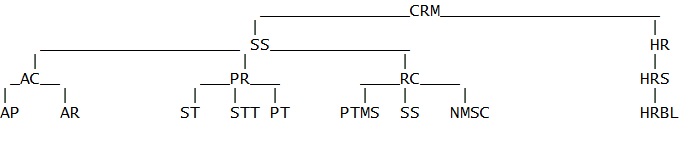
Each set of initials represent a business unit. When I place a new user in the 'AC' business unit and give them a role, I expect them only to see cases which are owned by users and/or teams from the 'AC business unit and below (AP and AR). This is because I am giving them a role with a security permissions of Parent:Child Read on the case entity meaning they should only see cases from AC, AP and AR.

However they are seeing cases owned by all teams and users across the board. e.g. I have an admin user sitting in Business Unit 'CRM' at the top. When they create a case, users in 'AC', 'PR' and 'RC' can see it, DESPITE only having Parent:Child Read access. 

  • Parent: Child Business Unit — Privileges for all records owned in the business unit to which the user belongs and to all the child business units subordinate to that business unit

By this definition, if the admin in the top business unit creates a case, then this shouldnt be seen by those in subordinate business units (unless they have organisational read access).

The cases havent been shared with the default teams of the business units either.

Any advice is appreciated - thanks

*This post is locked for comments

I have the same question (0)
  • Aileen Gusni Profile Picture
    44,524 on at

    Colin,

    By this definition, if the admin in the top business unit creates a case, then this shouldnt be seen by those in subordinate business units (unless they have organisational read access).

    --> Yes, you are correct, it is supposed like did what you said.

    So now, check who is the owner of the Case? Is it still the CRM Admin who's sitting in the top BU as the creator or any logic inside?

    And have you checked the Users in the subordinate have any additional security team and join another team other than its BU?

    Thank you.

  • Community Member Profile Picture
    on at

    Thanks Aileen! I have figured out that they are seeing all the cases because the Account of the Customer associated with the case is shared with them. Is there a way to share the Account (so they can log calls against accounts along with other teams in other business units) without them seeing the Cases for those Accounts when it's shared? Or is this a limitation in that when an account is shared, there is no way to prevent the sharing of the cases associated with customers of these accounts?

    It is quite a complex security requirement they are looking for. They have a list of organisations ('Accounts') in CRM that only certain business units want to see some of. So 'AC' and 'PR' may want to see all, whilst 'RC' and 'HRS' only want to see different subsets.

    I can't share the account because then 'RC' and 'HRS' will see cases created by users in 'AC' and 'PR' for any of the shared accounts which I can't have. I can't set 'Organisational Read' access because then 'RC' and 'HRS' will see unneccessary Accounts. I can't set the owner of the subset of Accounts to more than 1 team (RC and HRS) and the subsets of Accounts they need to see are different from each other. Very confusing situation!!

    Thanks

  • Verified answer
    Aileen Gusni Profile Picture
    44,524 on at

    Hi Colin,

    I think you can turn it off now, by go to the Account - Case Relationship properties here:

    And let's change the Parental behavior to Custom one (configurable cascading) that you can set for the Share, Unshare, and Assign.

    For the new records forward, after you change save and publish it, I think after you share any account, then the cases will not be shared as well.

    And for the existing record, you might be interested to see this post:

    http://www.crminnovation.com/blog/assigning-records-to-new-owners-what-happens-to-the-old-owner/

    Hope this helps!

    Thanks.

  • Community Member Profile Picture
    on at

    Hi Aileen,

    Thanks for your help and advice. I changed the relationship setting to 'Cascade None' for 'Assign', 'Share' and 'Unshare', saved the changes and published.

    I then shared the accounts with various teams in the hierarchy. I was able to see all 95 test cases which we have as expected (because this would only work for future created cases). I then created a new case as a user in 'RC' but this was still visible when I logged in a user in the 'AC' business straight after creating the case! :(

  • Community Member Profile Picture
    on at

    I think I have now fixed the problem. As the post above says, whenever I changed the 'Account to Case' relationship to 'Cascade None', it did not appear to make a difference. However I also had to edit the 'Contact to Case' relationship to 'Cascade None'. I believe that when the Account was shared, it also shares the Contacts of the Account which is fine but also the Cases of those Contacts which I had to prevent. I did this by modifying the 'Contact to Case' relationship as well as 'Account to Case' to ensure cases were not visible when the account was shared either directly through the Account, or through the shared Contacts (indirectly). I have a little more testing to do but thank you very much Aileen for your help

  • Aileen Gusni Profile Picture
    44,524 on at

    Hi Colin,

    Great to hear you found the solution.

    I also have same issue, but it is in Quote.

    You can see this:

    community.dynamics.com/.../142383.aspx

    But in this case, the Quote, whether you assign the Account (Potential Customer) to anybody or not, if other user create a quote under your Account, then you can see the Quote itself, as long as you are the Account owner, some CRM entities have inheritance behavior. This is just FYI :)

    Thank you.

Under review

Thank you for your reply! To ensure a great experience for everyone, your content is awaiting approval by our Community Managers. Please check back later.

Helpful resources

Quick Links

Responsible AI policies

As AI tools become more common, we’re introducing a Responsible AI Use…

Neeraj Kumar – Community Spotlight

We are honored to recognize Neeraj Kumar as our Community Spotlight honoree for…

Leaderboard > 🔒一 Microsoft Dynamics CRM (Archived)

#1
SA-08121319-0 Profile Picture

SA-08121319-0 4

#1
Calum MacFarlane Profile Picture

Calum MacFarlane 4

#3
Alex Fun Wei Jie Profile Picture

Alex Fun Wei Jie 2

Last 30 days Overall leaderboard

Featured topics

Product updates

Dynamics 365 release plans
