web
You’re offline. This is a read only version of the page.
close
Skip to main content

Notifications

Announcements

No record found.

Community site session details

Community site session details

Session Id :
Small and medium business | Business Central, N...
Suggested Answer

Dynamics 365 Service Admin vs Power Platform Admin

(0) ShareShare
ReportReport
Posted on by

Hi,

   We have a developer who is deploying Dynamics 365 Sales Enterprise and they need the ability to approve email addresses to integrate it with Outlook.

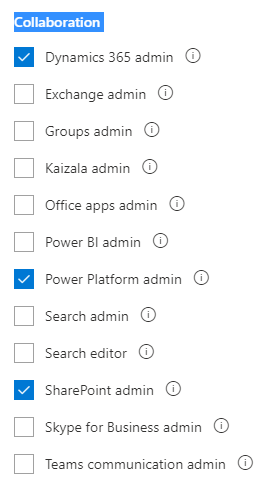
They are already a Dynamics 365 admin but apparently they also need the Dynamics 365 Service Admin Role to be able to achieve this without having to make them a Global Admin. However, when I go in to roles the service admin role is not listed per the below screenshot
pastedimage1582076264417v1.png

I've seen other posts that say to choose either the Dynamics 365 Service Admin or Power Platform Admin.

Would this do the trick? If not how do I enable and assign the Dynamics Service Admin role?

Thanks!

I have the same question (0)
  • Suggested answer
    AJ-22040756-0 Profile Picture
    on at

    Hi Partner

    As far as I know, Power platform Admin should work, However you can verify this in your trial org first inorder to avoid any issues directly in production environment.

    Here are the reference article which might help: 

    https://docs.microsoft.com/en-us/power-platform/admin/global-service-administrators-can-administer-without-license

    docs.microsoft.com/.../use-service-admin-role-manage-tenant

  • Tony-Bluefly Profile Picture
    on at

    Hi Akash,

      Thanks for your reply.

    We tried adding the Power Platform Admin role and received the below error.

    pastedimage1582086477210v1.png

    So adding this role hasn't changed anything. I found the below about the Dynamics 365 Service admin role

    Users with the Dynamics 365 Service Admin role can perform the following tasks:

    • Configure new instance
    • Backup and restore
    • Sandbox copy
    • Approve email addresses
    • Create and access support requests
    • Access the service health
    • Access message center

    https://crmtipoftheday.com/844/tip-844-administer-dynamics-365-online-without-being-a-global-admin/

    It's the "Approve email addresses" functionality  listed above that we want to provide the developer. Has this role been discontinued? Is that why it's no longer an option?

    Thanks,

    Tony

  • Suggested answer
    AJ-22040756-0 Profile Picture
    on at

    Hi Partner,

    In order to use the "Approve Email" Functionality the user should have global Admin rights. 

    Reference article:

    support.microsoft.com/.../changes-to-mailbox-approval-in-dynamics-365

  • Tony-Bluefly Profile Picture
    on at

    Thanks for that update. However it is not ideal to give a project consultant unlimited access to the Office 365 environment.

  • theplatz Profile Picture
    15 on at

    You're right that it's not ideal, but it's also the answer I've gotten from MS Support on the topic in the past. Maybe someday they'll have a way to approve mailboxes without being a Global Admin...

Under review

Thank you for your reply! To ensure a great experience for everyone, your content is awaiting approval by our Community Managers. Please check back later.

Helpful resources

Quick Links

Responsible AI policies

As AI tools become more common, we’re introducing a Responsible AI Use…

Neeraj Kumar – Community Spotlight

We are honored to recognize Neeraj Kumar as our Community Spotlight honoree for…

Leaderboard > Small and medium business | Business Central, NAV, RMS

#1
OussamaSabbouh Profile Picture

OussamaSabbouh 3,010

#2
Jainam M. Kothari Profile Picture

Jainam M. Kothari 1,270 Super User 2025 Season 2

#3
YUN ZHU Profile Picture

YUN ZHU 1,085 Super User 2025 Season 2

Last 30 days Overall leaderboard

Featured topics

Product updates

Dynamics 365 release plans
