web
You’re offline. This is a read only version of the page.
close
Skip to main content

Announcements

No record found.

News and Announcements icon
Community site session details

Community site session details

Session Id :
Microsoft Dynamics AX (Archived)

Compare Values to Send notification

(0) ShareShare
ReportReport
Posted on by

Hi!

I have been trying to make one customization for last two weeks but can't make it as I am new to AX. Please Help me with this somebody. I am even ready to pay 50$ for this particular customization. Please help Please Please Please.
7484.1.png

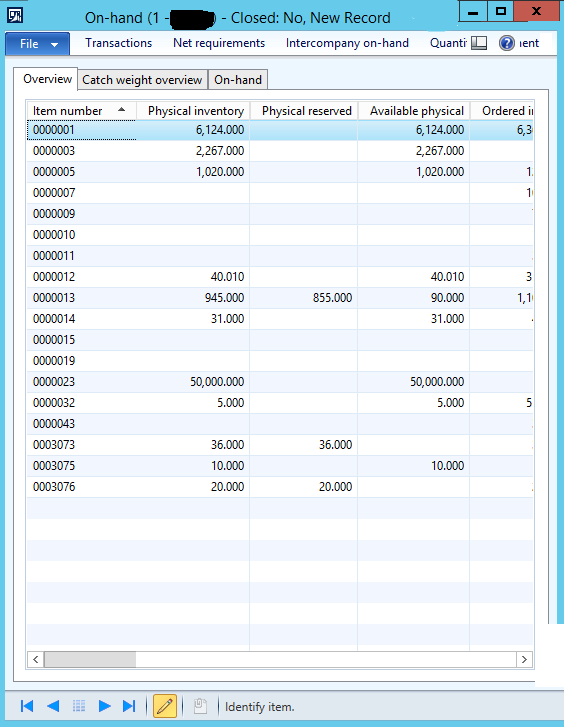
My requirement is, In this form, there is a field Available Physical. this is the actual quantity in the inventory left for all the products. 
08021.2.png

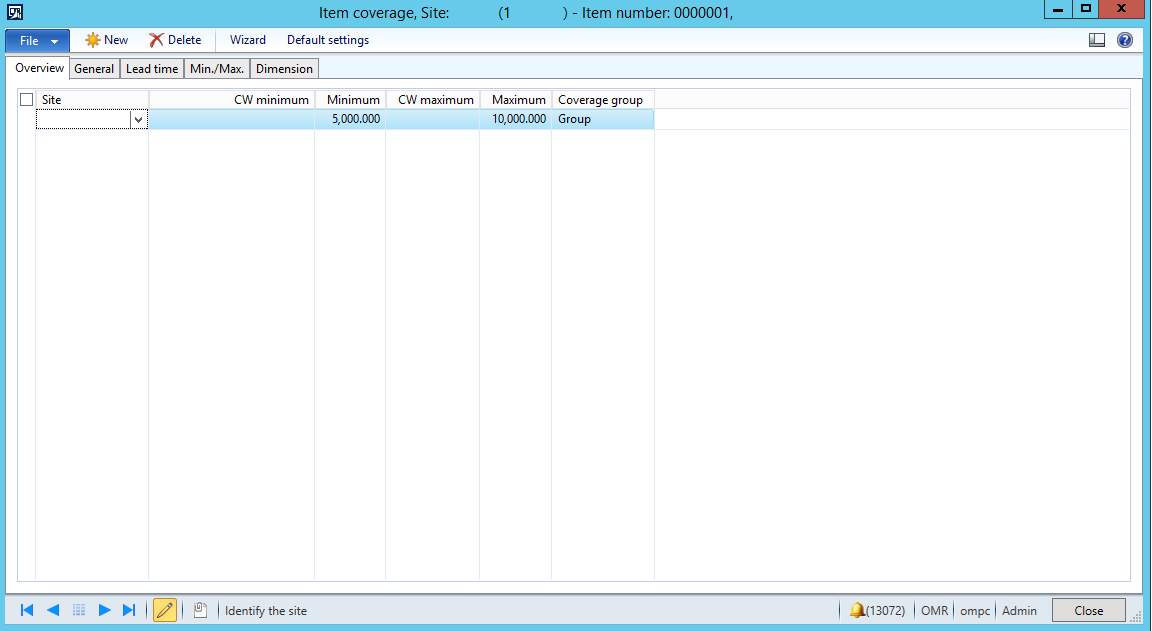
and this is the form where we enter the minimum and maximum quantity of product seperately. means for each product there is a form like this. all the form like these are connected to one table. 

So What we need to do is , we need to compare available physical from that table from the minimum and maximum. and on the update of the available physical quantity, if it gets less then the minimum quantity of any product the notification should be sent to a customized group of people in system administration, else if the physical quantity get more than the maximum quantity notification should be sent to the same group sayingg the inventory increased.

*This post is locked for comments

I have the same question (0)
  • B K Sharma Profile Picture
    737 on at

    Which type of notification you want, Ax notification or email notification, and how will be the frequency of this notification like one time in day or every time when a single product onhand vary from its min-max ?

    Thanks

  • Community Member Profile Picture
    on at

    Hi sir thanks alot for the ressponse.

    sir the requirement is AX notification. and it gets sent everytime when a single product on hand vary from its min-max.

  • B K Sharma Profile Picture
    737 on at

    Hi Hassan,

    Can you please send me mail to discuss the issue in details. my mail id is bk.sharma007@hotmail.com.

    In summary i am understanding your requirement and it means when min-max item stock vary from min-max quantity than it shoot a notification in ax. means when you min-max items stock grow or consume than this notification sent.

    Thanks

  • Suggested answer
    Chaitanya Golla Profile Picture
    17,225 on at

    Hi,

    AvailablePhysical is a field on InventSum table and gets updated in the method setAvailFields.

    So probably you can include your code here or in the update method of InventSum table by making a join with tables EcoResProduct, Inventtable using the following code and to make a comparison on between max and min. After that accordingly send the alert.

    select * from inventTable    
       where inventTable.ItemId == this.ItemId
       join ecoResProduct
       where inventTable.Product == ecoResProduct.RecId;


    Refer following link:

    (Create Alert using X++ codes)

    community.dynamics.com/.../create-alert-using-x-codes.

  • Community Member Profile Picture
    on at

    I have sent u the email

  • Community Member Profile Picture
    on at

    hi Chaitanya salam,

    chaitanya thats all what i need to write on the method setavailfields

    ?

  • Community Member Profile Picture
    on at

    I did not write any code yet chaitanya because i dont know where to start from and what to write

  • Chaitanya Golla Profile Picture
    17,225 on at

    Hi,

    Its not.Let me send you the entire code.

  • Community Member Profile Picture
    on at

    Thank you so much Chaitanya

  • Verified answer
    Chaitanya Golla Profile Picture
    17,225 on at

    Hi,

    Please use the following code in the update method of InventSum table. Please test it once. For notification refer to the link I shared earlier.

    public void update()
    {
        InventTable             inventTable;
        EcoResProduct           ecoResProduct;
        InventQtyAvailPhysical  availPhysical;
        ReqItemTable            reqItemTable;
        InventDim               inventDim;
        
        availPhysical = this.AvailPhysical;
        
        this.ClosedQty = this.isAllQtyFieldsZero();
        this.Closed    = this.isAllValueFieldsZero() && this.ClosedQty;
        this.setAvailFields();   
        
        super();
        
        if (availPhysical != this.AvailPhysical)
        {
            select * from inventTable    
            where inventTable.ItemId == this.ItemId
            join ecoResProduct
            where inventTable.Product == ecoResProduct.RecId
            join inventDim
            where inventDim.inventDimId == this.inventDimId;
            
            if (inventTable.ItemId)
            {
                select * from reqItemTable       
                    where reqItemTable.ItemId == inventTable.ItemId
                    && reqItemTable.CovInventDimId == inventDim.inventDimId;
                
                if (this.AvailPhysical < ReqItemTable.MinInventOnhand)
                {
                    // Send notification;
                }
                else if (this.AvailPhysical > ReqItemTable.MaxInventOnhand)
                {
                    //  Send notification;
                }
            }
        }
    }

Under review

Thank you for your reply! To ensure a great experience for everyone, your content is awaiting approval by our Community Managers. Please check back later.

Helpful resources

Quick Links

Introducing the 2026 Season 1 community Super Users

Congratulations to our 2026 Super Stars!

Meet the Microsoft Dynamics 365 Contact Center Champions

We are thrilled to have these Champions in our Community!

Congratulations to the April Top 10 Community Leaders

These are the community rock stars!

Leaderboard > 🔒一 Microsoft Dynamics AX (Archived)

#1
CP04-islander Profile Picture

CP04-islander 24

#2
Michel ROY Profile Picture

Michel ROY 14

#3
Jagadabi Profile Picture

Jagadabi 6

Last 30 days Overall leaderboard

Featured topics

Product updates

Dynamics 365 release plans
