web
You’re offline. This is a read only version of the page.
close
Skip to main content

Notifications

Announcements

No record found.

Community site session details

Community site session details

Session Id :
Small and medium business | Business Central, N...
Answered

When a line item is omitted from Invoice Discount% - where to check?

(0) ShareShare
ReportReport
Posted on by 191

Hi, I'm still trying to learn Business Central - it's way too complicated for my liking.

I've been running some reporting for sales/return details through posted sales invoice and posted credit memo combination and run with item/customer statistics to match the #, but this month I have encountered some issues.

Basically, we started to use the invoice discounts and using total discount $ and total amount$, I calculated the average of discount and applied to each rows of posted sales invoice lines.

The totals matched up for invoices but when for each items they do not match and when I drilled through I realized one of the items in Item Ledger Entries show that it did not get the discount applied.

I'm trying to figure out why this is caused - What excludes the item from being discounted from total invoice?  It DOES have Allow Invoice Disc. True so I don't think that's the case but other than that I'm out of ideas.

Allow Invoice Disc.

true

Any Insights on this? For example below the highlight one didn't get the discount but rest did.
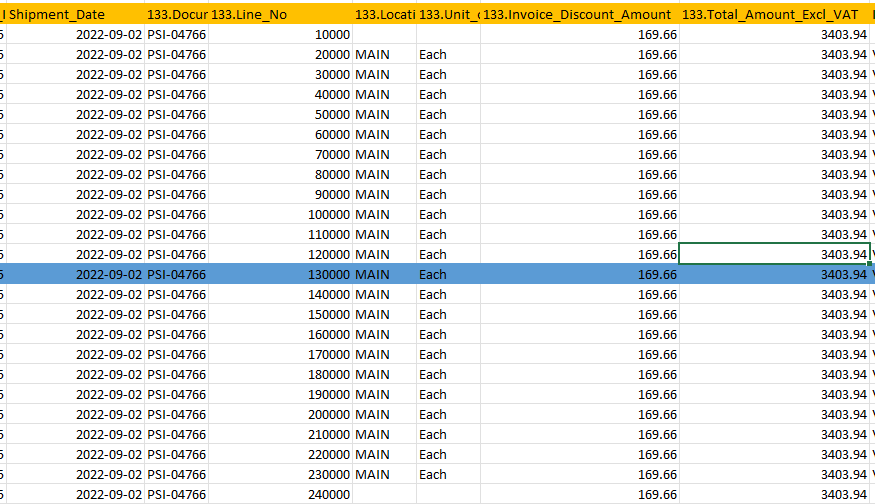
pastedimage1664909008833v1.png

Thank you,

I have the same question (0)
  • Suggested answer
    Dallefeld Profile Picture
    211 User Group Leader on at

    Whats your invoice discount setup look like?

  • LizHK Profile Picture
    191 on at

    Sorry where to check that?

    Thanks,

  • LizHK Profile Picture
    191 on at

    Where to check that info?

    Thanks,

  • Suggested answer
    Inge M. Bruvik Profile Picture
    1,111 Moderator on at

    When you define sales price lists you can tell if the system allows line discount and invoice discount in addition to the price on the price list. So please start by checking for sales price lists for that specific item.

  • LizHK Profile Picture
    191 on at

    Thanks but that feature is not enabled in our environment.

    pastedimage1664915592383v1.png

  • Suggested answer
    Inge M. Bruvik Profile Picture
    1,111 Moderator on at

    That message just means that the new sales price experience is not activated in your environment.

    You can still have defined sales prices for your items through the old sales price experience.

  • LizHK Profile Picture
    191 on at

    Would you be a little more specific - I'm not sure what place you are referring to exactly. I do Item Discount Groups, etc but never have defined the specific item that way (for that specific group of products - they are not defined as far as I know . If you could tell me in which menu(page) that I can see if there is a setting that someone else had put in that I didn't know about that would have caused it to be missing out from invoice discount, that'll be very helpful. Thank you so much!!

  • Suggested answer
    Dallefeld Profile Picture
    211 User Group Leader on at

    So your screen shot is showing that the line did give an invoice discount...

    So you are simply doing invoice discounts at the customer level, correct.?

    What do you mean that the discount does not show in the item ledger entries?

    And how can the total be right but the lines don't match the total....?

  • LizHK Profile Picture
    191 on at

    Sorry I don't think I was clear -

    I believe the order processor put in discount % in the sales order like below:

    pastedimage1664919235490v1.png

    The Posted Sales Invoice Line item do not seem to have each discounted $ from invoice discount in each rows so I used below values get % values to have updated total. (Discount here is (169.66/(169.66+3403.94) - 4.748% so applied it in all rows of this discount- therefore total invoices matched sum of each rows of my updated values.

    pastedimage1664919352257v2.png

    However, when I ran pastedimage1664919560990v3.pngreport to double check, the numbers didn't match for items and were slightly off so when I dug through I learned that all the rest of rows with sales had 5% discount (instead of 4.748%) and one row had 0% discount (through item ledger entry)- thus overall discount of 4.748%. I also confirmed with the order processor that she put in 5% overall discount.

    There were a few more of these that were throwing my numbers a bit and was wondering why this is happening.

    Thanks,

  • Suggested answer
    YUN ZHU Profile Picture
    95,739 Super User 2025 Season 2 on at

    Hi, Could it be a tax issue?
    From your screenshot it looks like the amount in the line is excluding vat.

    5% -> 4.748%, I'm not sure, is it 5% after calculating the price including vat?

    Hope this can give you some hints.

    Thanks.

    ZHU

Under review

Thank you for your reply! To ensure a great experience for everyone, your content is awaiting approval by our Community Managers. Please check back later.

Helpful resources

Quick Links

Responsible AI policies

As AI tools become more common, we’re introducing a Responsible AI Use…

Neeraj Kumar – Community Spotlight

We are honored to recognize Neeraj Kumar as our Community Spotlight honoree for…

Leaderboard > Small and medium business | Business Central, NAV, RMS

#1
OussamaSabbouh Profile Picture

OussamaSabbouh 2,135

#2
YUN ZHU Profile Picture

YUN ZHU 733 Super User 2025 Season 2

#3
Sumit Singh Profile Picture

Sumit Singh 612

Last 30 days Overall leaderboard

Featured topics

Product updates

Dynamics 365 release plans



