web
You’re offline. This is a read only version of the page.
close
Skip to main content

Notifications

Announcements

No record found.

Community site session details

Community site session details

Session Id :
Microsoft Dynamics NAV (Archived)

Global Dimension change in Navision 2018

(0) ShareShare
ReportReport
Posted on by

Dear Expert,

Can you please help me to resolve this error in Nav2018?

Actually I am facing two type of issue in Navision 2018 W1 version due to change in Global dimension functionality.

1) I am not able to change or replace dimension code as earlier version we did due to disable of the dimension fields and i am not clear on status feature also. (Screenshot for your Reference Pic1)

4ec7tm7dyakz.png

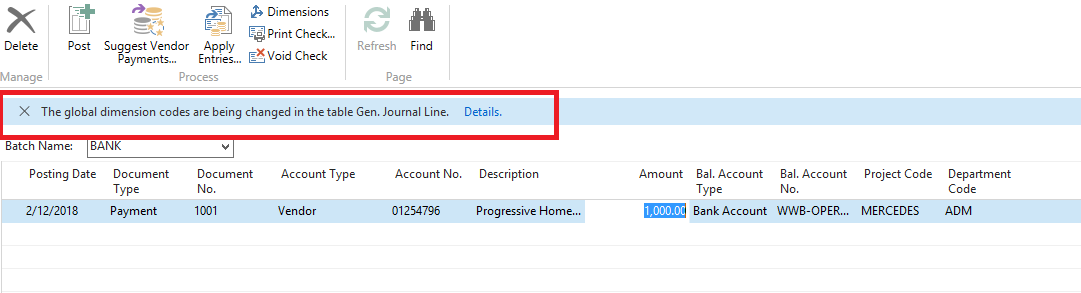
2) When i set Global dimension in a company i am not able to do transaction due to Pop-up message( The Global dimension Code are being changed in the Table Gen. Journal Line) Reference see the attachment no 2 (Pic.2)1004.Pic1.png8666.Pic2.png

*This post is locked for comments

I have the same question (0)
  • Community Member Profile Picture
    on at

    Hi

    Did have you managed to resolve this issue? 

    I have attempted to rerun the job to pick up the 'incomplete' change in global dimension on the Gen. Journal line but it remains in 0% progress.

  • atxnoe Profile Picture
    5 on at

    Hi,

    same issues here, any suggestions?

  • Suggested answer
    Ratankp Profile Picture
    2 on at

    Am also facing the same issue,kindly do suggest to resolve the issue

    pastedimage1566469007443v1.png

  • Suggested answer
    azharsaeedkhan Profile Picture
    60 on at

    Hi Tekraj!

    The Status column shows the status of change in dimensions on all the records of that table either it's scheduled, in progress, completed (global dimensions for all the records in that table are changed) or incomplete (global dimensions for some of the records may have changed but not all and cannot proceed due to some error).

    If the status is incomplete, it means that some error may have occurred while changing the global dimensions (the reason may be that this table is locked by some other user, or a transaction is in process for this table, or maybe this table is being used in some other session). You can use the Rerun function to restart the process from the point where it was stopped before.

    You also can use the refresh action to update the progress.

    For more details on how to change global dimensions in NAV, before 2018 version and how it's changed in NAV 2018 and the later versions, click on the link below and view my explanation of it.

    www.askbusinesscentralandnav.com/.../change-global-dimensions-before-in-and.html

    Thanks

    ASK

Under review

Thank you for your reply! To ensure a great experience for everyone, your content is awaiting approval by our Community Managers. Please check back later.

Helpful resources

Quick Links

Responsible AI policies

As AI tools become more common, we’re introducing a Responsible AI Use…

Neeraj Kumar – Community Spotlight

We are honored to recognize Neeraj Kumar as our Community Spotlight honoree for…

Leaderboard > 🔒一 Microsoft Dynamics NAV (Archived)

Last 30 days Overall leaderboard

Featured topics

Product updates

Dynamics 365 release plans