web
You’re offline. This is a read only version of the page.
close
Skip to main content

Announcements

News and Announcements icon
Community site session details

Community site session details

Session Id :
Microsoft Dynamics CRM (Archived)

Error when exporting dynamic marketing list members to Excel on CRM2015

(0) ShareShare
ReportReport
Posted on by

Hello,

I tested all out CRM 2015 deployments. It is not possible to Export a dynamic worksheet. I tested it also on crm 2011, 2013. It worked fine.

On CRM 2016 and CRM online it is not possible anymore to export dynamic worksheets.

CRM2015

1145.Capture4.PNG

select the columns and click on Export, then this error occurs:
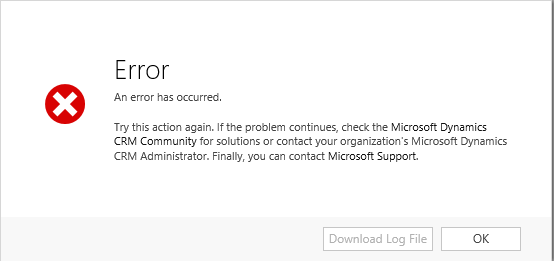
1651.Capture5.PNG

nothing in the error log or someplace else.

CRM online
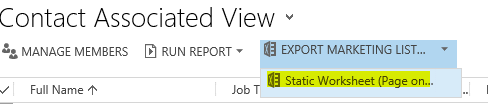
4375.Capture6.PNG

could it be that Microsoft deprecated this funktionality on Marketing list?

*This post is locked for comments

I have the same question (0)
  • Community Member Profile Picture
    on at

    Hi,

    Please check below.

    crmtipoftheday.com/.../exporting-marketing-list-members-to-dynamic-spreadsheets

    Mansoor

  • Fabian SL Profile Picture
    on at

    thanks I also found this, but it is not telling me why I am getting an error when I try to export. It is the Workaround for CRM 2016 and CRM Online

  • Community Member Profile Picture
    on at

    Hi,

    I think they are deprecated it. I can export marketing list members to static work sheet without any issue

    Mansoor

  • Fabian SL Profile Picture
    on at

    In CRM2015 the button is still there and is throwing the error shown above. this is my problem.

    I can also export static worksheets. this is not the issue.

  • Sumeet_MSFT Profile Picture
    Microsoft Employee on at

    Hello Fabian,

    Thank you for your query!

    I was able to successfully exporting a Marketing list as Dynamics Worksheet in CRM 2016 On premise deployment.

    Please let me know if I am missing something over here and also please share the exact repro steps.

    Thanks & Regards,

    Sumeet Deshmukh

    Microsoft Dynamicsâ„¢ CRM Support Engineer

  • Fabian SL Profile Picture
    on at

    Hi,

    how did you do this? because in our CRM2016 deployment there is no button for this.

    Are you able to do the same in CRM2015?

    Wishes

  • Community Member Profile Picture
    on at

    Hello,

    I've got the same issue using Dynamics CRM 2015 on-premise.

    Is there any solution, yet?

    Thx

    Dennis

  • Suggested answer
    Andreas Cieslik Profile Picture
    9,267 on at

    This page:

    www.microsoft.com/.../Microsoft_Dynamics_CRM_2015_CRM_Online_Readme.htm

    states

    For Excel export and import, Dynamic Worksheet and PivotTable requires CRM for Outlook (340877, 336562)

    When you export CRM data using Export to Excel, if you choose Dynamic Worksheet or Dynamic PivotTable, you need to have CRM for Outlook installed on your computer. Otherwise, the PivotTable won’t be created and you won’t be able to refresh the data from CRM.

    Have you installed and tried it with the Outlook CRM Addin installed, configured and activated?

    Which version of 2015 are you using?

Under review

Thank you for your reply! To ensure a great experience for everyone, your content is awaiting approval by our Community Managers. Please check back later.

Helpful resources

Quick Links

Season of Sharing Community Challenge Launch!

Jump in, show your community spirit, and win prizes!

Women in Power Builds Momentum

Expanding mentorship, skilling, and AI innovation

Congratulations to the May Top 10 Community Leaders

These are the community rock stars!

Leaderboard > 🔒一 Microsoft Dynamics CRM (Archived)

Last 30 days Overall leaderboard

Featured topics

Product updates

Dynamics 365 release plans
