web
You’re offline. This is a read only version of the page.
close
Skip to main content

Notifications

Announcements

Community site session details

Community site session details

Session Id :
Small and medium business | Business Central, N...
Answered

How do we convert WebPageViewer into AL (NAV 2018)

(0) ShareShare
ReportReport
Posted on by 5

Hi experts,

I'm facing difficulties when converting Web Page Viewer Add-in from CAL to AL.
I had converted the Control Add-in in NAV 2018 to usercontrol in AL, however I have no clue on how to making functions of the Control Add-in avaialble in AL.
pastedimage1581332450079v1.png

Seeking help on whoever able to enlighten me how to migrate below into AL.
pastedimage1581332533883v2.png

Thank you very much.

I have the same question (0)
  • Suggested answer
    I Gusti Made Ari Profile Picture
    3,608 on at

    you need to declare the Web Page Viewer as the dot net first : 

    dotnet
    {
        assembly("Microsoft.Dynamics.Nav.Client.WebPageViewer")
        {
            Culture = 'neutral';
    
            type("Microsoft.Dynamics.Nav.Client.WebPageViewer.IWebPageViewer"; WebPageViewer)
            {
                IsControlAddIn = true;
            }
        }
    }

    Above will be in single file , let say dotnet.al

    Then use it on your page like below : 

     layout
        {
    
                usercontrol(WebPageViewer; WebPageViewer)
                {
                    ApplicationArea = All;
    
                    trigger ControlAddInReady(callbackUrl: Text)
                    begin
                        CurrPage.WebPageViewer.LinksOpenInNewWindow();
                        CurrPage.WebPageViewer.SetContent(BodyText);
                    end;
    
                    trigger DocumentReady()
                    begin
    
                    end;
    
                    trigger Callback(data: Text)
                    begin
    
                    end;
    
                    trigger Refresh(callbackUrl: Text)
                    begin
                        CurrPage.WebPageViewer.LinksOpenInNewWindow();
                        CurrPage.WebPageViewer.SetContent(BodyText);
                    end;
                }


        }
    

    Above will be in your Page Extension file

  • Travis138 Profile Picture
    5 on at

    Hi I Gusti Made Ari Permadi,

    Many thanks for your reply.

    I had tried the method that you propose but it doesn't seem to work on NAV 2018.

    I created the AL file as advice but encounter an error.
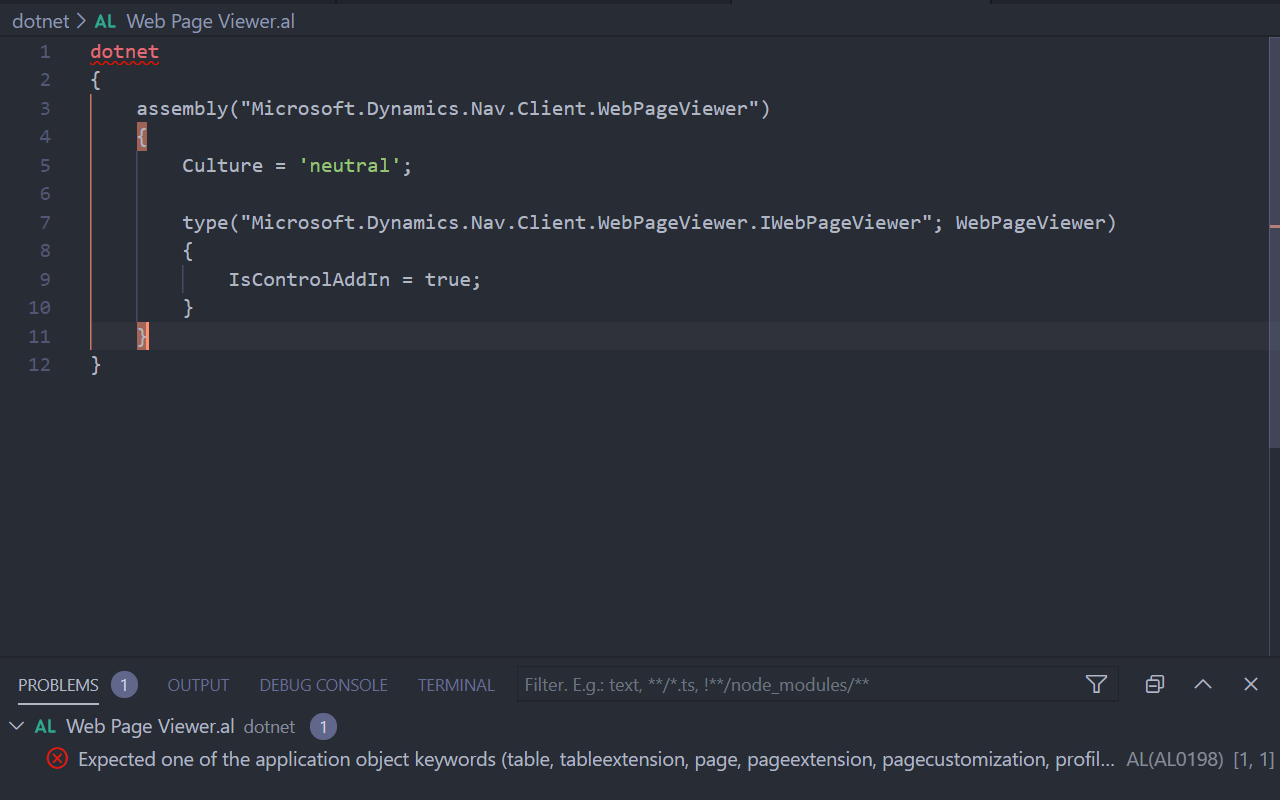
    pastedimage1581407483327v1.png

    "Expected one of the application object keywords (table, tableextension, page, pageextension, pagecustomization, profile, codeunit, report, xmlport, query, controladdin)"

    I'm currently on NAV 2018 with AL Language 0.13.91787.

    Seek your kind advise.

  • Verified answer
    I Gusti Made Ari Profile Picture
    3,608 on at

    Sorry , i think dotnet in AL  only available in BC and not backported to NAV 2018. For this case I think you cannot convert this and better if you call standard Email Dialog Page (Page ID 9700)

  • Travis138 Profile Picture
    5 on at

    Thanks for your reply, it seems like I have to find another workaround.

    [Update]

    Manage to use Table 9500 Email Item and standard functions in this table to call out the page for sending email.
    Thank you for all the advice.

    pastedimage1587092490454v1.png

Under review

Thank you for your reply! To ensure a great experience for everyone, your content is awaiting approval by our Community Managers. Please check back later.

Helpful resources

Quick Links

Responsible AI policies

As AI tools become more common, we’re introducing a Responsible AI Use…

Congratulations to our 2025 Community Spotlights

Thanks to all of our 2025 Community Spotlight stars!

Leaderboard > Small and medium business | Business Central, NAV, RMS

#1
OussamaSabbouh Profile Picture

OussamaSabbouh 2,072

#2
Dhiren Nagar Profile Picture

Dhiren Nagar 1,234

#3
YUN ZHU Profile Picture

YUN ZHU 1,029 Super User 2025 Season 2

Last 30 days Overall leaderboard

Featured topics

Product updates

Dynamics 365 release plans
