web
You’re offline. This is a read only version of the page.
close
Skip to main content

Notifications

Announcements

No record found.

Community site session details

Community site session details

Session Id :
Small and medium business | Business Central, N...
Answered

Receiving Order no. Series must have a value in Purchase header: Document Type = Order, no. = PI-XXXX. It cannot be zero or empty.

(0) ShareShare
ReportReport
Posted on by 4,971

Hi Community,

I have received this error below, but my company has always had the no series set up till end of the year.

Any idea why this happens?

It definitely not due to Purchase and Payables set up, since i have set up all except for bank no series.
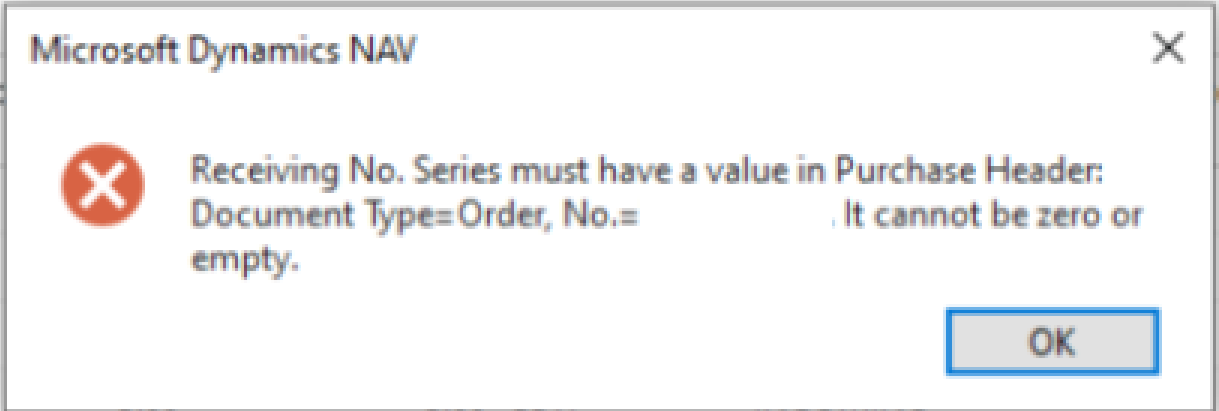
pastedimage1646960517341v1.png

I have the same question (0)
  • Verified answer
    Manan_Shah Profile Picture
    1,459 on at

    Hi josh,

    Possible while creating a Purchase order system wouldn't assigned the receiving no. series so when you try to post it's passing this error.

    To resolve it I suggest create configuration package for Purchase header table export excel data with document no. filter and update value for field for receiving no. series and receiving no. import the excel. And issue will resolved.

    Please verify the reply if it answers your query.

    Many Thanks,

    Manan

  • Verified answer
    YUN ZHU Profile Picture
    95,379 Super User 2025 Season 2 on at

    Hi, This is an obvious No. Series setup issue, please check the setup below, on the Purchases and Payables Setup page, called ""Posted Receipt Nos.".

    pastedimage1647216323529v3.png

    pastedimage1647216210555v1.png

    If I remove it, I will get the same error as you.

    pastedimage1647216280920v2.png

    Hope this will help.

    Thanks.

    ZHU

  • joshtechsolutions Profile Picture
    4,971 on at

    Hi Zhu,

    It seems that even though I have the no series P-RCT series, it still doesn't work for me.

    pastedimage1647239107494v1.png

    pastedimage1647239155871v2.png

  • Suggested answer
    Nitin Verma Profile Picture
    21,698 Moderator on at

    Hi Josh,

    Can You please create new PO and enter vendor No. and check if the field "Receiving No. Series" filed up, or is there any custom code written to modify Purchase header? Because as per the screen shot you shared its correct, also check by lookup this field in PP setup and check Line relationship of no. series

    Thanks

  • Suggested answer
    YUN ZHU Profile Picture
    95,379 Super User 2025 Season 2 on at

    Hi, Is Default No. of P-RCPT enabled? It seems that the Posted Receipt No. was not obtained when the Purchase Order is being posted.

     pastedimage1647300864715v1.png

    PS: You can open an order and click "Menu --> Page -> About This page" to see if this value is assigned to the order.

    pastedimage1647301238695v4.png

    pastedimage1647301214407v3.png

    pastedimage1647301185791v2.png

    Hope this will help.

    Thanks.

    ZHU

  • joshtechsolutions Profile Picture
    4,971 on at

    Hi all,

    Thanks for your help! I think I will just ask the purchaser to recreate. It seems to have been accidentally-manually created by user.

  • Verified answer
    Community Member Profile Picture
    on at

    Josh,

    Make sure the No. Series for the Posted Receipt No. does NOT have the Manual checked. It is possible it was blank prior to creating a PO document hence the message. I would recreate the PO and it should work.

    Thanks,

    Steve

Under review

Thank you for your reply! To ensure a great experience for everyone, your content is awaiting approval by our Community Managers. Please check back later.

Helpful resources

Quick Links

Responsible AI policies

As AI tools become more common, we’re introducing a Responsible AI Use…

Neeraj Kumar – Community Spotlight

We are honored to recognize Neeraj Kumar as our Community Spotlight honoree for…

Leaderboard > Small and medium business | Business Central, NAV, RMS

#1
OussamaSabbouh Profile Picture

OussamaSabbouh 3,143

#2
Jainam M. Kothari Profile Picture

Jainam M. Kothari 1,694 Super User 2025 Season 2

#3
YUN ZHU Profile Picture

YUN ZHU 1,067 Super User 2025 Season 2

Last 30 days Overall leaderboard

Featured topics

Product updates

Dynamics 365 release plans
