web
You’re offline. This is a read only version of the page.
close
Skip to main content

Announcements

No record found.

News and Announcements icon
Community site session details

Community site session details

Session Id :
Microsoft Dynamics AX (Archived)

There is no Data when report is printed

(0) ShareShare
ReportReport
Posted on by 495

Hello guys, I have a very strange situation here. So, I have a user who has all the access and right to the reports(SSRS) it is normal for this user to print the inventory value report(Inventory and Warehouse Management->Reports->Status->Inventory Value->Inventory value) every month end. However, the user tried to print the report the other day and got the the following..Image below.
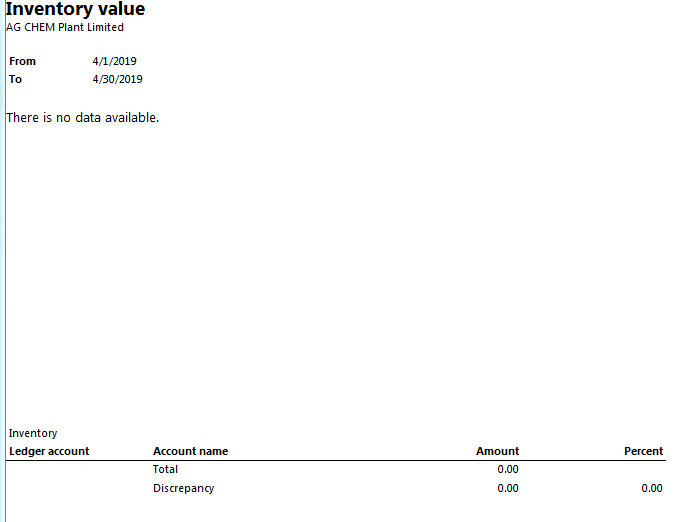
inventory-report.PNG

As you can see only the shell of the report comes out, no data is printed on the report. I am lost as to what happened and why this started happening. I delete the user from AD and re-create the user but that did not resolve the problem..... User can print other report but not this one.

Please, anyone who may have an idea why this is happening please help. Thanks much in advance.

*This post is locked for comments

I have the same question (0)
  • Verified answer
    Sohaib Cheema Profile Picture
    49,679 Super User 2026 Season 1 on at

    I cannot guarantee a solution by my answer but please check two things.

    1) usage data of the user, for this report, its queries and Controller class. Clear those entries only.

    2) Make sure if there has been no change in the security of the user. For example the access of the temp table might not gone away, from which DataSet gets the data of the report.

  • Suggested answer
    Ludwig Reinhard Profile Picture
    Microsoft Employee on at

    Hi,

    Running the inventory value report requires that a inventory value report configuration ID is created and setup beforehand that is selected when running the report.

    I would expect that this configuration is possibly incomplete. Can you check that?

    Here is a screenshot that shows a sample setup from my demo machine

    invvaluereport.png

    Please compare your configuration and let us know how it is setup.

    Many thanks and best regards,

    Ludwig

  • Lionel07 Profile Picture
    495 on at

    It's very strange, the user used to be able to run the report every month. But all of a sudden it doesn't show any data. From my limited understanding of SSRS i think the user may have lost access to the temp table... can this happen without human intervention? What is the temp table and how do I check it to see if the user has access?

  • Verified answer
    Ludwig Reinhard Profile Picture
    Microsoft Employee on at

    Hello Lionel07,

    Nothing should be lost without any user interaction. This sound indeed strange.

    Can you - with your user account - or a colleague run the report?

    When doing that can you share the parameters that you used before hitting the OK button for running the report?

    Many thanks and best regards,

    Ludwig

  • Lionel07 Profile Picture
    495 on at

    Just checked the user computer and compared it with me. The invent value report parameters are the same. everything is the same.

    Inv-Val-Rep.PNG

    We are using the same parameters. I am able to generate the report but he cannot. Even though 1 month ago he was able to run the report without any problem.

  • Suggested answer
    Ludwig Reinhard Profile Picture
    Microsoft Employee on at

    Hi Lionel07,

    Can this be a caching issue or something related to the usage data of your colleage?

    Have you tried running the report for this ID / configuration?

    Your screenshot only shows the setup.

    Best regards,

    Ludwig

  • Lionel07 Profile Picture
    495 on at

    Hi Ludwig, I have already refresh the cache (Metadata caches on the report server have been cleared.) When you same "something related to the usage data of your colleage" what do you mean?

    Here  is a screenshot of the ID/configuration

    ID-Inventory-Report.PNG

    I thanks you for your help.... just cant figure out why this is happening.

  • Suggested answer
    Ludwig Reinhard Profile Picture
    Microsoft Employee on at

    Hi,

    Try to delete all the usage data of your colleague to see if this caused the issue. Do this first in a demo environment where you can test whether it resolved the issue.

    What you can also test is whether some role settings of your colleague are responsible for this. Probably test in your demo system if your colleague can see the data if he/she gets e.g. the system admin role assigned.

    What might also  be interesting to know is whether only one colleague is affected by this issue or multiple.

    Best regards

    Ludwig

  • Prashant Singh Profile Picture
    8,802 on at

    Dear Lionel07,

    Which system role you have assigned to the user.

  • Lionel07 Profile Picture
    495 on at

    Good morning, user has admin role... As I mentioned before, the user has always run the report and now nothing is coming out.

    user-role.PNG

Under review

Thank you for your reply! To ensure a great experience for everyone, your content is awaiting approval by our Community Managers. Please check back later.

Helpful resources

Quick Links

Introducing the 2026 Season 1 community Super Users

Congratulations to our 2026 Super Stars!

Meet the Microsoft Dynamics 365 Contact Center Champions

We are thrilled to have these Champions in our Community!

Congratulations to the April Top 10 Community Leaders

These are the community rock stars!

Leaderboard > 🔒一 Microsoft Dynamics AX (Archived)

#1
CP04-islander Profile Picture

CP04-islander 39

#2
Michel ROY Profile Picture

Michel ROY 14

#3
imran ul haq Profile Picture

imran ul haq 8

Last 30 days Overall leaderboard

Featured topics

Product updates

Dynamics 365 release plans
