Hi all,
I'm wondering if anyone has been able to build a plugin using .NET 4.6.2 on Dynamics 365 V9 on premise using the latest Microsoft.CrmSdk.CoreAssemblies (currently 9.0.2.34) . We tried to do that but we are getting a runtime error.
The version of Dynamics we are testing this on is Microsoft Dynamics 9.0.3.7 on premise
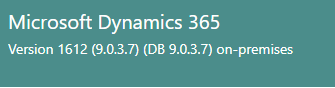
We tried the following combinations:
- .NET 4.5.2 - Microsoft.CrmSdk.CoreAssemblies 8.2.0.2: Works fine!
- .NET 4.5.2 - Microsoft.CrmSdk.CoreAssemblies 9.0.2.5: Works fine!
- .NET 4.5.2 - Microsoft.CrmSdk.CoreAssemblies 9.0.2.34: Plugin registration tool gives the error “Currently, Microsoft Dynamics 365 requires the .NET Framework version 4.6.2 for plug-in assemblies. Rebuild the assembly with the .NET Framework version 4.6.2 and try again.”
- .NET 4.6.2 - Microsoft.CrmSdk.CoreAssemblies 9.0.2.34: Plugin registration is able to register the plugin but we get the following error at runtime: "Could not load file or assembly '<Our assembly name>, Version=1.0.0.0, Culture=neutral, PublicKeyToken=b4ec06d9a40abb18' or one of its dependencies. The system cannot find the file specified."
NOTE: We also tried to deploy exactly the same assembly in Dynamics Online/Dataverse and it works fine!
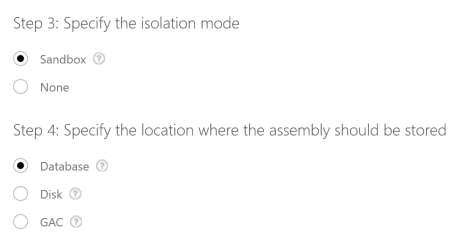
In all cases we are using Isolation Mode as Sandbox and location as Database (see screenshot below)
We also switched on assembly binding logging and got the following logs:
LOG: This bind starts in default load context.
LOG: Using application configuration file: C:\Program Files\Dynamics 365\Server\bin\Microsoft.Crm.Sandbox.WorkerProcess.exe.Config
LOG: Using host configuration file:
LOG: Using machine configuration file from C:\Windows\Microsoft.NET\Framework64\v4.0.30319\config\machine.config.
LOG: Post-policy reference: <Our Assembly name>, Version=1.0.0.0, Culture=neutral, PublicKeyToken=b4ec06d9a40abb18
LOG: Attempting download of new URL file:///C:/Program Files/Dynamics 365/Server/bin/<Our Assembly name>.DLL.
LOG: Attempting download of new URL file:///C:/Program Files/Dynamics 365/Server/bin/<Our Assembly name>/<Our Assembly name>.DLL.
LOG: Attempting download of new URL file:///C:/Program Files/Dynamics 365/Server/bin/<Our Assembly name>.EXE.
LOG: Attempting download of new URL file:///C:/Program Files/Dynamics 365/Server/bin/<Our Assembly name>/<Our Assembly name>.EXE.
It appears that the Sandbox service is trying to find the assembly locally rather than in the database. The same assembly works just fine if we build it with target framework as .NET 4.5.2
Any help on this is much appreciated
Thanks
Juan





