web
You’re offline. This is a read only version of the page.
close
Skip to main content

Notifications

Announcements

No record found.

Community site session details

Community site session details

Session Id :
Finance | Project Operations, Human Resources, ...
Suggested Answer

Purchase Order Report header not showing most of the elements after report customization.

(0) ShareShare
ReportReport
Posted on by 35

Good day,

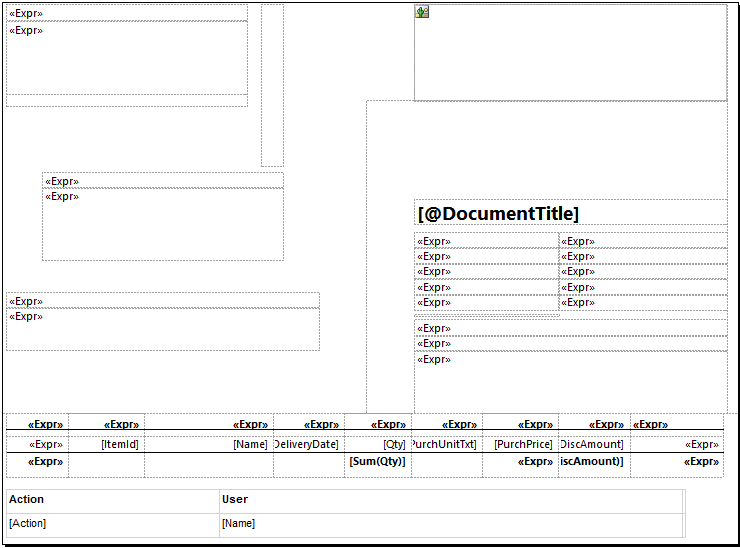
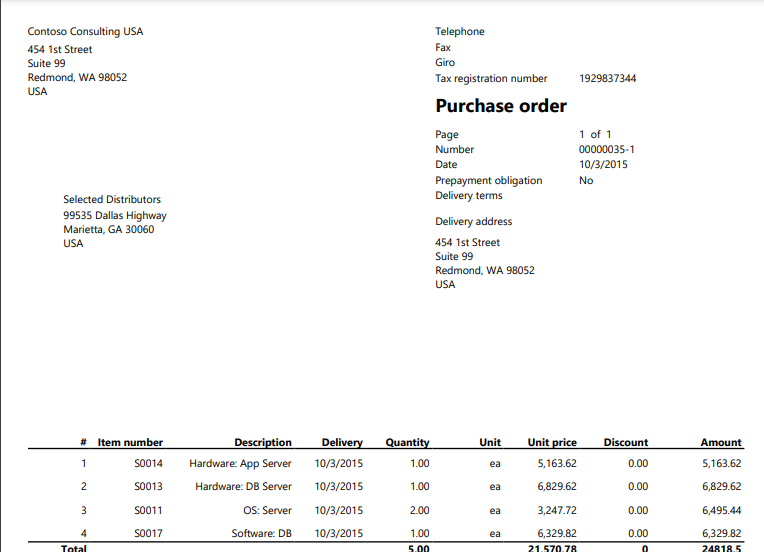
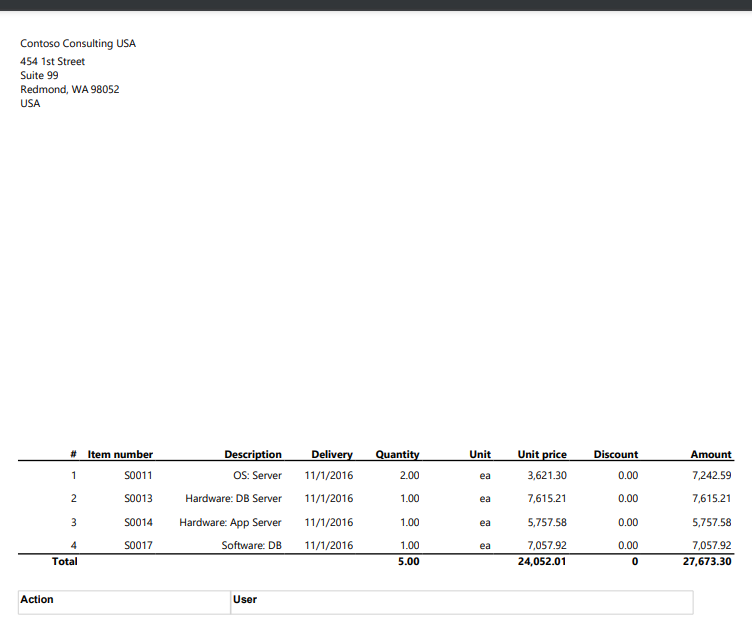
I have duplicated and customized the Purchase Order report (PurchPurchaserOrder). However after deploying the report yesterday on my Dev environment it is nolonger showing most of the elements in the report header, for instance Page Number, Purchase Order number, Delivery Terms, Delivery Address, Vendor address, etc. All these elements are defined within the report but when you build, sync and deploy they are not showing on the report. The report used to print just fine the day before yesterday. I have also checked the Visible property of these elements and they seem fine.Please assist me. I have attached the before and after pics below.
pastedimage1681977150906v2.png5722.Screenshot-_2800_159_2900_.png

The SRS Report setup...

Screenshot-_2800_160_2900_.png

I have the same question (0)
  • Suggested answer
    Bharani Preetham Peraka Profile Picture
    3,634 Moderator on at

    Seems your changes are not reflecting correctly. So do a model build, sync then restart the ssrs services and redeploy report.

  • Suggested answer
    GirishS Profile Picture
    27,827 Moderator on at

    Hi Tapiwa,

    After doing the changes have you closed and reopen the design again? Does your changes remain intact?

    Probably restarting the Sql server reporting service will fix your issue.

    Thanks,

    Girish S.

  • Suggested answer
    Mohit Rampal Profile Picture
    12,565 Moderator on at

    Hi, If you have already restarted SQL server reporting service and issues persists then please ensure report is getting deployed properly, debug DP class to check if values are flowing. Reset usage data.

    Add a new textbox and see if it's reflected on report.

  • Tapiwa Louis Profile Picture
    35 on at

    I have built the model, synchronized, restarted ssrs service, re-deployed.

    Some fields have started whilst the company address and delivery address have vanished.

    renamed the report and renamed the report design... redeployed, no change.

    I have attached a screenshot

    Screenshot-_2800_162_2900_.png

  • Tapiwa Louis Profile Picture
    35 on at

    I have built the model, synchronized, restarted ssrs service, re-deployed.

    Some fields have started to show whilst the company address and delivery address have vanished.

    renamed the report and renamed the report design... redeployed, no change.

  • Tapiwa Louis Profile Picture
    35 on at

    I have built the model, synchronized, restarted ssrs service, re-deployed.

    Some fields have started to show whilst the company address and delivery address have vanished.

    renamed the report and renamed the report design... redeployed, no change.

  • Suggested answer
    Bharani Preetham Peraka Profile Picture
    3,634 Moderator on at

    Now in that company address just hard code some value in the text box do deploy report and check if it is showing. If not showing is means try the same process again. Before doing this process close all tabs in vs.

  • Mohit Rampal Profile Picture
    12,565 Moderator on at

    Generally restarting SSRS fix this issue, not sure why its fixed partially. Have you debugged if you can see values in DP class for company and delivery address. As suggested above, please try same process once again.

Under review

Thank you for your reply! To ensure a great experience for everyone, your content is awaiting approval by our Community Managers. Please check back later.

Helpful resources

Quick Links

Responsible AI policies

As AI tools become more common, we’re introducing a Responsible AI Use…

Neeraj Kumar – Community Spotlight

We are honored to recognize Neeraj Kumar as our Community Spotlight honoree for…

Leaderboard > Finance | Project Operations, Human Resources, AX, GP, SL

#1
Martin Dráb Profile Picture

Martin Dráb 663 Most Valuable Professional

#2
André Arnaud de Calavon Profile Picture

André Arnaud de Cal... 540 Super User 2025 Season 2

#3
Sohaib Cheema Profile Picture

Sohaib Cheema 348 User Group Leader

Last 30 days Overall leaderboard

Product updates

Dynamics 365 release plans