web
You’re offline. This is a read only version of the page.
close
Skip to main content

Announcements

No record found.

News and Announcements icon
Community site session details

Community site session details

Session Id :
Small and medium business | Business Central, N...
Answered

How to Add Attachments with the New "Doc. Attachment List Factbox" in BC 25?

(8) ShareShare
ReportReport
Posted on by 270

I am working in Business Central v25 (GB) and want to add the new Doc. Attachment List Factbox to my Item Journal Line table and page. My issue is with adding attachments:

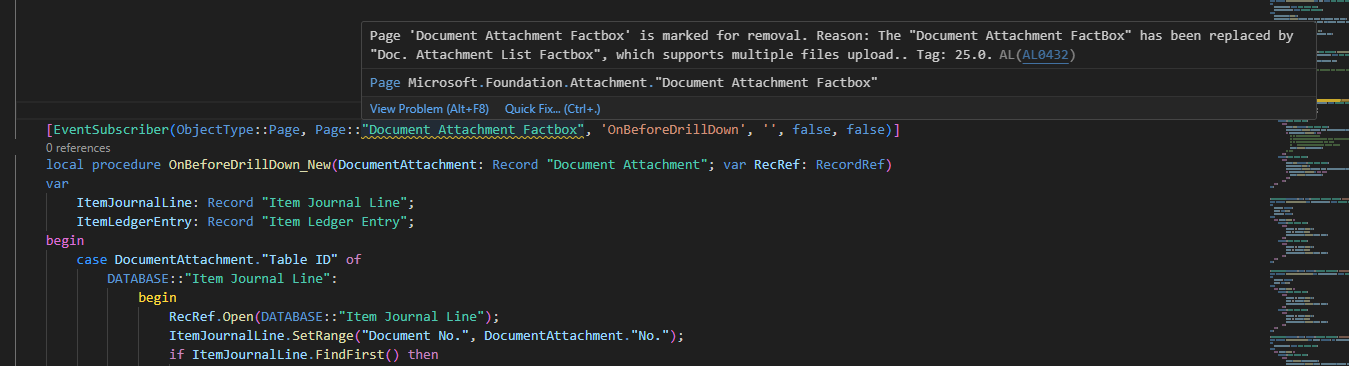
I can only get file uploads to work using a codeunit that leverages the older Document Attachment Factbox,

But this approach now triggers a deprecation warning:

Page 'Document Attachment Factbox' is marked for removal. Reason: The "Document Attachment FactBox" has been replaced by "Doc. Attachment List Factbox", which supports multiple file uploads. Tag: 25.0.

Question:

Has anyone successfully implemented file upload/add attachment functionality using the new Doc. Attachment List Factbox on a custom table or page (e.g., Item Journal Line)?

  • How should the events and RecordRef handling be set up to allow uploads?
  • Are there any working AL code samples or guidance on replacing the old FactBox functionality?

Any examples or best practices for this scenario would be greatly appreciated!
I have the same question (1)
  • Verified answer
    Sumit Singh Profile Picture
    11,751 Super User 2026 Season 1 on at
    Steps to Implement File Upload with Doc. Attachment List Factbox
    1. Add the Factbox to Your Page
    In your Item Journal Line page, add the new Factbox:
    area(FactBoxes)
    {
        part(Attachments; "Doc. Attachment List Factbox")
        {
            ApplicationArea = All;
            SubPageLink = "Table ID" = const(Database::"Item Journal Line"),
                          "No." = field("Entry No."); // or your primary key field
        }
    }

    2. Handle RecordRef Linking via Events
    To ensure uploaded files are linked correctly to your custom record, implement these event subscribers:
     OnAfterGetRecRefFail (Page Event)
    [EventSubscriber(ObjectType::Page, Page::"Doc. Attachment List Factbox", 'OnAfterGetRecRefFail', '', false, false)]
    local procedure DocAttachmentListFactbox_OnAfterGetRecRefFail(var Sender: Page "Doc. Attachment List Factbox"; DocumentAttachment: Record "Document Attachment"; var RecRef: RecordRef)
    var
        ItemJournalLine: Record "Item Journal Line";
    begin
        case DocumentAttachment."Table ID" of
            DATABASE::"Item Journal Line":
                begin
                    RecRef.Open(DATABASE::"Item Journal Line");
                    if ItemJournalLine.Get(DocumentAttachment."No.") then
                        RecRef.GetTable(ItemJournalLine);
                end;
        end;
    end;
    OnAfterInitFieldsFromRecRef (Table Event)
    [EventSubscriber(ObjectType::Table, Database::"Document Attachment", 'OnAfterInitFieldsFromRecRef', '', false, false)]
    local procedure DocumentAttachment_OnAfterInitFieldsFromRecRef(var DocumentAttachment: Record "Document Attachment"; var RecRef: RecordRef)
    var
        FieldRef: FieldRef;
        RecNo: Code[20];
    begin
        case RecRef.Number of
            DATABASE::"Item Journal Line":
                begin
                    FieldRef := RecRef.Field(1); // Assuming Entry No. is the first field
                    RecNo := FieldRef.Value;
                    DocumentAttachment.Validate("No.", RecNo);
                end;
        end;
    end;

     We can check/test after trying the above:-
    • Multiple file uploads
    •  Attachments visible in both List and Card pages
    •  Accurate attachment count
    •  File preview and download

    Common Pitfall
    If you skip the event subscribers, uploaded files will be stored but not linked to the record, hence not visible in the Factbox.

    Note: This response was created in collaboration with Microsoft Copilot to ensure clarity and completeness. I hope it helps to some extent.
    Mark the Answer as Verified if this is Helpful.
     
  • Suggested answer
    DAnny3211 Profile Picture
    11,409 Super User 2026 Season 1 on at
     

    Hi there,

    You're correct — the Document Attachment Factbox has been deprecated in v25 and replaced by the Doc. Attachment List Factbox, which supports multiple file uploads and improved integration.

    To implement the new Factbox on a custom page (e.g., Item Journal Line), here are some steps and tips:

    1. Use the New Factbox Page:

      • Add the Doc. Attachment List Factbox to your custom page using PagePart.
     
    part(DocAttachmentList; "Doc. Attachment List Factbox")
    {
        SubPageLink = "Table ID" = CONST(DATABASE::"Item Journal Line"),
                      "No." = FIELD("Document No.");
    }
    1. Ensure Proper Field Mapping:

      • The Factbox relies on Table ID and No. fields to link attachments. Make sure your page and table expose these correctly.
    2. RecordRef Handling:

      • You no longer need to use deprecated event subscribers like OnBeforeFillInJournal. Instead, rely on the built-in logic of the new Factbox, which handles RecordRef internally.
    3. Enable File Uploads:

      • The new Factbox supports file uploads out of the box. Ensure your page is editable and the user has permissions to upload.
    4. Best Practices:

      • Avoid custom codeunits unless you're extending functionality beyond what's supported.
      • Use TableRelation and SubPageLink properly to ensure the Factbox binds correctly.

    Additional Resources:

    • Check the Business Central AL documentation for updates on Factbox usage.
    • Look into the standard pages (e.g., Sales Orders) that already use the new Factbox for working examples.

    Let me know if you'd like help adapting your AL code or reviewing your page structure!

    Please verify if this response was helpful.

    Best regards!

  • Suggested answer
    Andrés Arias Profile Picture
    4,790 Super User 2026 Season 1 on at
  • Suggested answer
    Kamal Khakhkhar Profile Picture
    2,491 on at
    Hii There as per requirement the page of Document attachment will remove in next upcomming versions. so for that you can add the same type of code for Doc. Attachment List Factfox . which contains the List rather then just count of attachment .
     
    so as per requirement you need to update same kind of code in that new page .


    If you found answer . mark It answered.
     
     
    Thank You
    Kamal Khakhkhar  

Under review

Thank you for your reply! To ensure a great experience for everyone, your content is awaiting approval by our Community Managers. Please check back later.

Helpful resources

Quick Links

Introducing the 2026 Season 1 community Super Users

Congratulations to our 2026 Super Stars!

Congratulations to our 2025 Community Spotlights

Thanks to all of our 2025 Community Spotlight stars!

Leaderboard > Small and medium business | Business Central, NAV, RMS

#1
OussamaSabbouh Profile Picture

OussamaSabbouh 1,840 Super User 2026 Season 1

#2
YUN ZHU Profile Picture

YUN ZHU 1,080 Super User 2026 Season 1

#3
Dhiren Nagar Profile Picture

Dhiren Nagar 846 Super User 2026 Season 1

Last 30 days Overall leaderboard

Featured topics

Product updates

Dynamics 365 release plans
