web
You’re offline. This is a read only version of the page.
close
Skip to main content

Notifications

Announcements

Community site session details

Community site session details

Session Id :
Small and medium business | Business Central, N...
Suggested Answer

Job Queue - unable to find the attachment when sending email

(0) ShareShare
ReportReport
Posted on by 60

Dear All,

Good day to all.

Current using version: Dynamics NAV 2017 (Version 10.0.29930)

I had set a job queue to send statement to our customers. I'm curious why job queue some time able to send email successfully but some time not.

Below some screenshots shown the job queue run successful on few times, but failed at last due to unable to find the attachment

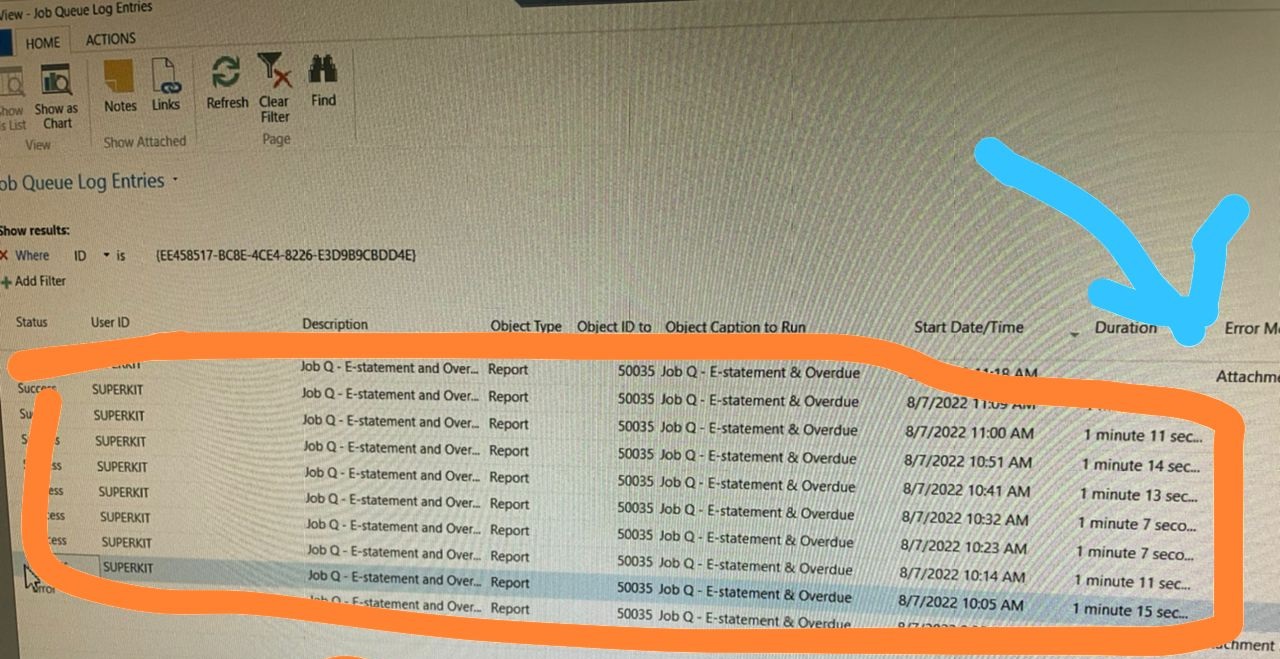
Job-Q-_2D00_Error.jpg

Job-Q-_2D00_Error-2.jpg

I have checked the folder permission and assigned Full Control to everyone. And the attachment also existed in this folder,

folder-permission.jpg

Appreciate if anyone can help.

Thanks and Best Regards,

Kit

I have the same question (0)
  • Suggested answer
    Nitin Verma Profile Picture
    21,708 Moderator on at

    Hi,

    Please try to run statement for this customer, with the same filters you are providing while sending email, and check if there is any data is coming in the PDF file.

    Thanks.

  • Ts. Kit Wong Profile Picture
    60 on at

    Dear Nitin Verma,

    Yes, the statement in PDF working fine with content. If I use another user to execute the job queue, it can be run and sent successfully for the customer.

    The user to executed job queue with super permission.

    Thanks and Best Regards,

    Kit

  • Suggested answer
    Nitin Verma Profile Picture
    21,708 Moderator on at

    You can go to that object which is assigned in Job queue, and allow the permission of that Table which is running the statement. May be its a permission issue for that particular user.

  • Ts. Kit Wong Profile Picture
    60 on at

    Let me to elaborate more on our e-statement method,

    1) We will generate the statement and invoices (in pdf format) of the customers and place in a shared folder. This shared folder had set full control permission for everyone and this folder in the same instance server.

    2) We set a job queue to run on specify date in order to attach the statement & invoice to send our customers

Under review

Thank you for your reply! To ensure a great experience for everyone, your content is awaiting approval by our Community Managers. Please check back later.

Helpful resources

News and Announcements

Season of Giving Solutions is Here!

Quick Links

Responsible AI policies

As AI tools become more common, we’re introducing a Responsible AI Use…

Neeraj Kumar – Community Spotlight

We are honored to recognize Neeraj Kumar as our Community Spotlight honoree for…

Leaderboard > Small and medium business | Business Central, NAV, RMS

#1
OussamaSabbouh Profile Picture

OussamaSabbouh 1,630

#2
Khushbu Rajvi. Profile Picture

Khushbu Rajvi. 800 Super User 2025 Season 2

#3
YUN ZHU Profile Picture

YUN ZHU 789 Super User 2025 Season 2

Last 30 days Overall leaderboard

Featured topics

Product updates

Dynamics 365 release plans
