Hi, I'm new to CRM customization and JavaScript, and am hoping I could get some help from experts here:
The goal here is to:
1. Have a button on a form of the Ticket entity.
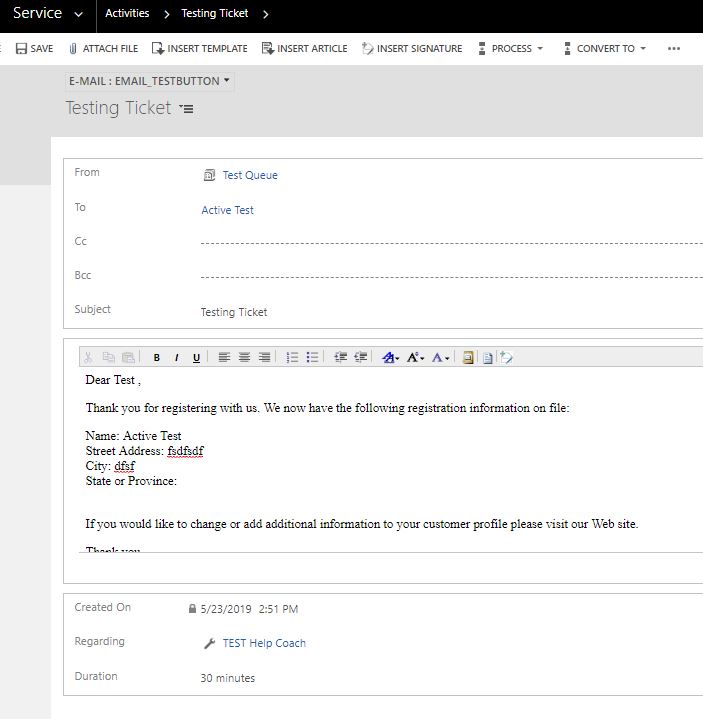
2. When the button is clicked from a ticket, a new Email form will show up in a new window with pre-populated fields including 'From', 'To', 'Regarding', and 'Description'
3. In the new email form - 'To' refers to the customer; 'Regarding' refers to the ticket title; 'Description' needs to include a default email template; all fields except 'Description' are look up fields.
4. the form should look like below:
I've found various articles online and this seems to match my goal the most - https://community.dynamics.com/crm/f/117/t/273017
I've also created a customized button and was able to publish my first Jscript passing string values from the Ticket entity. However, I'm having trouble populating all the look up fields and inserting an email template (To, Regarding, Description); The syntax I'm using is Xrm.Utility.openEntityForm(name,id,parameters,windowOptions) and below is what I've had so far:
function CreateNewEmail()
{
//Get lookup value from Form to open the entity form
var regarding = Xrm.Page.data.entity.attributes.get("title").getValue();
var regarding = Xrm.Page.data.entity.attributes.get("incidentid").getValue(); // this line seems incorrect?
//Open a new window
var windowOptions = {
openInNewWindow: true
};
//Pass paramenters
var parameters = {};
parameters["subject"] = regarding;
parameters["formid"] ="000AA4A1-11AA-1234-ABCD-12345678ABCD";
parameters["regardingobjectid"] = regardingobjectid; // this line seems incorrect?
Xrm.Utility.openEntityForm("email", null, parameters, windowOptions);
}
Also, if I click an existing ticket - go to timeline - click Activities tab and select 'E-mail', then the page would go to an email form with the all the pre-populated fields I'm looking for; however I would need the email form to show up in a new window and it seems like the timeline tab is an OOB feature and thus I am not sure if I could customize this part of the form?
One last thing - not sure if there is a better way to open a new email form in a new window rather than clicking a customized bottom on a ticket form. Any recommendation is welcome. Thank you all in advance :)


