web
You’re offline. This is a read only version of the page.
close
Skip to main content

Notifications

Announcements

No record found.

Community site session details

Community site session details

Session Id :
Microsoft Dynamics NAV (Archived)

How to add new aging bracket in Aged Accounts Receivable report in NAV

(0) ShareShare
ReportReport
Posted on by 192

Hello Experts,

I see the report 120: Aged Accounts Receivable has only four aging bracket: 1-30 days, 31-60 days, 61-90 days and more than 90 days.
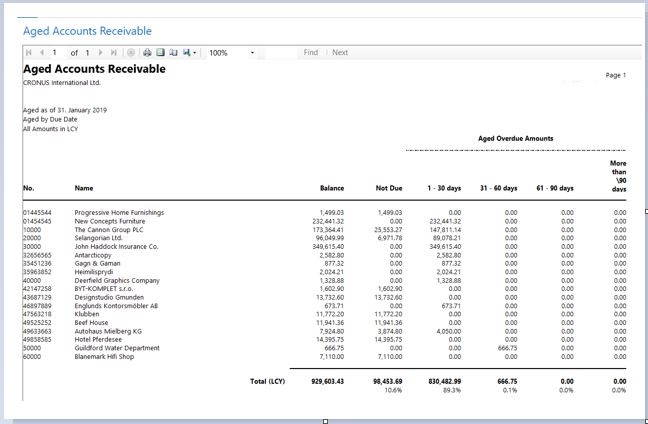
8814.Capture.JPG

However if I want to add more date ranges say( 91 – 120 days, 121 – 180 days , 181 – 360 days,  Over 360 days) to the report what would be the process.

Thanks for your help.

*This post is locked for comments

I have the same question (0)
  • Mitr Profile Picture
    192 on at

    Hello Experts,

    I am able to add the aging brackets now but they are in the range with difference of 30 days I can now see 91-120 days 

    1070.Capture.JPG

    but further columns come in 121-150 days, 151-180 days & 181-210 days which I don't want. 

    I want them now after 91-120 days to be 121 – 180 days , 181 – 360 days,  Over 360 days.

    Any idea.

    Thanks

  • Srinivasan Raja Profile Picture
    37 on at

    Hi, do know how to add bracket in aged account report

Under review

Thank you for your reply! To ensure a great experience for everyone, your content is awaiting approval by our Community Managers. Please check back later.

Helpful resources

Quick Links

Responsible AI policies

As AI tools become more common, we’re introducing a Responsible AI Use…

Neeraj Kumar – Community Spotlight

We are honored to recognize Neeraj Kumar as our Community Spotlight honoree for…

Leaderboard > 🔒一 Microsoft Dynamics NAV (Archived)

#1
HoangNam Profile Picture

HoangNam 7

Last 30 days Overall leaderboard

Featured topics

Product updates

Dynamics 365 release plans
