web
You’re offline. This is a read only version of the page.
close
Skip to main content

Announcements

No record found.

News and Announcements icon
Community site session details

Community site session details

Session Id :
Microsoft Dynamics AX (Archived)

Form Customization - Query Lookup

(0) ShareShare
ReportReport
Posted on by 27

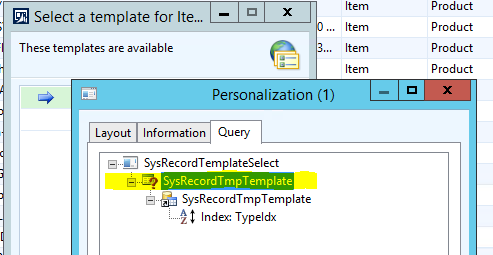
I want to customize this form: SysRecordTemplateSelect .  When I right click on it and select personalize, I see this query SysRecordTempTemplate.  However, I cannot locate this query in the Queries node in the AOT.  Does anyone know how I can find it?
templateQuery.PNG

*This post is locked for comments

I have the same question (0)
  • André Arnaud de Calavon Profile Picture
    303,988 Super User 2026 Season 1 on at

    Hi drMurray86,

    It might be a name used as object name. You can open the form in the AOT to see what has been actually used.

  • Guruprasanna Profile Picture
    1,093 on at

    Hi,

    "SysRecordTmpTemplate" is table not query, Generally when you personalize form it look like query but not.

    Regards

    Guru

  • drMurray86 Profile Picture
    27 on at

    Thanks for your responses.

    Here is how I see the form in the AOT.  I can definitely see the referenced table, but what does the "SysRecordTmpTemplate" with the query icon shown in my first post represent in the actual form tree?  It doesn't appear to exist.

    From AOT:

    templateQuery2.PNG

  • Rati Sharabidze Profile Picture
    612 on at

    Hi,

    The query is kind of auto-generated which has this table as datasource, you can not find it AOT.

    What you can do is to debug(most probably put a break point in the init method of the datasource or of the form) and find out how the temporary table is filled.

    Kind regards

  • André Arnaud de Calavon Profile Picture
    303,988 Super User 2026 Season 1 on at

    Hi drMurray,

    The query icon on the personalization is not leading; it is just an icon. The data sources together will generate a "query" which is used to get the data from the database. As mentioned above, you have to look at the form design. Your last screenshot of the form design is not showing the query icon, but a database table. So like also mentioned above, you should be able to find this table in the AOT.

Under review

Thank you for your reply! To ensure a great experience for everyone, your content is awaiting approval by our Community Managers. Please check back later.

Helpful resources

Quick Links

Introducing the 2026 Season 1 community Super Users

Congratulations to our 2026 Super Stars!

Meet the Microsoft Dynamics 365 Contact Center Champions

We are thrilled to have these Champions in our Community!

Congratulations to the March Top 10 Community Leaders

These are the community rock stars!

Leaderboard > 🔒一 Microsoft Dynamics AX (Archived)

#1
Joris dG Profile Picture

Joris dG 5

#2
Andrew Jones a1x Profile Picture

Andrew Jones a1x 2

#3
Basit Profile Picture

Basit 1

Last 30 days Overall leaderboard

Featured topics

Product updates

Dynamics 365 release plans
