web
You’re offline. This is a read only version of the page.
close
Skip to main content

Announcements

No record found.

News and Announcements icon
Community site session details

Community site session details

Session Id :
Microsoft Dynamics AX (Archived)

problem with printing Sales Invoice

(0) ShareShare
ReportReport
Posted on by

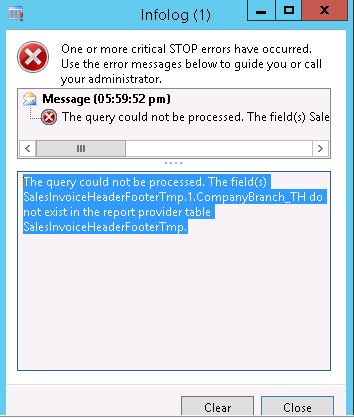
when i try printing Sales Invoice in AX 2012 R3 it got this message
Capture01.JPG

"The query could not be processed. The field(s) SalesInvoiceHeaderFooterTmp.1.CompanyBranch_TH do not exist in the report provider table SalesInvoiceHeaderFooterTm"

i really do compile for this report but stil this error so  how can i solve this problem

and pls if you can explain it step by step cuz i really new on this

printing

*This post is locked for comments

I have the same question (0)
  • André Arnaud de Calavon Profile Picture
    304,711 Super User 2026 Season 1 on at

    Hi Mohammad,

    Are there customizations on this report or within the data provider?

    Did you just do an x++ compilation or also a CIL compilation?

  • DMW Profile Picture
    on at

    thx for replay André

    it's within the data provider i don't make any customizations  for that report

    and i didn't  compilation too for both  of them should i? and how?

    and thx again

  • Sohaib Cheema Profile Picture
    49,679 Super User 2026 Season 1 on at

    gentleman few point to be noted

    1) have you refreshed your Datasources on VS , and tried after redeploying report?

    2) Have you deleted those DataSources and re-added with same name and deployed report

    3) Have you tried after enabling Thailnad sales tax key and then tried to refresh report datasources on VS

  • DMW Profile Picture
    on at

    thanks Sohaib for replay


    i do refresh Datasources on VS but when i try many times to redeploying show me those error:

    i think it's 2 error but it's duplicate

    1-"An error occurred while deploying the report SalesInvoice.

    This might be because the SQL Server Reporting Services extensions have not been installed on the report server, or configuration information has not been entered in the Report Servers form in Microsoft Dynamics AX."

    2-"The Value expression for the text box ‘CompanyNameTextBox3’ refers directly to the field ‘CompanyBranch_TH’ without specifying a dataset aggregate.  When the report contains multiple datasets, field references outside of a data region must be contained within aggregate functions which specify a dataset scope."

    3-"An error occurred while deploying the report SalesInvoice.

    This might be because the SQL Server Reporting Services extensions have not been installed on the report server, or configuration information has not been entered in the Report Servers form in Microsoft Dynamics AX."

    4-"The Value expression for the text box ‘CompanyNameTextBox2’ refers directly to the field ‘CompanyBranch_TH’ without specifying a dataset aggregate.  When the report contains multiple datasets, field references outside of a data region must be contained within aggregate functions which specify a dataset scope."


    and when i try to see preview desing i got this

    4186.Capture.JPG

    and i already enabling Thailnad sales tax key
    4186.Capture.JPG
    thanx again

  • Sohaib Cheema Profile Picture
    49,679 Super User 2026 Season 1 on at

    kindly make sure

    1)  SQL Server Reporting Services extensions have

    2) open report design in VS and check expression of CompanyNameTextBox2, you have to fix this expression

  • DMW Profile Picture
    on at

    thx again sohaib for helping now is SQL Server Reporting Services extensions instaled

    how about expression what should i do to fix it

    should it delete this expression or what?

    3480.Capture.JPG

  • Sohaib Cheema Profile Picture
    49,679 Super User 2026 Season 1 on at

    seems expression has been applied to show hide field, and at the same time, what is inside expression that does not exist. so better to remove this expression, this will always show you field CompanyNameTextBox2

    next depending  upon if you need it or not, you can make it visible or you can hide it permanently

    normally a  field which is being hide/shown based on a parameter of TH(Thailand) should not be important to others (who are not in Thailand ). But again it depends upon you if you really need that field or not.

    you may remove expression

  • DMW Profile Picture
    on at

    thanks again Sohaib  and sorry for that

    ok i remove this expression and i done from deploy successfully after rebuild

    but i got those error when i preview

    1-"An exception occurred in the query metadata execution. The exception is A currency to convert from is required to retrieve exchange rate information"

    2-"No report data table with name SalesInvoiceHeaderFooterTmp exists in report schema for data provider SalesInvoiceDP."

    3-"No report data table with name SalesInvoiceLocalizationTmp exists in report schema for data provider SalesInvoiceDP."

    4-"The Value expression for the text box ‘CompanyNameTextBox2’ refers to the field ‘CompanyBranch_TH’.  Report item expressions can only refer to fields within the current dataset scope or, if inside an aggregate, the specified dataset scope."

    130831.Capture.JPG

  • Sohaib Cheema Profile Picture
    49,679 Super User 2026 Season 1 on at

    I am not sure following will work or not but lets give it a try

    - refresh your client configuration

    - open the report again from aot VS project and re-select dataSources by clicking ... (3 dots toggle button). do this for each dataset

    -. for your textbox CompanyNameTextBox2, it is still referring to CompanyBranch_TH and the CompanyBranch_TH is not part of your current scope, fix it, either by removing or by placing it under valid scope of dataset or data group

    -re-deploy report

    if it id deployed successfully, skip view on VS

  • DMW Profile Picture
    on at

    thanks for reply

    i do these following steps:

    - uninstall Visual Studio Tools (for 2010) using AX installation, under development tools.

    - apply VS 2010 SP1.

    - reinstall Visual Studio Tools (for 2010)

    - perform full db sync & full compile.

    - then i editing the report again

    and i then after deploy i got these error

Under review

Thank you for your reply! To ensure a great experience for everyone, your content is awaiting approval by our Community Managers. Please check back later.

Helpful resources

Quick Links

Introducing the 2026 Season 1 community Super Users

Congratulations to our 2026 Super Stars!

Meet the Microsoft Dynamics 365 Contact Center Champions

We are thrilled to have these Champions in our Community!

Congratulations to the April Top 10 Community Leaders

These are the community rock stars!

Leaderboard > 🔒一 Microsoft Dynamics AX (Archived)

#1
CP04-islander Profile Picture

CP04-islander 39

#2
Michel ROY Profile Picture

Michel ROY 14

#3
imran ul haq Profile Picture

imran ul haq 8

Last 30 days Overall leaderboard

Featured topics

Product updates

Dynamics 365 release plans
