web
You’re offline. This is a read only version of the page.
close
Skip to main content

Announcements

News and Announcements icon
Community site session details

Community site session details

Session Id :
Microsoft Dynamics 365 | Integration, Dataverse...
Suggested Answer

Product Bundle view on UCI does not show the products underneath it

(0) ShareShare
ReportReport
Posted on by 155

Hi Guys,

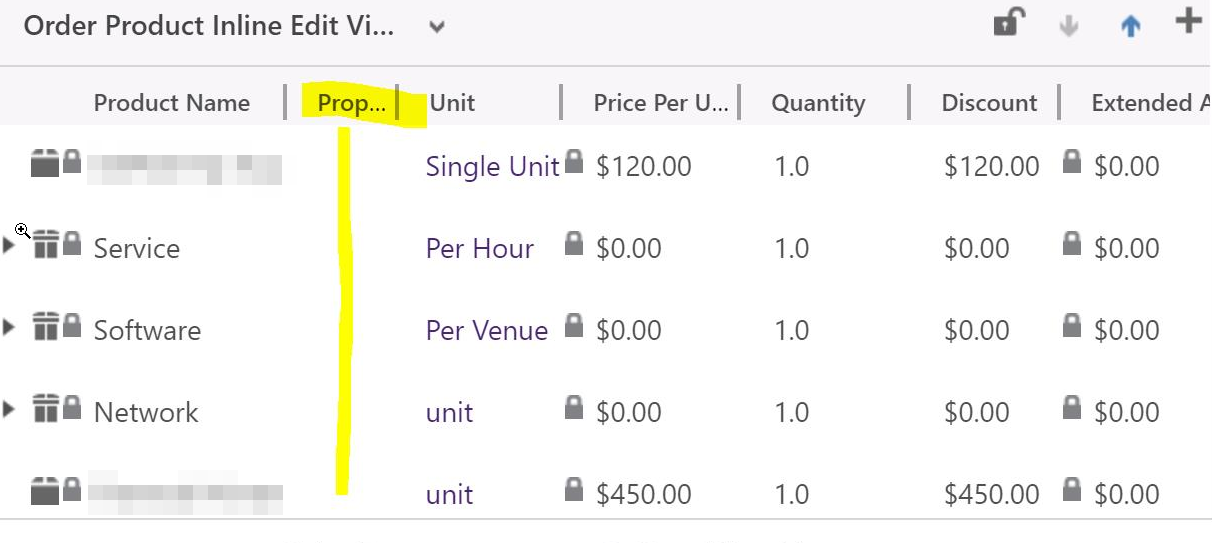
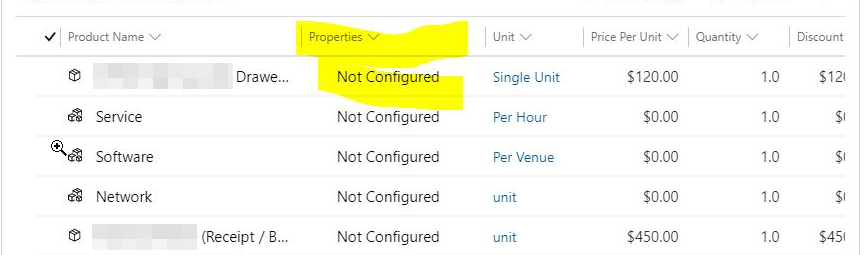
I have a product bundle and it shows differently on UCI compared to the Legacy Web App.

On our Legacy Web App we could click an arrow right beside the product bundle on Order Forms to see what it consists of but on UCI it seems like that option is not available anymore.

is this the case or can i do some customization to make it behave more like the Legacy Web App?

eg.

UCI
pastedimage1599367252818v1.png

Legacy Web App

pastedimage1599367316194v2.png

I have the same question (0)
  • Suggested answer
    Community Member Profile Picture
    on at

    Hi Jimmar,

    In the UCI, you can’t see the list of products for the Product Bundle with OOB function, which is by-design.

    However, you can add Nested Editable Grids manually to achieve it.

    The following link shows the same question and answer, you can refer it:

    https://community.dynamics.com/365/sales/f/dynamics-365-for-sales-forum/349719/bundle-associated-products-couldn-t-see-in-unified-interface

    You can refer following to get more information about Nested Editable Grids:

    https://community.dynamics.com/365/b/d365demystified/posts/nested-editable-grids-in-d365-ce-v9-uci

    Regards,

    Leah Ju

    Please mark as verified if the answer is helpful. Welcome to join hot discussions in Dynamics 365 Forums.

  • Jimmar Tangkia Profile Picture
    155 on at

    Hi Leah

    I have tried the nested editable grids but have had no luck making it show up the products underneath the bundle.

    Here is what it looks like.

    pastedimage1599524911283v1.png

    Here is the setting on my editable grid.

    pastedimage1599524934270v2.png

    Do you know why that would be the case?

  • Suggested answer
    Community Member Profile Picture
    on at

    Hi Jimmar,

    The steps are not problems.

    you can check the bundle ‘Network’ has bundle products or not? Or it is just product not bundle.

    For example, bundle2 don’t have bundle products, bundle1 have one bundle products,product is product.

    pastedimage1599544739608v1.pngpastedimage1599544748667v2.pngpastedimage1599544754061v3.png

    So in the grid, you will see that:

    pastedimage1599544781580v4.png

    Thanks. 

    Regards,

    Leah Ju

    Please mark as verified if the answer is helpful. Welcome to join hot discussions in Dynamics 365 Forums.

  • Community Member Profile Picture
    on at

    Hi Partner,

    Has the problem been solved? Any updates?

    Please click Yes under "Did this answer your question?" to close this thread.

    pastedimage1599647758033v1.png

    Thanks. 

    Regards,

    Leah Ju

    Please mark as verified if the answer is helpful. Welcome to join hot discussions in Dynamics 365 Forums.

Under review

Thank you for your reply! To ensure a great experience for everyone, your content is awaiting approval by our Community Managers. Please check back later.

Helpful resources

Quick Links

Season of Sharing Community Challenge Winners!

Congratulations to our community stars!

Women in Power Builds Momentum

Expanding mentorship, skilling, and AI innovation

Congratulations to the July Top 10 Community Leaders

These are the community rock stars!

Leaderboard > Microsoft Dynamics 365 | Integration, Dataverse, and general topics

#1
11manish Profile Picture

11manish 82 Super User 2026 Season 2

#2
André Arnaud de Calavon Profile Picture

André Arnaud de Cal... 44 Super User 2026 Season 2

#3
ParthPatel249 Profile Picture

ParthPatel249 40

Last 30 days Overall leaderboard

Product updates

Dynamics 365 release plans