web
You’re offline. This is a read only version of the page.
close
Skip to main content

Announcements

No record found.

News and Announcements icon
Community site session details

Community site session details

Session Id :
Customer experience | Sales, Customer Insights,...
Answered

How to set size for a segment in Dynamics 365 for Marketing?

(0) ShareShare
ReportReport
Posted on by 20

Hi everyone,

I have a segment that has more than 1000 contacts I want to set size to this segment like only first 50 records.

I have read about segment query on the below link but can not find any solutions without using interactions like email clicked.

https://docs.microsoft.com/en-us/dynamics365/marketing/developer/segment-query-definition

Any ideas or solutions?

Thanks in advance.
I have the same question (0)
  • cloflyMao Profile Picture
    25,210 on at

    Hi Nguyen,

    Members in segment could be regarded as a whole, we couldn't split part of members.

    As you said, you would like to use only first 50 records, so you should build another segment for these members.

    Could you share me more details about your business requirement?

    What's criteria for filter out first 50 records, do you mean the first 50 contacts who opened email? 

    Regards,

    Clofly

  • Suggested answer
    Nguyen Hieu Profile Picture
    20 on at

    Hi Clofly,

    Thanks for your reply.

    I want to create Campaign (Customer Journey) to randomly 50 or 100 customers from a segment (that contains more than 1000 members who live in the same city) for evaluating the effectiveness of the campaign.

    And the members of the segment have never done any Customer Journey before so I can not filter by interactions like who opened email or not.

    As you said, I can create a static segment for these members but it takes a lot of time. 

    I've read about Query view like Count() function but Maybe it doesn't work for this situation.

    Do you have any ideas for this?

    Thank you so much!!!

  • cloflyMao Profile Picture
    25,210 on at

    Hi Nguyen,

    I tested a demo and got expected result, but I'm not sure whether it could work for you, please test in your environment.

    1. I set city of 5 contacts to Shanghai.
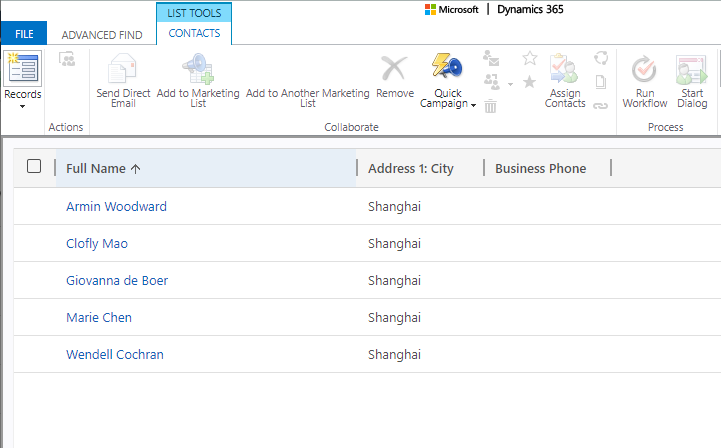
    pastedimage1583397456628v2.png

    2. There is a segment which will include contacts whose last name contains Mao, 

    let's call it Mao segment.

    I ran a customer journey for Mao, so only Clofly Mao has interaction data(Email sent) compared with other 4 records in advanced find result.

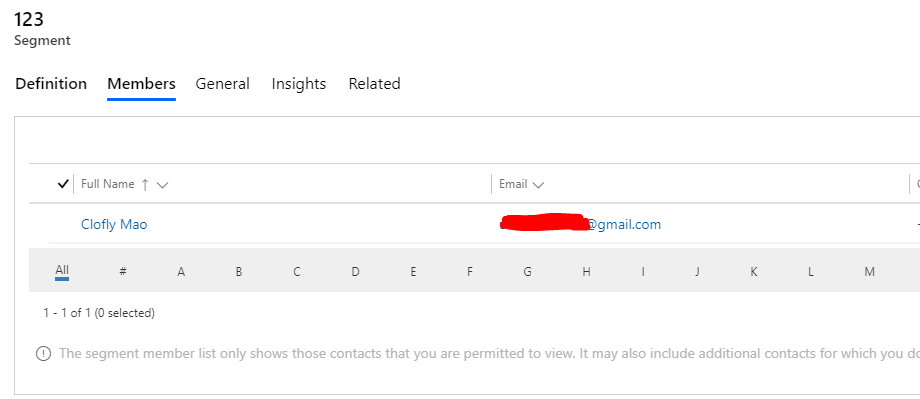
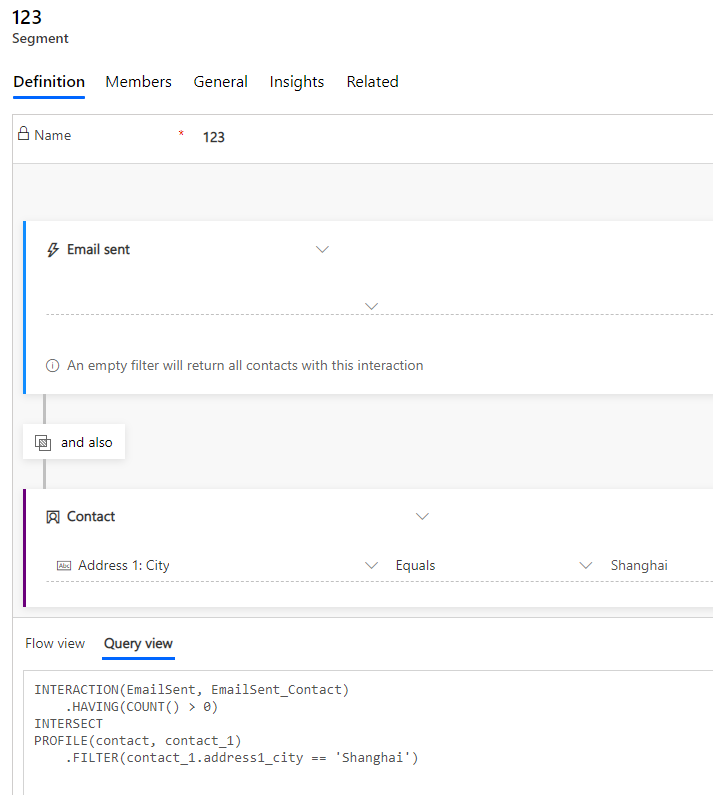
    3. I created a segment 123, which will find people who live in Shanghai and at least received one email.
    pastedimage1583399377214v3.png

    Member: only Clofly Mao in it.

    pastedimage1583399431425v4.png

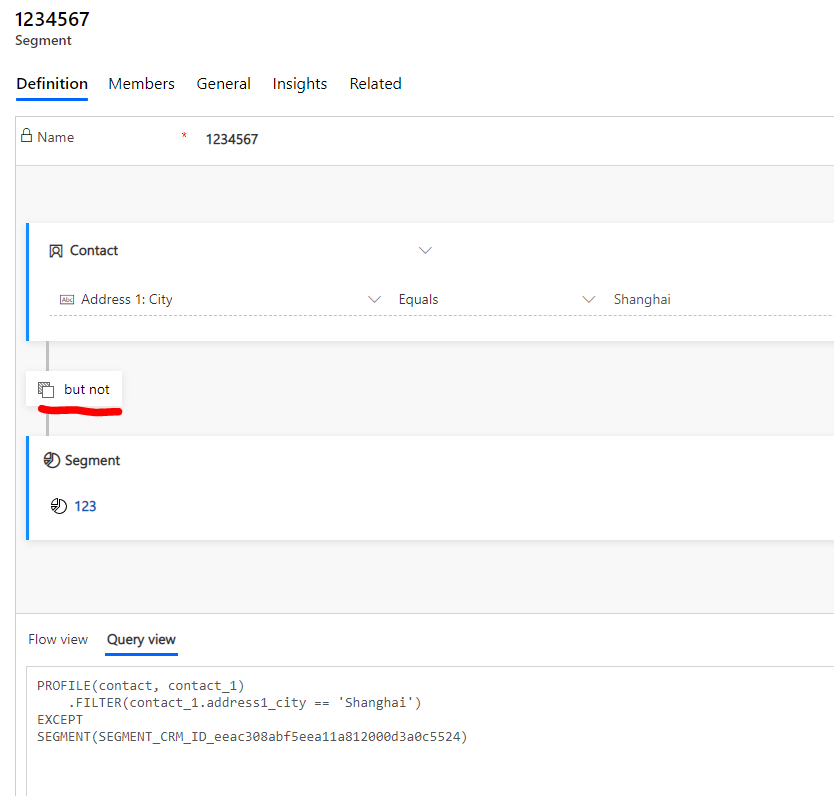
    4. I created another segment 1234567, it'll firstly find people who live in Shanghai, then exclude member(s) in segment 123.
    pastedimage1583399514961v5.png

    As what we see, Clofly Mao has been excluded from new segment.

    If these contacts are real people, then I can run campaign for them based on this segment.
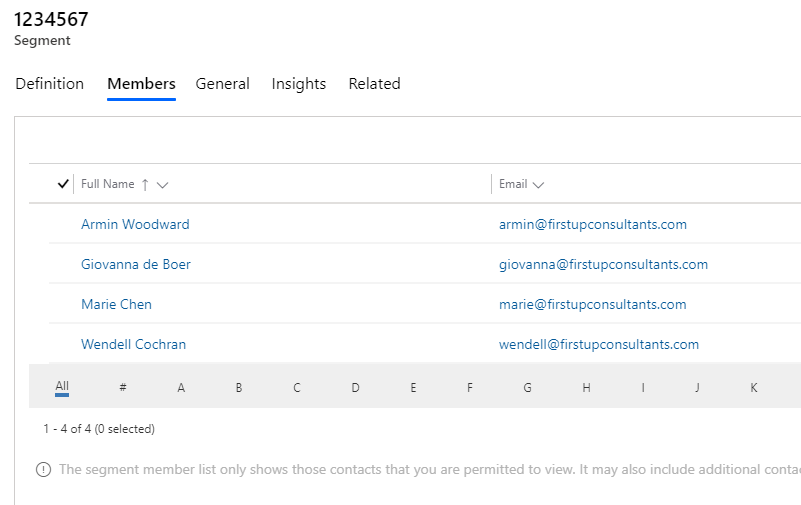
    pastedimage1583399557806v6.png

    Regards,

    Clofly

  • Suggested answer
    Petit Hibou Profile Picture
    on at

    Hi Hieu Nguyen,

    the scenario you've described imho may fit into A/B testing concept.

    The way that A/B testing works is that you define percentage of the total number of contacts in the target segment (say, 5%), then 5% of emails will be sent with email variant A, 5% with email variant B. Then, after a certain time (configurable) a winner is being declared based on the selected criteria (configurable), such as email opens. The remaining 90% of the emails are sent using the winning variant.

    Br

    Elena

  • Suggested answer
    d_radulova Profile Picture
    2 User Group Leader on at

    Hello @Nguyen Hieu,

    In situations like this we would normally use a splitter tile in a customer journey.

    You could-

    1. Create your segment with 1000+ members (or as many as you want)

    2. Create your customer journey with the segment being the entry point

    3. Add a splitter tile to your customer journey and define either exact number of contacts or percentage 

    4. This gives you two branches in your journey. Define the toichpoins in each. One of them could do  nothing with the contacts and the other could send them a series of emails for example.

    Reference docs  here-

    docs.microsoft.com/.../customer-journey-tiles-reference

    Screenshot_5F00_20200305_2D00_201939_5F00_Chrome.jpg

    Let us know how you get on. Good luck

    Thanks,

    -DD 

  • Suggested answer
    Nguyen Hieu Profile Picture
    20 on at

    Hi Dilyana,

    Many thanks for your help, that worked!!!

    I'd like to thank you all for your support

    Best regards,

    Nguyen

  • d_radulova Profile Picture
    2 User Group Leader on at

    Good news! I'm sure it will be a great campaign.

    How are you going to do your analysis of how successful each of the branches is?

Under review

Thank you for your reply! To ensure a great experience for everyone, your content is awaiting approval by our Community Managers. Please check back later.

Helpful resources

Quick Links

Introducing the 2026 Season 1 community Super Users

Congratulations to our 2026 Super Stars!

Meet the Microsoft Dynamics 365 Contact Center Champions

We are thrilled to have these Champions in our Community!

Congratulations to the April Top 10 Community Leaders

These are the community rock stars!

Leaderboard > Customer experience | Sales, Customer Insights, CRM

#1
Muhammad Shahzad Shafique Profile Picture

Muhammad Shahzad Sh... 69 Most Valuable Professional

#2
ManoVerse Profile Picture

ManoVerse 60 Super User 2026 Season 1

#3
11manish Profile Picture

11manish 43

Last 30 days Overall leaderboard

Product updates

Dynamics 365 release plans