web
You’re offline. This is a read only version of the page.
close
Skip to main content

Announcements

No record found.

News and Announcements icon
Community site session details

Community site session details

Session Id :
Microsoft Dynamics AX (Archived)

Change in delivery date on Parent planned production order

(0) ShareShare
ReportReport
Posted on by

Hi,
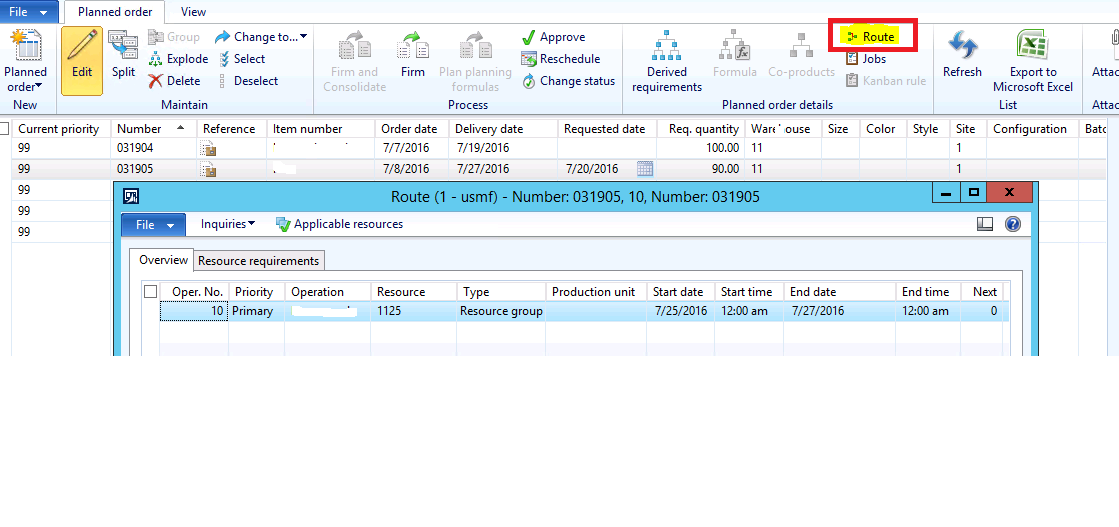
I have 1 level of item. Lower level item have BOM and Route attached to them and they have been setup as pegged supply on its parent BOM. When we run MRP, the system calculates Order and delivery date for both the parent and child item. when we change the delivery date of Parent item, for the child item in the job i can see the order and delivery date remains the same.

In the Master planning module --> Common --> Planned orders --> select any order and change the delivery date, In the Planned order details --> Route (Check order and delivery date for the Parent and child item)

can anybody explain me on thischange-in-delivery-date.png
*This post is locked for comments

I have the same question (0)
  • Verified answer
    Community Member Profile Picture
    on at

    On the order you've highlighted, notice that the requested date is showing earlier than scheduled date. This means that MP wants you to reschedule it, but because it's a production order rather than planned order, it won't automatically do it.

    When you manually changed the parent order's delivery date, you should generally make two changes. First, edit the delivery date to reflect your new finish date. Since that doesn't change the routing-based work, though, you also need to run either operation or job scheduling to update the details to line up with your revised due date. It's in that second step, operation or job scheduling, that you can select "schedule references) on the General tab. Checking "schedule references" will automatically reschedule any hard-pegged lower level orders. This won't work for soft-pegged, though--those still have to be handled through exception messages and manual rescheduling.

  • Community Member Profile Picture
    on at

    Thanks :)

  • Fredrik Sætre Profile Picture
    12,644 on at

    Hi Rubeena,

    If you're satisfied with the answer, then please tick the answered button on the suggested answer.

  • Suggested answer
    Community Member Profile Picture
    on at

    Thanks

Under review

Thank you for your reply! To ensure a great experience for everyone, your content is awaiting approval by our Community Managers. Please check back later.

Helpful resources

Quick Links

Introducing the 2026 Season 1 community Super Users

Congratulations to our 2026 Super Stars!

Meet the Microsoft Dynamics 365 Contact Center Champions

We are thrilled to have these Champions in our Community!

Congratulations to the April Top 10 Community Leaders

These are the community rock stars!

Leaderboard > 🔒一 Microsoft Dynamics AX (Archived)

#1
CP04-islander Profile Picture

CP04-islander 24

#2
Michel ROY Profile Picture

Michel ROY 14

#3
Jagadabi Profile Picture

Jagadabi 6

Last 30 days Overall leaderboard

Featured topics

Product updates

Dynamics 365 release plans
