web
You’re offline. This is a read only version of the page.
close
Skip to main content

Notifications

Announcements

No record found.

Community site session details

Community site session details

Session Id :
Microsoft Dynamics CRM (Archived)

Email tracking working sporadically

(0) ShareShare
ReportReport
Posted on by 95

Hi all,

I'm hoping someone can help save what's left of my sanity.  I've got an on-premise install of Dynamics 2011 using rollup 11.  Users are using the Outlook plugin and are trying to track all emails related to Cases in dynamics, so a user will get an email in, convert it to a case and then reply to the email with a tracked email so it's associated with the case.  Obviously then the plan is that any reply comes in gets tracked, and any subsequent reply in either direction is automatically tracked.

Outlook has been set up as such:
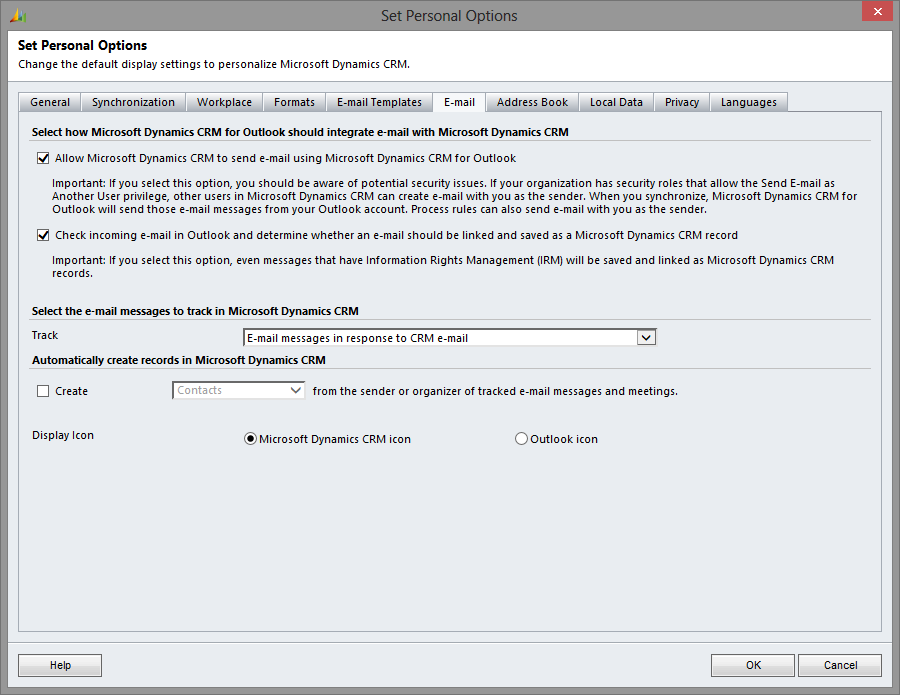
and I've set up the sync interval to be 1 minute while I'm testing.

The problem I'm getting is that some emails when they come in don't appear to be automatically tracked straight away, despite having CRM:xxxxxx in the subject line.  This means that when a reply is done it's not set to track.  However, in most cases if the system is left for a length of time it does eventually seem to catch up and associate them with the case......most of the time.

Can someone point me to anything that might explain the lag/occasional failure to track.

Cheers,

Luke 

*This post is locked for comments

I have the same question (0)
  • lwhitworth Profile Picture
    95 on at

    Just as  a quick addition to this, on the emails that don't get automatically tracked, clicking the track button in outlook does automatically track it against the right case without any further user input.

  • Suggested answer
    AaronRic Profile Picture
    10,035 on at

    Hi Luke, in this situation, the reply emails would not be expected to track because you are only tracking emails in response to CRM email messages. The original email is not tracked in CRM. For example, if you skip the part of receiving an email, converting to a case and go right to the reply, you would simply create a tracked email and any response to this will be tracked. However, in your case, the original incoming email is not tracked, so these will not track. We ran into this issue some time back and confirmed that this is expected behavior. You would need to Track All Emails or use Smart Matching which would use the subject and track this.

  • lwhitworth Profile Picture
    95 on at

    Hi Aaron,

    Cheers for your response but I must admit I'm a bit confused.  For clarification when that first email is received it is converted to a case and therefore tracked.  To my mind then the responses going forward should then themselves be tracked.  What is happening is that the responses further down the line are mostly tracked until one for some reason isn't.  If the user responds to this one immediately their response is then not automatically tracked either.  However, clicking the track button does associate it with the right case automatically.

    It's almost as if it just decides for whatever reason not to check one email randomly.

    Hope this makes a bit more sense!

    Luke

  • AaronRic Profile Picture
    10,035 on at

    Hi Luke,

    In my testing, this should not automatically track at all unless you are using smart matching. However, manually tracking this will correctly work as you are telling the system to track instead of using the systems tracking token or smart matching. Have you enabled smart matching to verify the results?

  • Community Member Profile Picture
    on at

    hello

Under review

Thank you for your reply! To ensure a great experience for everyone, your content is awaiting approval by our Community Managers. Please check back later.

Helpful resources

Quick Links

Responsible AI policies

As AI tools become more common, we’re introducing a Responsible AI Use…

Neeraj Kumar – Community Spotlight

We are honored to recognize Neeraj Kumar as our Community Spotlight honoree for…

Leaderboard > 🔒一 Microsoft Dynamics CRM (Archived)

#1
SA-08121319-0 Profile Picture

SA-08121319-0 4

#1
Calum MacFarlane Profile Picture

Calum MacFarlane 4

#3
Alex Fun Wei Jie Profile Picture

Alex Fun Wei Jie 2

Last 30 days Overall leaderboard

Featured topics

Product updates

Dynamics 365 release plans



