web
You’re offline. This is a read only version of the page.
close
Skip to main content

Notifications

Announcements

No record found.

Community site session details

Community site session details

Session Id :
Microsoft Dynamics 365 | Integration, Dataverse...
Suggested Answer

How can I map a custom attribute from Azure AD B2C User registration flow to DataVerse OptionSet field

(0) ShareShare
ReportReport
Posted on by 11

Hi,

I can create custom attributes in Azure AD B2C, they are showing on my registration form, and are successfully mapping to dataverse for text fields, like I have created a custom attribute "Address 2" fields and mapped it to Street 2 field in dataverse.

But I facing issues while mapping custom attributes to Dataverse Optionset fields, is ther a way to map the string/Int fields from Azure AD B2C to OptionSet/Choice fields in dataverse.

I have created a custom user field "Gender" field in Azure AD B2C, selected it uder User attributes and Claim attributes. (tried both with test/int data type)

After registration completed, it redirect me to the page to https://[myportalurl]/Account/Login/ExternalAuthenticationFailed
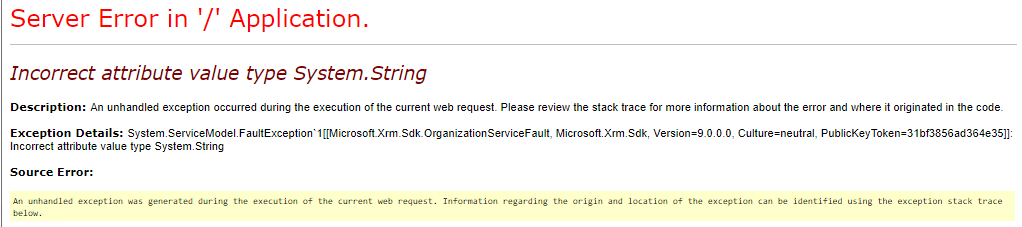
pastedimage1682026193220v1.png

Thank you in advance for your expertise!

I have the same question (0)
  • Eiken Profile Picture
    on at

    Hi,

    The following link may help you.

    Incorrect attribute value type System.String in Dynamics 365 (CRM) - Microsoft Dynamics CRM Community

  • Suggested answer
    Siddique mahsud Profile Picture
    11 on at

    Hi Eiken,

    I'm not doing any custom coding, By the way, we can only provide registration claims mapping for the Azure AD B2C provider in the Power Apps authentication settings, and I don't think if we have a way to access the actual service calls that using the provided mapping. The mapping works for single line text fields, but it's not working for option set/datetime fields.

    As a workaround, we created new text fields in Dataverse and mapped the Azure AD B2C custom fields to these new text fields. Then, we created a plugin and registered it on the "update" of the contact in the pre-operation stage (adding the text fields in filtering attributes). This plugin retrieves the values from the text fields and updates the actual option set/datetime fields.

    Thanks.

Under review

Thank you for your reply! To ensure a great experience for everyone, your content is awaiting approval by our Community Managers. Please check back later.

Helpful resources

Quick Links

Responsible AI policies

As AI tools become more common, we’re introducing a Responsible AI Use…

Neeraj Kumar – Community Spotlight

We are honored to recognize Neeraj Kumar as our Community Spotlight honoree for…

Leaderboard > Microsoft Dynamics 365 | Integration, Dataverse, and general topics

#1
#ManoVerse Profile Picture

#ManoVerse 93

#1
Siv Sagar Profile Picture

Siv Sagar 93 Super User 2025 Season 2

#3
Martin Dráb Profile Picture

Martin Dráb 62 Most Valuable Professional

Last 30 days Overall leaderboard

Product updates

Dynamics 365 release plans



