web
You’re offline. This is a read only version of the page.
close
Skip to main content

Notifications

Announcements

No record found.

Community site session details

Community site session details

Session Id :
Small and medium business | Business Central, N...
Answered

VALIDATION IN BUSSINESS CENTRAL

(0) ShareShare
ReportReport
Posted on by 234
I want to apply validation on an existing field such that if i keep it empty and save it or send for approval it should throw validation error.Why this code is not working in my table extention.
 modify("Free Text")
        {
            trigger OnBeforeValidate()
           
            begin
                if (rec."Free Text" = '') then
                    Error('Narration field is blank on Purchase Order. Kindly fill the same to sent PO for approval');
            end;
        }
I have the same question (0)
  • Suggested answer
    Govinda Kumar Profile Picture
    2,304 Moderator on at

    Hi Pragya752,

    If the free text is your own custom field, you can add the validation condition while adding the field in your table extension as shown below,

            field(50002; "Free Text"; Text[150])
            {
                Caption = 'Free Text';
                trigger OnValidate()
                begin
                    if (rec."Free Text" = '') then
                        Error('Narration field is blank on Purchase Order. Kindly fill the same to sent PO for approval');
                end;
            }

    here's the screenshot of the tested result

    pastedimage1681722133401v1.png

    Regards

  • Suggested answer
    Mohana Yadav Profile Picture
    61,005 Super User 2025 Season 2 on at

    This code will work only when you are entering or clearing data in the Free Text field and not in any other process.

    so you have to write this code in the right place in the process that you need.

    if you looking to verify this while releasing then you have to find a trigger in release codeunit and verify there

    if you want to verify this while sending for the approval then you have to find event in that process and write code there.

  • Suggested answer
    Govinda Kumar Profile Picture
    2,304 Moderator on at

    I apologize for the misunderstanding. The validation code I provided earlier only works when you save/validate the record. If you want to validate the field when sending it for approval, you need to add the code in the relevant event trigger as suggested by Mohana. If you can tell me the specific table or process, I can help you find the appropriate event trigger.

  • Pragya752 Profile Picture
    234 on at

    I want to modify validation on a pre-existing field in Purchase Order such that if i leave it empty then,Error should be shown and order should not be sent for approval in request approval action

  • Suggested answer
    Mohana Yadav Profile Picture
    61,005 Super User 2025 Season 2 on at

    Please add your verification in OnAfterCheckSalesApprovalPossible event

  • Pragya752 Profile Picture
    234 on at

    This field should be mandatory before sending the Sales Invoice under Approval Workflow.How can i make this field mandatory

  • Suggested answer
    Mohana Yadav Profile Picture
    61,005 Super User 2025 Season 2 on at

    yes, if you write code in above event then whenever you click on 'send approval request' the system will check if the field is entered or not.

    if not then show error

  • Suggested answer
    Govinda Kumar Profile Picture
    2,304 Moderator on at

    just adding some additional information here.

    you can try using the OnBeforeCheckPurchaseApprovalPossible event,
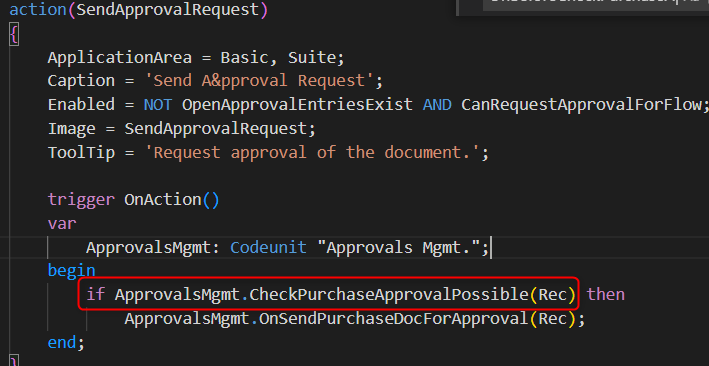
    pastedimage1681724659100v1.png

    pastedimage1681724716472v2.png

    codeunit 52452 TestCodeUnit
    {
    
        [EventSubscriber(ObjectType::Codeunit, Codeunit::"Approvals Mgmt.", OnBeforeCheckPurchaseApprovalPossible, '', false, false)]
        local procedure OnBeforeCheckPurchaseApprovalPossible(var PurchaseHeader: Record "Purchase Header"; var Result: Boolean; var IsHandled: Boolean);
        begin
            if (PurchaseHeader."Free Text" = '') then
                Error('Narration field is blank on Purchase Order. Kindly fill the same to sent PO for approval');
        end;
    }

    It runs before the purchase order is sent for approval, so you can use it to add your validation check and prevent the order from being sent if the field is empty.

    pastedimage1681724785802v3.png

    Regards.

  • Pragya752 Profile Picture
    234 on at

    let me try this

  • Pragya752 Profile Picture
    234 on at

    Support for using Identifiers instead of Literals in event subscribers.' is not available in runtime version '9.0'. The supported runtime versions are: '11.0' or greater this error is coming.

Under review

Thank you for your reply! To ensure a great experience for everyone, your content is awaiting approval by our Community Managers. Please check back later.

Helpful resources

Quick Links

Responsible AI policies

As AI tools become more common, we’re introducing a Responsible AI Use…

Neeraj Kumar – Community Spotlight

We are honored to recognize Neeraj Kumar as our Community Spotlight honoree for…

Leaderboard > Small and medium business | Business Central, NAV, RMS

#1
OussamaSabbouh Profile Picture

OussamaSabbouh 2,785

#2
Jainam M. Kothari Profile Picture

Jainam M. Kothari 1,007 Super User 2025 Season 2

#3
YUN ZHU Profile Picture

YUN ZHU 948 Super User 2025 Season 2

Last 30 days Overall leaderboard

Featured topics

Product updates

Dynamics 365 release plans



