web
You’re offline. This is a read only version of the page.
close
Skip to main content

Announcements

No record found.

News and Announcements icon
Community site session details

Community site session details

Session Id :
Finance | Project Operations, Human Resources, ...
Suggested Answer

How to Get Count on Tile Via Code without using AOT Query

(0) ShareShare
ReportReport
Posted on by 30

Hi,

I have made Extension of Payroll workspace then added Tile Button on Payroll Workspace
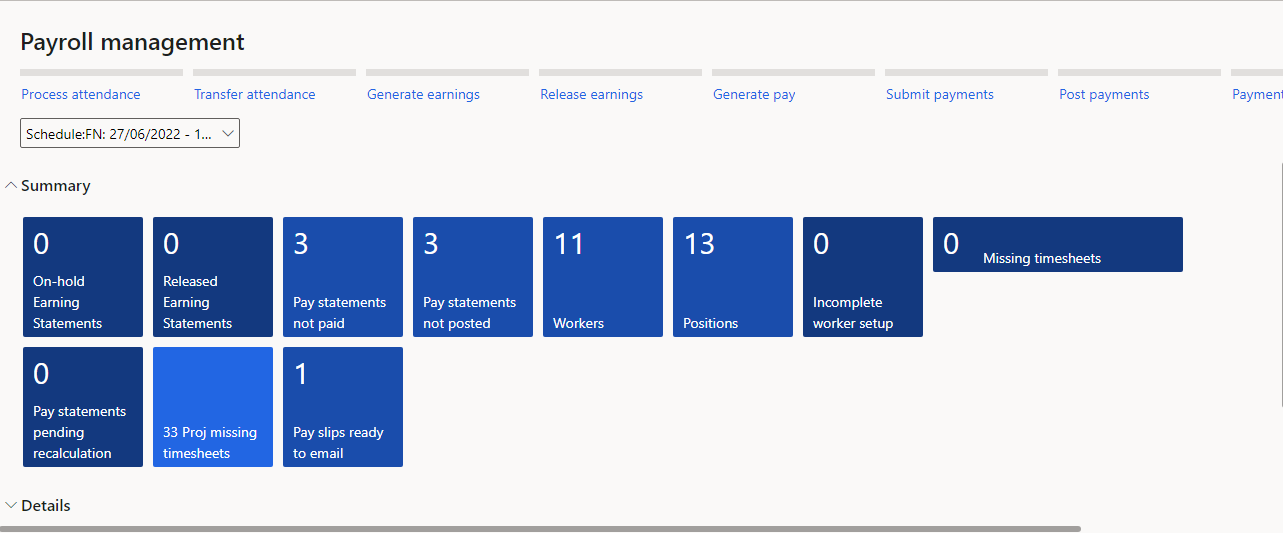
Proj missing timesheet is my custom tile

Proj missing timesheet is my custom tile.


Tile Button is linked to my custom Form i.e PayrollWorkspaceWorkerMissingAllTimesheetsPart

Form Named as 'PayrollWorkspaceWorkerMissingAllTimesheetsPart' is having datasource XYZ_ProjMissingHourRejView which is custom View 'ProjMissingHourRejView' made from AOT Query 'XYZ_ProjMissingHourRej ' (which is Duplicate of AOT Query out of the box Report
AOT Query Named ProjMissingHourRej)
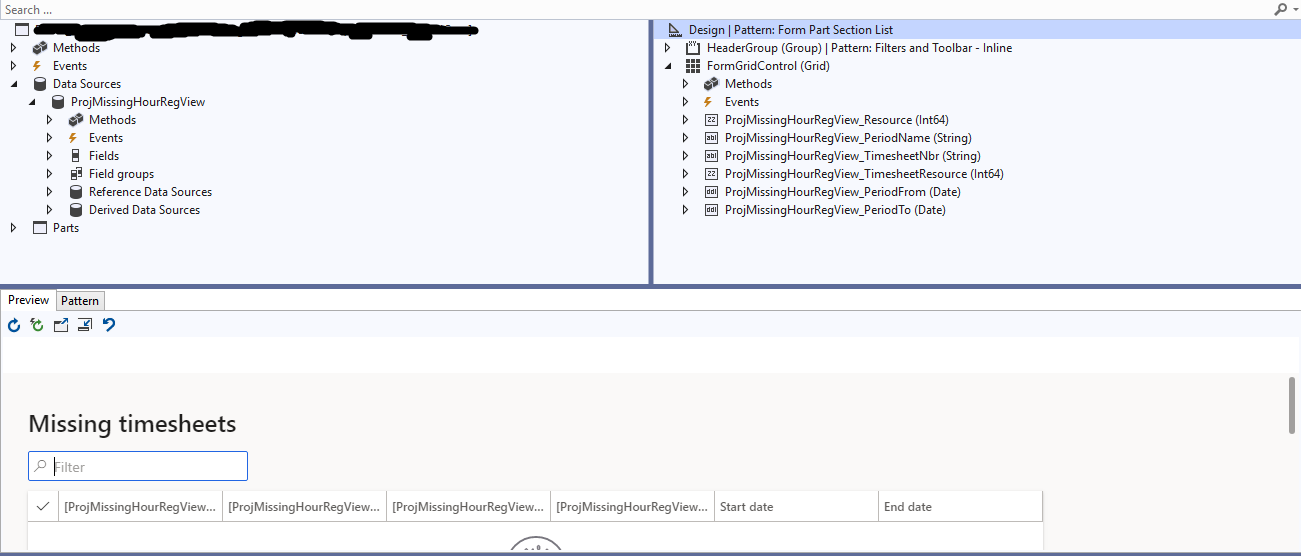
0160.Timesheet-Part-Form.PNG

Records are getting flitered using range which applied on Datasource XYZ_ProjMissingHourRejView in init method after super

Made Extension of Payroll workspace 


Button Tile on Payroll Workspace


Tile Button is linked to my custom Form  

Form Named as 'PayrollWorkspaceWorkerMissingAllTimesheetsPart' is having datasource XYZ_ProjMissingHourRejView which is custom View made from Custom AOT Query (which is made from AOT Query out of the box Report
AOT Query Named ProjMissingHourRej

Records are getting flitered using range which applied on Datasource XYZ_ProjMissingHourRejView in init method after super


    [DataSource]
    class ProjMissingHourRegView
    {
        /// 
        ///
        /// 
        public void init()
        {

            
           super();
           
            select PayrollPayCycleId, PayrollPayPeriod from payrollWorkspaceParameters
                where payrollWorkspaceParameters.UserId == curUserId();

            select PeriodEndDate, PeriodStartDate from payrollPeriod
                where payrollPeriod.RecId == payrollWorkspaceParameters.PayrollPayPeriod;
          
            this.query().dataSourceName(formDataSourceStr(XYZ_PayrollWorkspaceWorkerMissingAllTimesheetsPart, ProjMissingHourRegView)).addRange(fieldNum(ProjMissingHourRegView, PeriodFrom)).value(SysQuery::value(payrollPeriod.PeriodStartDate));
            this.query().dataSourceName(formDataSourceStr(XYZ_PayrollWorkspaceWorkerMissingAllTimesheetsPart, ProjMissingHourRegView)).addRange(fieldNum(ProjMissingHourRegView, PeriodTo)).value(SysQuery::value(payrollPeriod.PeriodEndDate));
            
        }

    }

I need to show Count on Tile button, which is of type count which is on workspace (Extension of Payroll workspace) Via Code,

I have used following link for Guidance

https://axtechsolutions.blogspot.com/2018/05/how-to-change-tile-count-at-runtime.html

But in that link, He is using custom workspace but, in my case, I am using extension of Payroll Workspace and I am unable to make override getData() method of that tile button because it is extension of out of the box Payroll workspace.   

How can I do it ?

I have the same question (0)
  • GirishS Profile Picture
    27,843 Moderator on at

    Hi Muhammed,

    Have you tried the same using COC? I mean creating extension class for your tile button control and add coc for getData method.

    Thanks,

    Girish S.

  • Martin Dráb Profile Picture
    239,451 Most Valuable Professional on at

    I wonder why you don't want to simply create a query for it. Is it because you don't know, or do you have other reasons for it?

    Anyway, you can use a form control extension of override methods for a control.

    For example:

    [ExtensionOf(formControlStr(FormName, ControlName))]
    final internal class Demo_Extension
    {
    
    }

    By the way, let me simplify your current code. This:

    this.query().dataSourceName(formDataSourceStr(XYZ_PayrollWorkspaceWorkerMissingAllTimesheetsPart, ProjMissingHourRegView))
    	.addRange(fieldNum(ProjMissingHourRegView, PeriodFrom)).value(SysQuery::value(payrollPeriod.PeriodStartDate));
    this.query().dataSourceName(formDataSourceStr(XYZ_PayrollWorkspaceWorkerMissingAllTimesheetsPart, ProjMissingHourRegView))
    	.addRange(fieldNum(ProjMissingHourRegView, PeriodTo)).value(SysQuery::value(payrollPeriod.PeriodEndDate));

    can be replaced with this code:

    this.queryBuildDataSource().addRange(fieldNum(ProjMissingHourRegView, PeriodFrom)).value(queryValue(payrollPeriod.PeriodStartDate));
    this.queryBuildDataSource().addRange(fieldNum(ProjMissingHourRegView, PeriodTo)).value(queryValue(payrollPeriod.PeriodEndDate));

  • Suggested answer
    M_Zeeshan Profile Picture
    30 on at

    Hi I have Tired But I got Error on next

    Error :50855.Capture.PNG next method cannot be invoked in method 'getData' because it's not a Chain Of Command

  • GirishS Profile Picture
    27,843 Moderator on at

    Then it won't be possible to override getData method.

    You need to think the other way of doing that. Have you set the tile property "Refresh frequency"?

    Try setting the Refresh frequency property to "AsFastAsPermissible" and check.

    Thanks,

    Girish S.

  • M_Zeeshan Profile Picture
    30 on at

    Its Already 'AsFastAsPermissible', can you suggest me any other way to achieve it ?

  • Martin Dráb Profile Picture
    239,451 Most Valuable Professional on at

    What exactly is "it"? Why are you writing code instead of simply using a query?

Under review

Thank you for your reply! To ensure a great experience for everyone, your content is awaiting approval by our Community Managers. Please check back later.

Helpful resources

Quick Links

Introducing the 2026 Season 1 community Super Users

Congratulations to our 2026 Super Stars!

Meet the Microsoft Dynamics 365 Contact Center Champions

We are thrilled to have these Champions in our Community!

Congratulations to the April Top 10 Community Leaders

These are the community rock stars!

Leaderboard > Finance | Project Operations, Human Resources, AX, GP, SL

#1
Giorgio Bonacorsi Profile Picture

Giorgio Bonacorsi 620

#2
André Arnaud de Calavon Profile Picture

André Arnaud de Cal... 521 Super User 2026 Season 1

#3
CP04-islander Profile Picture

CP04-islander 430

Last 30 days Overall leaderboard

Product updates

Dynamics 365 release plans
