web
You’re offline. This is a read only version of the page.
close
Skip to main content

Announcements

No record found.

News and Announcements icon
Community site session details

Community site session details

Session Id :
Microsoft Dynamics AX (Archived)

Cost amount inventory transaction <> cost amount inventory journal

(0) ShareShare
ReportReport
Posted on by

Hello,

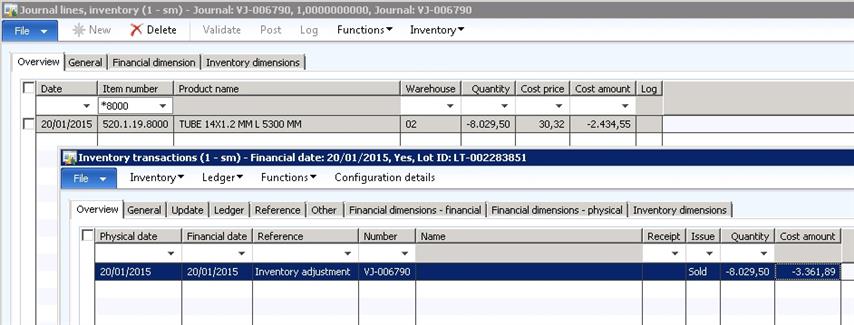
We've made a inventory journal (adjustment).   In the journal we have a line with cost amount  : 2434.55  After posting the journal, the transaction shows a cost amount of 3361.89  !!!

What is a possible reason ?  Item-model-group : Weighted avg. + include_physical_value.   No closing has been run.

Thx 

Ferry
*This post is locked for comments

I have the same question (0)
  • Suggested answer
    Weaveriski Profile Picture
    23,620 Moderator on at

    The cost on the journal is the current item average cost, it is not the actual cost of the item which is then calculated based upon your costing method at posting, and potentially again at inventory close. If you look back through the transactions you should see the cost removed was the calculated weighted average at the posting date, whilst the item card figure was not.

  • Suggested answer
    André Arnaud de Calavon Profile Picture
    304,711 Super User 2026 Season 1 on at

    Hi Ferry,

    In addition: when you post a deduction, AX will use its cost mechanism to apply the cost. Only when you post an increase of the inventory, you can control the cost to be updated manually.

    If this deduction should be related to correcting a certain transaction, you can use the Marking functionality to link the incoming and outgoing inventory transactions. Then run the inventory recalculation or closing to apply the correct cost.

  • Community Member Profile Picture
    on at

    Thx.  Costing isn't easy ....

    But what I don't understand is  for that item

    * all cost-calculations of the last  year give 30.32/100 EUR as costprice

    * all transctions of the last year are validated at 30.32/100 EUR

    But one transaction is validated at 41.86/100 EUR.

    So there should be a reason why the actual cost at posting <> current-item-average cost.

  • Weaveriski Profile Picture
    23,620 Moderator on at

    The only way to answer that is to go through the transactions, the costing setup and screens at the time and pick it apart - there is little that can be done here. As you are weighted average the one transaction validated at 41.86 must have been processed through, which means it was a purchase invoice posted at that cost or production made at that cost or a positive inventory journal with that cost manually entered - find the source transaction and then validate it. This is the one that raised the average cost, so you need to find out what it was, why, who processed it and if it is correct.

    I am not sure if your 41.86 is your reference, but AX believes that is the cost at the time. So are you costing by dimension, warehouse etc. Trace these back and look because the removal of stock is settled against transactions within the same elements, so you need to pull it apart I am afraid.  

Under review

Thank you for your reply! To ensure a great experience for everyone, your content is awaiting approval by our Community Managers. Please check back later.

Helpful resources

Quick Links

Introducing the 2026 Season 1 community Super Users

Congratulations to our 2026 Super Stars!

Meet the Microsoft Dynamics 365 Contact Center Champions

We are thrilled to have these Champions in our Community!

Congratulations to the April Top 10 Community Leaders

These are the community rock stars!

Leaderboard > 🔒一 Microsoft Dynamics AX (Archived)

#1
CP04-islander Profile Picture

CP04-islander 39

#2
Michel ROY Profile Picture

Michel ROY 14

#3
imran ul haq Profile Picture

imran ul haq 8

Last 30 days Overall leaderboard

Featured topics

Product updates

Dynamics 365 release plans
