web
You’re offline. This is a read only version of the page.
close
Skip to main content

Notifications

Announcements

No record found.

Community site session details

Community site session details

Session Id :
Microsoft Dynamics CRM (Archived)

Chart height problem

(0) ShareShare
ReportReport
Posted on by 50

Hello everyone,

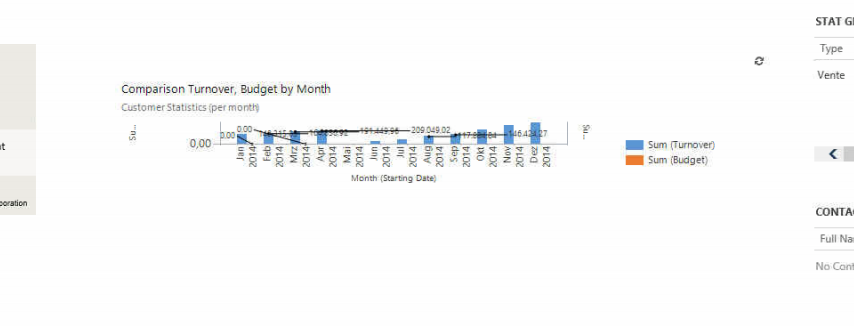
I'm implementing a chart in the Account form. On this purpose I inserted a sub-grid in the form and I checked the "Show Chart Only" property, but when I looked at the result I ended up with a completly flat chart (see bellow).

I tried to change the number of row, decrease the number of row of the element above, put it in the same section, in another one, but with no result.

Any idear how to solve this problem ?

Thanks
*This post is locked for comments

I have the same question (0)
  • Verified answer
    Mithilesh Kumar Profile Picture
    10,047 on at

    Hi Baptiste,

    Go to the properties >> formatting and increase the row number

    Hope that helps

    Thanks

    Please mark my post as verified if you found it helpful

  • Baptiste Profile Picture
    50 on at

    Hi, I alredy doubled the number of rows (4->8)and didn't changed anything, but I still tried after your post with an even higher number (8->20) and I finally get results.

    Whith 20 rows it's just appear normal but ridiculously small compare to the the size dispaly in the form designer.

    Thank you any way.

  • Suggested answer
    Mithilesh Kumar Profile Picture
    10,047 on at

    Hi Baptiste,

    Yeah you are correct. You need to design according to your need. The space you see in the Form Editor gives you a rough idea of what the actual size would be on the runtime.

    You may also choose to automatically expand your chart, but that would leave you with a much smaller area when the range in Y-axis is too large say (0-500,0000, in case of Revenue for example), therefore I try to assign a bigger value keeping in mind the maximum Y-axis range.

    Hope that helps

    Thanks

    Please mark my post as verified if you found it helpful

Under review

Thank you for your reply! To ensure a great experience for everyone, your content is awaiting approval by our Community Managers. Please check back later.

Helpful resources

Quick Links

Responsible AI policies

As AI tools become more common, we’re introducing a Responsible AI Use…

Neeraj Kumar – Community Spotlight

We are honored to recognize Neeraj Kumar as our Community Spotlight honoree for…

Leaderboard > 🔒一 Microsoft Dynamics CRM (Archived)

#1
SA-08121319-0 Profile Picture

SA-08121319-0 4

#1
Calum MacFarlane Profile Picture

Calum MacFarlane 4

#3
Alex Fun Wei Jie Profile Picture

Alex Fun Wei Jie 2

Last 30 days Overall leaderboard

Featured topics

Product updates

Dynamics 365 release plans



