web
You’re offline. This is a read only version of the page.
close
Skip to main content

Notifications

Announcements

No record found.

Community site session details

Community site session details

Session Id :
Finance | Project Operations, Human Resources, ...
Answered

sales tax amount calculation on purchase invoice

(0) ShareShare
ReportReport
Posted on by 135

Dear All,

sales tax amount is not calculation correct on purchase invoice journal.

purchase amount = 100

sale tax is 10% of purchase amount

system calculate tax 9.09 as image attached
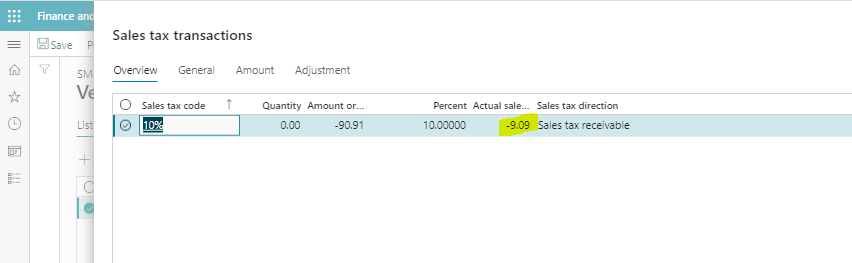
pastedimage1636547083140v1.png

pastedimage1636547465437v2.png

here distribution should be like below, but in my case there is a problem any hints

CR = payable amount should be = 110

DR = sales tax = 10

DR = expense account = 100

I have the same question (0)
  • Verified answer
    Ludwig Reinhard Profile Picture
    Microsoft Employee on at

    Hi,

    Can you please check the journal setup?

    There is a parameter that allows you specifying whether the amounts entered in the journal are net or gross.

    Seems that this parameter is different from what you expect.

    Note: When you create a new journal you can directly see this default parameter and change it if needed. For the long-term it might be better making the change in the journal name form in GL.

    Best regards,

    Ludwig

  • Verified answer
    Alireza Eshaghzadeh Profile Picture
    14,679 Super User 2025 Season 2 on at

    Hi Afazal,

    Like Ludwig mentioned, if you use vendor journal, check the journal setup (General journal > Journal setup > Journal names) and check the alternative for "Amounts include sales tax".

    If it PO, you can either manage field "Prices include sales tax" on PO Header and Vendor card.

    pastedimage1636569330808v1.png

  • Verified answer
    saurabh bharti Profile Picture
    15,039 Moderator on at

    As mentioned by others , look likes you are calculating inclusive tax ...

    for calculating exclusive disable price inclusive sales tax on journal name, vendor master or item master as per your scenario

Under review

Thank you for your reply! To ensure a great experience for everyone, your content is awaiting approval by our Community Managers. Please check back later.

Helpful resources

Quick Links

Responsible AI policies

As AI tools become more common, we’re introducing a Responsible AI Use…

Neeraj Kumar – Community Spotlight

We are honored to recognize Neeraj Kumar as our Community Spotlight honoree for…

Leaderboard > Finance | Project Operations, Human Resources, AX, GP, SL

#1
Martin Dráb Profile Picture

Martin Dráb 559 Most Valuable Professional

#2
André Arnaud de Calavon Profile Picture

André Arnaud de Cal... 464 Super User 2025 Season 2

#3
Sohaib Cheema Profile Picture

Sohaib Cheema 250 User Group Leader

Last 30 days Overall leaderboard

Product updates

Dynamics 365 release plans

