web
You’re offline. This is a read only version of the page.
close
Skip to main content

Announcements

No record found.

News and Announcements icon
Community site session details

Community site session details

Session Id :
Finance | Project Operations, Human Resources, ...
Answered

How to use QueryBuildRange in adanced query?

(0) ShareShare
ReportReport
Posted on by 932

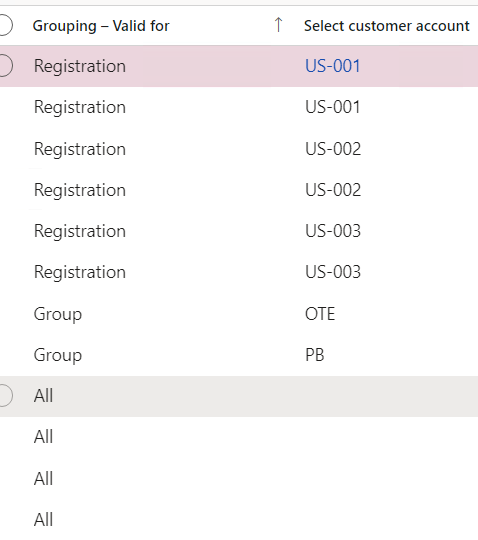
I have this form: 

pastedimage1676104270024v1.png

which registration : for customer account

       Group : for customer group

all : all cutomer:

then I add button in Cutomer : Sales and marketing>Customers>All customers
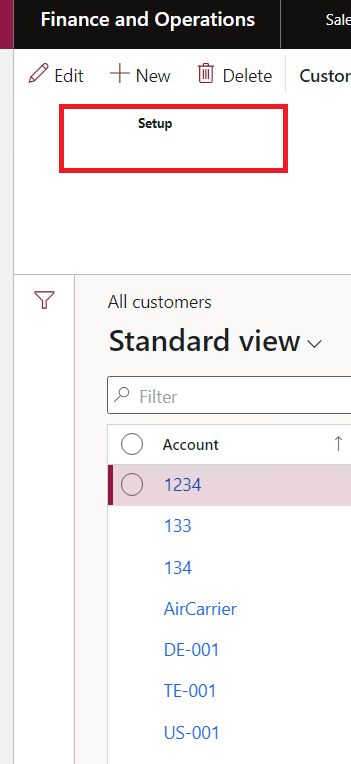
pastedimage1676104504749v2.png

I want when I click on setup , I get records from the first form which: 

   the customeraccount = accountNum for the current cutomer

  if the current cutomer have a chainId , search if this group exist in the first Form

 get all the records which the field "Grouping-valid for" = All

so I add eventHandler onclick : 

[FormControlEventHandler(formControlStr(CustTable, CodeBreakButton), FormControlEventType::Clicked)]
    public static void CodeBreakButton_OnClicked(FormControl sender, FormControlEventArgs e)
    {
        Args            args ;
        Object          formRun;
       
        args = new Args();
        args.record(sender.formRun().dataSource("CustTable").cursor());
        args.name(formstr(CodeBreakTable));
        formRun = classfactory.formRunClass(args);
        formRun.init();
        formRun.run();
        formRun.wait();

    }

the I add this code in init method in dataSource  : 

[DataSource]
    class CodeBreakTable
    {
        public void init()
        {
            CustTable   custTable;
            QueryBuildRange qbr1;
            QueryBuildDataSource queryBuildDataSource;

            super();
            if(element.args().record() == custTable)
            {
                Query query = new Query();
                select CompanyChainId from custTable;
                qbr1.value(strFmt('((%1.%2 == "%3" && (%1.%5 == %6)) && ((%1.%2 == "%4") && (%1.%5 == %7)) && (%1.%5 == %8))',
                query.dataSourceTable(tableNum(CodeBreakTable)).name(), // CodeBreakTable %1
                fieldStr(CodeBreakTable, CustomerAccount), // cutomerAccount %2
                fieldStr(custTable, AccountNum),//%3
                fieldStr(custTable, CompanyChainId),//%4
                fieldStr(CodeBreakTable, CodeBreakPattern),//%5
                any2int(CodeBreakPattern::Enregistrement), // %6
                any2int(CodeBreakPattern::Groupe), // %7
                any2int(CodeBreakPattern::Tout)));// %8
            }
        }
    }

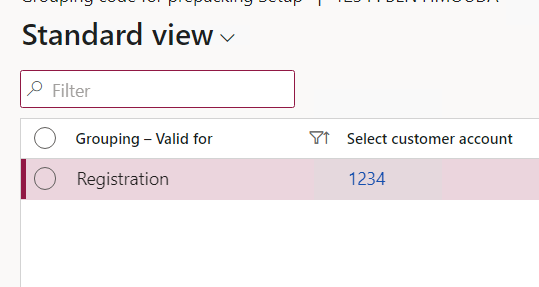
But when I run this code : 

I get only the enum registration for the current customer : 
pastedimage1676106661324v3.png

I have the same question (0)
  • Suggested answer
    André Arnaud de Calavon Profile Picture
    303,332 Super User 2026 Season 1 on at

    Hi Basma,

    You are using the 'AND' (&&) operator which makes the filter stricter. I would need to meet all conditions. You must use also 'OR' (||) operators for the value. Then there are multiple options. An example:

    '((%1.%2 == "%3" && (%1.%5 == %6)) || ((%1.%2 == "%4") && (%1.%5 == %7)) || (%1.%5 == %8))'

  • BASMA Profile Picture
    932 on at

    hello André, I use this structure but only I get record like this : 

    pastedimage1676118697746v1.png

    But I want to display like this : 

    pastedimage1676118769308v2.png

  • Martin Dráb Profile Picture
    238,753 Most Valuable Professional on at

    Don't look just at records - look at the query that you generated by your code.

  • BASMA Profile Picture
    932 on at

    sorry Martin ,

    I don't understand what do you mean exactly

  • Martin Dráb Profile Picture
    238,753 Most Valuable Professional on at

    You say that your query doesn't return correct data, but you don't know what to fix because you don't know what's wrong in your query. Therefore you should look at the query generated by your code and compare it with the query that you intended to generate. When you know what's wrong, fixing it usually easy.

    You can see the query directtly in GUI (right-click somewhere in the form, click Form information > {Form name} and see data in Form information form), in the debugger or by calling toString() method of a query or a data source.

    If you still can' see the problem problem, please share the query string with us, together with your current code.

  • BASMA Profile Picture
    932 on at

    hello, 

    thanks for reply 

    I look at standard, and I find that I want to add same logic like this : 

    pastedimage1676290042907v1.png

    pastedimage1676290098017v2.png

    How can I add the same logic in my case, I don't find which method I can debug it in inventPosting form

  • Martin Dráb Profile Picture
    238,753 Most Valuable Professional on at

    First of all, learn how to look at the query, as discussed above. It's an importing skill for a developer. Here is what you can see for the posting form:

    pastedimage1676292482039v1.png

    The query is build in InventPostingForm.querySales(). But I wouldn't pay too much attention to the code, if I was you, because it's more complex than you seem  to need in your case.

  • BASMA Profile Picture
    932 on at

    for the query, I test it in sql server and it works : 

    select * from CODEBREAKTABLE where( (CODEBREAKTABLE.CUSTOMERACCOUNT='US-002' and CODEBREAKTABLE.CODEBREAKPATTERN=1)
    or(CODEBREAKTABLE.CUSTOMERACCOUNT='OTE' and CODEBREAKTABLE.CODEBREAKPATTERN=2)
    OR (CODEBREAKTABLE.CUSTOMERACCOUNT='' and CODEBREAKTABLE.CODEBREAKPATTERN=3))

    But when I use this code in init method  , I don't get what I want : 

     [DataSource]
        class CodeBreakTable
        {
            public void init()
            {
                CustTable   custTable;
                str   custAccount,chainId;
                QueryBuildRange queryBuildRange;
                QueryBuildDataSource queryBuildDataSource;
                super();
                custTable = element.args().record();
                custAccount = custTable.AccountNum;
                chainId = custTable.CompanyChainId;
                queryBuildDataSource = this.query().dataSourceTable(tableNum(CodeBreakTable));
                queryBuildRange = queryBuildDataSource.addRange(fieldNum(CodeBreakTable,DataAreaId));
                queryBuildRange.value(strFmt('(((%1.%2 == "%3")&& (%1.%5 == %6))||((%1.%2 == "%4")&&(%1.%5 == %7))||((%1.%2 == "")&& (%1.%5 == %8)))',
                queryBuildDataSource.name(), // CodeBreakTable %1
                fieldStr(CodeBreakTable, CustomerAccount),  // cutomerAccount %2
                custAccount,//%3
                chainId,//%4
                fieldStr(EOLECodeBreakTable, CodeBreakPattern),//%5
                any2int(CodeBreakPattern::Enregistrement), // %6
                any2int(CodeBreakPattern::Groupe), // %7
                any2int(CodeBreakPattern::Tout)));// %8*/
                super();
            }

  • Martin Dráb Profile Picture
    238,753 Most Valuable Professional on at

    Please share the query used by the form X code. We can't get it just from your code, because it also depends on the current query of the form and the caller record.

    If you have a caller record, pay attention to (potentically unwanted) dynamic links.

    By the way, let me make your code a bit easier to read:

    [DataSource]
    class CodeBreakTable
    {
    	public void init()
    	{
    		super();
    		
    		CustTable custTable = element.args().record();
    		
    		QueryBuildDataSource codeBreakQbds = this.query().dataSourceTable(tableNum(CodeBreakTable));
    		QueryBuildRange queryRange = codeBreakQbds.addRange(fieldNum(CodeBreakTable, DataAreaId));
    		
    		queryRange.value(strFmt('(((%1.%2 == "%3") && (%1.%5 == %6))||((%1.%2 == "%4")&&(%1.%5 == %7))||((%1.%2 == "")&& (%1.%5 == %8)))',
    			codeBreakQbds.name(), // CodeBreakTable %1
    			fieldStr(CodeBreakTable, CustomerAccount),  // customerAccount %2
    			custTable.AccountNum,//%3
    			custTable.CompanyChainId,//%4
    			fieldStr(EOLECodeBreakTable, CodeBreakPattern),//%5
    			any2int(CodeBreakPattern::Enregistrement), // %6
    			any2int(CodeBreakPattern::Groupe), // %7
    			any2int(CodeBreakPattern::Tout)));// %8*/
    		
    		super(); // BUG?
    	}
    }

    The fact that you're calling super() twice seems to be a bug.

  • BASMA Profile Picture
    932 on at

    sorry Martin,

    it's a mistake , i set the code before super()

    can you tell me

    how can  see the query directtly in GUI : because I don't find how to do it

Under review

Thank you for your reply! To ensure a great experience for everyone, your content is awaiting approval by our Community Managers. Please check back later.

Helpful resources

Quick Links

Introducing the 2026 Season 1 community Super Users

Congratulations to our 2026 Super Stars!

Congratulations to our 2025 Community Spotlights

Thanks to all of our 2025 Community Spotlight stars!

Leaderboard > Finance | Project Operations, Human Resources, AX, GP, SL

#1
André Arnaud de Calavon Profile Picture

André Arnaud de Cal... 509 Super User 2026 Season 1

#2
Giorgio Bonacorsi Profile Picture

Giorgio Bonacorsi 375

#3
Adis Profile Picture

Adis 268 Super User 2026 Season 1

Last 30 days Overall leaderboard

Product updates

Dynamics 365 release plans
