web
You’re offline. This is a read only version of the page.
close
Skip to main content

Announcements

No record found.

News and Announcements icon
Community site session details

Community site session details

Session Id :
Microsoft Dynamics AX (Archived)

Financial Dimension wise Vendor & Customer Aging

(0) ShareShare
ReportReport
Posted on by 85

Dear Friends,

One of our client has a requirement of filtering Vendor & Customer Aging on one of the Financial Dimension. I tried adding Default Dimensions in the Advance Filters but didn't work. Please suggest what can be done to meet this requirement.

System - Dynamics AX R3 

Regards

KK

*This post is locked for comments

I have the same question (0)
  • Ludwig Reinhard Profile Picture
    Microsoft Employee on at

    Hello KrishnaKranth,

    What Report, form, etc. do you refer to when saying vendor & customer aging?

    Ludwig

  • KrishnaKranth Profile Picture
    85 on at

    Its the standard Vendor Aging report from Accounts Payables (Path : Accounts payable/Reports/Status/Vendor aging report) and similarly for Customer Aging report from Accounts Receivables modules. In that report, client wants to filter the transaction using the financial dimension.

  • Suggested answer
    Ludwig Reinhard Profile Picture
    Microsoft Employee on at

    Hi KrishnaKrath,

    Not sure if I fully understood your issue. Therefore, here an example.

    That's my customer aging Report run without any filter
    custaging4.png

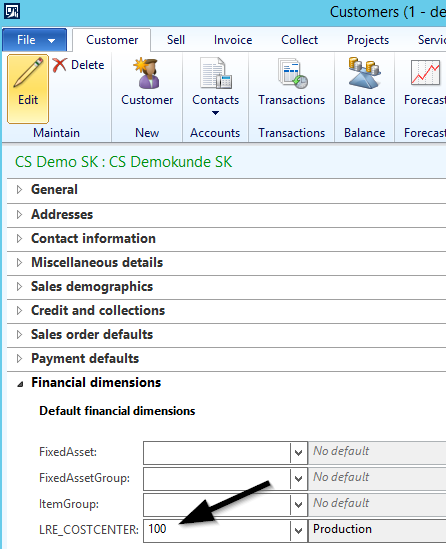
    Then I Setup the first customer record with a cost Center value

    custaging2.png

    This cost Center was then uses as the filter criteria for the report
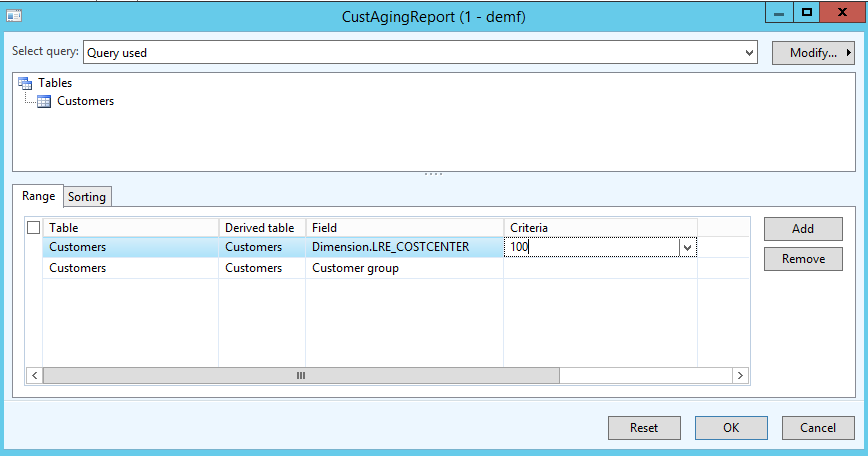
    custaging3.png

    And as a result, AX filtered only this account
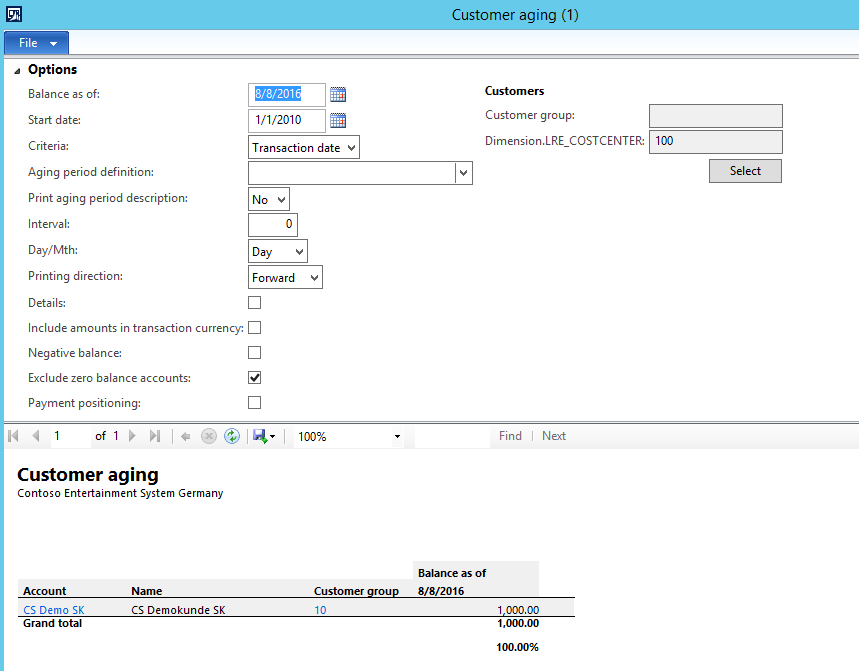
    custaging4.png

    Please note that this is a simple filter only.

    Is it this what you try to achieve or do you want to see the financial Dimension value in the Report?

    Ludwig

  • KrishnaKranth Profile Picture
    85 on at

    [quote user="Ludwig Reinhard"]

    Hi KrishnaKrath,

    Not sure if I fully understood your issue. Therefore, here an example.

    That's my customer aging Report run without any filter

    custaging4.png

    Then I Setup the first customer record with a cost Center value

    custaging2.png

    This cost Center was then uses as the filter criteria for the report

    custaging3.png

    And as a result, AX filtered only this account

    custaging4.png

    Please note that this is a simple filter only.

    Is it this what you try to achieve or do you want to see the financial Dimension value in the Report?

    Ludwig

    [/quote][quote user="Ludwig Reinhard"]

    Hi KrishnaKrath,

    Not sure if I fully understood your issue. Therefore, here an example.

    That's my customer aging Report run without any filter

    custaging4.png

    Then I Setup the first customer record with a cost Center value

    custaging2.png

    This cost Center was then uses as the filter criteria for the report

    custaging3.png

    And as a result, AX filtered only this account

    custaging4.png

    Please note that this is a simple filter only.

    Is it this what you try to achieve or do you want to see the financial Dimension value in the Report?

    Ludwig

    [/quote][quote user="Ludwig Reinhard"]

    Hi KrishnaKrath,

    Not sure if I fully understood your issue. Therefore, here an example.

    That's my customer aging Report run without any filter

    custaging4.png

    Then I Setup the first customer record with a cost Center value

    custaging2.png

    This cost Center was then uses as the filter criteria for the report

    custaging3.png

    And as a result, AX filtered only this account

    custaging4.png

    Please note that this is a simple filter only.

    Is it this what you try to achieve or do you want to see the financial Dimension value in the Report?

    Ludwig

    [/quote]

    Great, you understood my requirement crystal clear even with my lack of explaining skills. However there's a minor deviation. Say you have selected the cost center at the customer master level but my customer have transactions across cost centers. So the cost center financial dimension is being tagged at invoice level not at the master level. In such cases how can I filter?

  • KrishnaKranth Profile Picture
    85 on at

    Great, you understood my requirement crystal clear even with my lack of explaining skills. However there's a minor deviation. Say you have selected the cost center at the customer master level but my customer have transactions across cost centers. So the cost center financial dimension is being tagged at invoice level not at the master level. In such cases how can I filter?

  • Suggested answer
    Ludwig Reinhard Profile Picture
    Microsoft Employee on at

    Hello KrishnaKranth,

    Filtering on the financial dimension used at the invoice line level is not possible for the customer aging report. What you can use alternatively would be the AR / GL/ Sales cube that might provide you with this Information but the Standard SSRS customer aging Report can't deliver you this information to my knowledge.

    Best regards,

    Ludwig

  • shawnmrogan Profile Picture
    20 on at

    Hey,

    Any updates for this in D365F&O? We have our GL accounts brokedown by Main account and business unit. We would like to run an aging by Business unit. I'm not seeing a filter in the AP aging report to filter just the Buiness Unit and have it tie to the GL.

    Thanks,

    Shawn

  • Ludwig Reinhard Profile Picture
    Microsoft Employee on at

    Hi Shawn,

    Can you post this in the D365FO forum? This one is for Ax and the thread is already very old. Thanks, Ludwig

  • shawnmrogan Profile Picture
    20 on at

    ok. I just did. thanks. <community.dynamics.com/.../ap-aging-report-by-financial-dimensions>

  • Atmakuri Rajashekar Profile Picture
    95 on at

    Hi Ludwig Reinhard,

    Same requirement i required to do in customer aging report in D365. Please share the steps are links to resolve this.

    Thanks

    A. Rajashekar

Under review

Thank you for your reply! To ensure a great experience for everyone, your content is awaiting approval by our Community Managers. Please check back later.

Helpful resources

Quick Links

Introducing the 2026 Season 1 community Super Users

Congratulations to our 2026 Super Stars!

Meet the Microsoft Dynamics 365 Contact Center Champions

We are thrilled to have these Champions in our Community!

Congratulations to the April Top 10 Community Leaders

These are the community rock stars!

Leaderboard > 🔒一 Microsoft Dynamics AX (Archived)

#1
CP04-islander Profile Picture

CP04-islander 24

#2
Michel ROY Profile Picture

Michel ROY 14

#3
imran ul haq Profile Picture

imran ul haq 8

Last 30 days Overall leaderboard

Featured topics

Product updates

Dynamics 365 release plans
